
Disclosure: This page may contain affiliate links. Prices were checked on the date shown and may change.
An introduction to Zynaptiq UNCHIRP, based on information from the maker and distributors: what it does, how to use it and who it may suit. It is not scored.
UNCHIRP is a plug-in for removing the most obnoxious artifacts associated with lossy audio encoding and other FFT based processes, such as spectral de-noising.
— Zynaptiq official site
What is UNCHIRP?
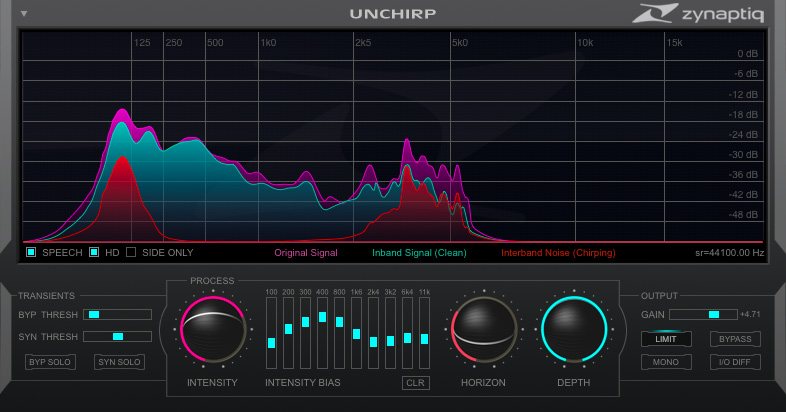
UNCHIRP is a plug-in from Zynaptiq that removes artifacts left by lossy encoding such as MP3 and by FFT-based processes such as de-noising. It is described as addressing high-frequency chirping, musical noise, smeared transients and lost high frequencies.
Listed source material includes music encoded at low bit rates, speech that went through a low-bit-rate uplink, material de-noised too strongly, and footage recorded on consumer mobile devices. The page also mentions using it to add contour to recordings that are already good.
Two algorithms, Musical Noise Reduction and Dechirping, are available at the same time, each with its own breakpoint curve editor for frequency-dependent processing.
Other features include transient synthesis, a Treble Boost circuit, a Side-only mode for joint-stereo material and a high-quality HD mode. A 30-day free trial is offered.
Key features
Chirp suppression
It suppresses the high-frequency chirping, sometimes described as warbling or underwater sound, heard in compressed audio. The Dechirping algorithm handles this.
Musical noise reduction
It reduces the glittery musical noise that de-noising can produce. The Musical Noise Reduction algorithm handles this and can be adjusted separately from Dechirping.
Transient synthesis and sync
It can augment or replace transients that were smeared by FFT processing or heavy compression. The SYNC parameter synchronizes processing to signal transients, which the page says increases clarity.
Treble Boost (Enhance / Excite)
Low-bit-rate audio can have a high-frequency 'dead band' where an ordinary EQ has nothing to boost. Enhance is a perceptually tuned EQ and Excite synthesizes harmonics to fill the gap.
Frequency-dependent processing
Key parameters have breakpoint-curve settings by frequency, with snap and copy/paste functions. It may be useful when you want different amounts of processing in different bands.
Batch-friendly tools
An output limiter helps avoid overs in unattended batch processing, and an I/O difference function lets you hear exactly what is being removed.
Specifications
| Item | Details |
|---|---|
| Maker | Zynaptiq |
| Type | Codec artifact removal / transient retrieval |
| Formats | AU, VST 2.4, VST 3, AAX Native |
| OS (Mac) | macOS 10.15 or later (64-bit), Apple Silicon or Intel with at least 2 cores |
| OS (Windows) | Windows 10 or later |
| Trial | 30 days, free |
| Algorithms | Musical Noise Reduction, Dechirping (usable together) |
| Modes | Side-only, HD |
What is included and system requirements
- The UNCHIRP plug-in
- A 30-day free trial
- Also sold in the ZAP Bundle with UNVEIL, UNFILTER and PITCHMAP
How to use it
- Install it from the trial or the download after purchase.
- Insert UNCHIRP on the track where degradation is a concern.
- Raise Dechirping a little at a time and listen to the change in chirping.
- If musical noise is a concern, add Musical Noise Reduction too.
- Listen to the I/O difference to check what is being removed.
- If the highs are lacking, try Enhance or Excite in Treble Boost.
- If needed, vary the amount by frequency with the curves.
Where it may come in handy
Restoring compressed material
It may be tried to tidy chirping in audio taken from low-bit-rate MP3s and similar sources.
Finishing after de-noising
It may be used to tidy roughness or smearing in voices that were de-noised heavily.
Phone recordings and calls
It may be used on audio from mobile-device video or recordings made over calls.
Who it may suit
- People who work with compressed or old audio
- Those concerned about the sound after de-noising
- Post-production staff cleaning up location sound
Good to know before you buy
- The HD mode uses more CPU and offline processing is recommended.
- For Windows CPU details, check the official system requirements.
- UNCHIRP is sold alone and also in the ZAP Bundle.
Price
Please check the official page for the price.
See UNCHIRP on the product page
More of the same kind
We have introduced 11 noise reduction and repair tools. Here are some of the others.
- Waves Clarix LB
- Accentize dxRevive Pro
- Waves X-Noise
- Descript Studio Sound
- McDSP NF575 Noise Filter
- Waves W43 Noise Reduction
We have introduced 10 other products from Zynaptiq.
- Zynaptiq WIDE
- Zynaptiq MORPH 3 PRO
- Zynaptiq UNFILTER
- Zynaptiq ORANGE VOCODER NANO
- Zynaptiq Mac Audio Apps Bundle 2
For a side-by-side comparison scored on the same criteria, see our comparison of noise reduction and repair tools.
See the full list in Product database: Effects.
Sources: zynaptiq.com pluginboutique.com (checked 2026-10-27)










Comments