
Disclosure: This page may contain affiliate links. Prices were checked on the date shown and may change.
An introduction to United Plugins Transmutator, based on information from the maker and distributors: what it does, how to use it and who it may suit. It is not scored.
Transmutator is a cutting-edge tool that crossfades between two inputs in a multitude of exciting ways.
— United Plugins official site
What is Transmutator?
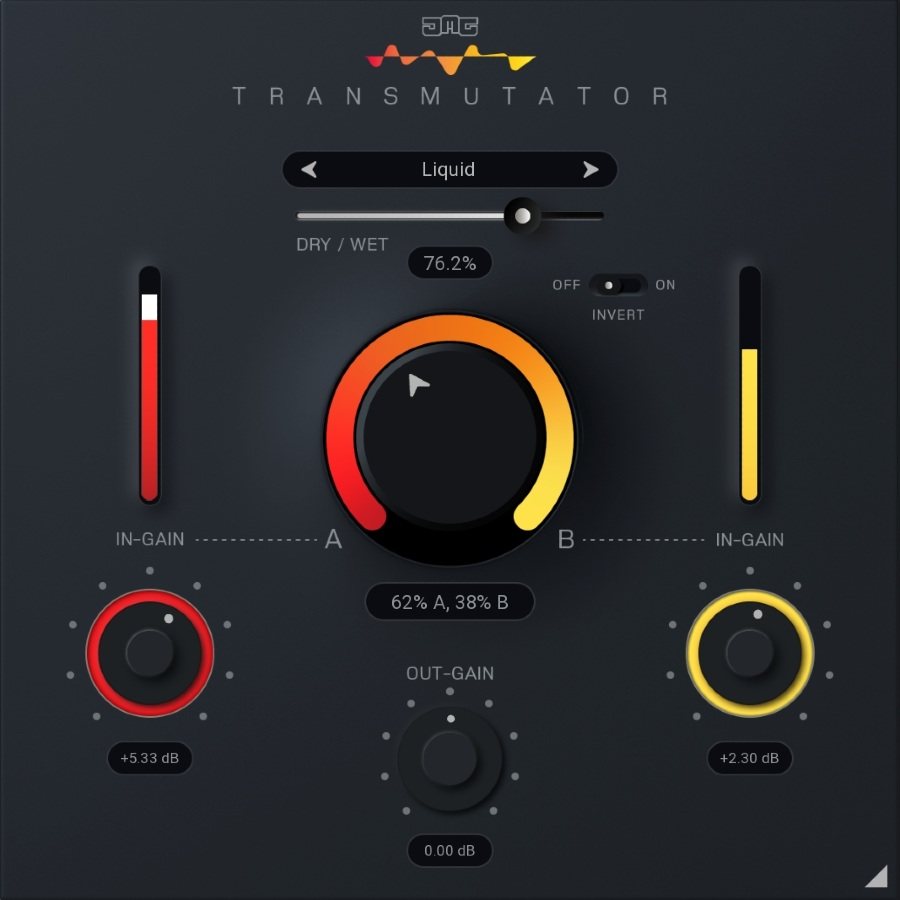
Transmutator is a crossfade-style effect from United Plugins. You place it on a track, feed a second track into its sidechain input and use the Mix dial to move from input A to input B.
Rather than a plain volume crossfade, it offers 16 blend modes including Mid/Side, multiband, dynamics, filtering, spectral freezing and blurring, and pitch/frequency shifting. An Invert parameter changes how each mode behaves, which gives the '16 (x2)' modes the maker describes.
A Dry/Wet slider sets how far the effect goes, from a traditional crossfader to heavy sound mangling. It is also built for sound design such as blending two signals or merging noise and tone.
Listed uses include transitions between song sections or between songs, effects that follow video transitions and switching between voice-over characters. Because it relies on sidechain routing, hosts without sidechain support such as GarageBand are not suitable.
Key features
16 blend modes
Modes such as Mid/Side, multiband, dynamics, filter, spectral and pitch/frequency shifting give different kinds of transition, so the same two sources can move in different ways.
Invert parameter
Invert changes the behavior of each mode. The audio examples list normal and inverted versions of modes such as Filter and Transient.
Sidechain input as source B
A second track sent to the sidechain becomes signal B, which may suit switching elements within a track or joining songs.
Dry/Wet slider
The amount can be set from something like a traditional volume crossfader to heavy processing.
64-bit processing and smart bypass
Internal 64-bit processing handles sample rates of 192 kHz and above. Bypass switching is designed to avoid clicks and compensates for latency.
Licensing and trial
Activation uses license files with no iLok, dongle or internet connection. The maker lists a 15-day free trial and free updates.
Specifications
| Item | Details |
|---|---|
| Maker | United Plugins |
| Type | Crossfade / blending effect |
| Blend modes | 16 (x2 with Invert) |
| Inputs | Main input plus sidechain input |
| Internal processing | 64-bit |
| Mac | macOS 10.10 or later (64-bit, Apple silicon supported), VST2 / VST3 / AAX / AU |
| Windows | Windows 8 to 11 (32 / 64-bit), VST2 / VST3 / AAX |
| Processor | Intel/AMD with SSE2 |
| Note | Not suited to hosts without sidechain support such as GarageBand |
What is included and system requirements
- Transmutator plug-in (Mac: VST2 / VST3 / AAX / AU, Windows: VST2 / VST3 / AAX)
- License-file activation (no iLok, dongle or internet required)
- 15-day free trial (maker's page)
How to use it
- Install the plug-in and activate it with the license file.
- Insert Transmutator on the track you want as signal A.
- Send the output of the track you want as B to Transmutator's sidechain input.
- Choose a blend mode.
- Move the Mix dial and listen to how A changes into B.
- Toggle Invert to hear how the behavior changes.
- Adjust the effect amount with Dry/Wet.
- Automate Mix in your DAW to match the point where a section changes.
Where it may come in handy
Joining song sections
Automating Mix may help in moving from verse to chorus or from build-up to drop.
Moving between songs
Like a DJ mix, you could try a way of joining two songs other than a plain volume fade.
Video scene changes
It may suit effects that follow video transitions or switching between voice-over characters.
Sound design
Blending two sources or merging noise with tone could be tried for new material.
Who it may suit
- Producers who want elaborate transitions between sections
- Those who want to blend two sources into a new sound
- Video makers looking for audio transitions to match scene changes
Good to know before you buy
- A DAW with sidechain support is required.
- Prices differ between stores, so please check the current listing before buying.
Price
Please check the official page for the price.
See Transmutator on the product page
More of the same kind
Other introduction articles of the same kind.
- W. A. Production DJFX
- Waves Submarine
- Arturia Tape MELLO-FI
- Nomad Factory COSMOS
- Leapwing Audio CenterOne 3
- Waves LoAir
We have introduced 34 other products from United Plugins.
- United Plugins FirePreamp
- United Plugins Electrum Core
- United Plugins FireSpacer
- United Plugins Bassment
- United Plugins Phantomix
See the full list in Product database: Effects.
Sources: unitedplugins.com pluginboutique.com (checked 2026-10-27)










Comments