
Disclosure: This page may contain affiliate links. Prices were checked on the date shown and may change.
An introduction to Three-Body Technology Sapphire Drive, based on information from the maker and distributors: what it does, how to use it and who it may suit. It is not scored.
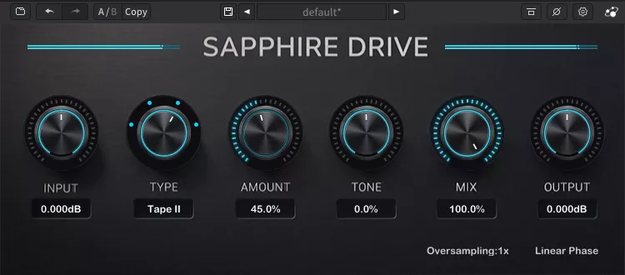
Six parameters. Four saturation types. That's all there is.
— Three-Body Technology official site
What is Sapphire Drive?
Sapphire Drive is a saturation plug-in from Three-Body Technology. Its defining trait is a simple layout of six parameters and four saturation types.
The four types are Bloom for upper-mid sparkle, Tape I for tape warmth, Tape II for tape pushed harder, and Thick for low-mid mass. You choose a type, set the amount and start working.
The Tone control is described as working inside the circuit rather than as an EQ after the distortion. Turning it up brings out more overtones, and pulling it back moves toward a warmer, darker character.
At 1x oversampling the latency is 0 ms, and CPU use is described as low. The design assumes you may run several instances on tracks, buses or the master.
Key features
Four saturation types
Choose from Bloom, Tape I, Tape II and Thick. You pick the type closest to your goal, from airy vocals to heavy bass.
Tone inside the circuit
Tone shapes the harmonic character while the signal is being driven. The maker says this differs from adding an EQ afterward.
Built-in Level Match
Level Match equalizes loudness before and after processing. It may help you judge texture without being swayed by level changes.
Up to 16x oversampling
Oversampling goes up to 16x. Latency is 0 ms when disabled, about 0.1 ms in minimum phase mode, and about 0.7 to 1 ms in linear phase mode from 2x to 16x.
Dry/wet mix and gain staging
The Dry/Wet mix enables parallel saturation. Input and output gain let you set drive amount and final level separately.
Light on resources
CPU usage is described as low and the plug-in is built for many instances, which could make it easy to place on every track of a big session.
Specifications
| Item | Details |
|---|---|
| Type | Saturation |
| Parameters | 6 |
| Saturation types | Bloom, Tape I, Tape II, Thick |
| Oversampling | Up to 16x |
| Latency | 0 ms with oversampling disabled |
| Formats | VST2, VST3, AAX, Audio Unit (64-bit) |
| Requirements | Intel/AMD CPU with SSE 4.1 or Apple Silicon, macOS 11 / Windows 8, 4 GB RAM, 100 MB disk |
What is included and system requirements
- Sapphire Drive plug-in
- Formats: VST2, VST3, AAX, AU (64-bit)
- Activation requires a maker account (per the retailer's instructions)
How to use it
- After purchase, register an account with the maker.
- Activate the license, then download and run the installer.
- Rescan plug-ins in your DAW.
- Insert Sapphire Drive on a track or bus.
- Choose Bloom, Tape I, Tape II or Thick to suit the source.
- Set the amount and adjust overtone brightness with Tone.
- Turn on Level Match to compare before and after at equal loudness.
Where it may come in handy
Adding air to vocals
A light touch of Bloom may add brightness in the upper mids.
Gluing a drum bus
Tape I or Tape II on the bus may help it feel more cohesive.
Adding weight to bass
Thick may raise the density of the low mids.
Light use on many tracks
Because CPU load is described as low, you may be able to place it on each track in small amounts.
Who it may suit
- People looking for a saturator with few controls
- Those who want easy tape-style warmth
- Users who need to run many instances with low CPU load
Good to know before you buy
- The maker's own page could not be reached, so this follows the Plugin Boutique product page.
- Requirements are macOS 11 or later and Windows 8 or later.
- Activation requires registering an account with the maker.
Price
Please check the official page for the price.
See Sapphire Drive on the product page
More of the same kind
We have introduced 82 saturation and distortion effects. Here are some of the others.
- Universal Audio Oxide Tape Recorder
- Kuassa Efektor Bass Smasher Distortion
- AudioThing Valves
- Waves Manny Marroquin Distortion
- Signum Audio SKYE Clipper Surround
- Kuassa EFEKTOR OD3603 Overdrive
We have introduced 11 other products from Three-Body Technology.
- Three-Body Technology Tape Vibe
- Three-Body Technology Transformer X
- Three-Body Technology Nylon
- Three-Body Technology Brit 73
- Three-Body Technology Tube Bell
For a side-by-side comparison scored on the same criteria, see our comparison of saturation and distortion effects.
See the full list in Product database: Effects.
Sources: pluginboutique.com (checked 2026-10-27)










Comments