
Disclosure: This page may contain affiliate links. Prices were checked on the date shown and may change.
An introduction to Sonnox Voca, based on information from the maker and distributors: what it does, how to use it and who it may suit. It is not scored.
A complete vocal chain in one window: levelling, de-essing, compression, saturation and tone shaping.
— Sonnox official site
What is Voca?
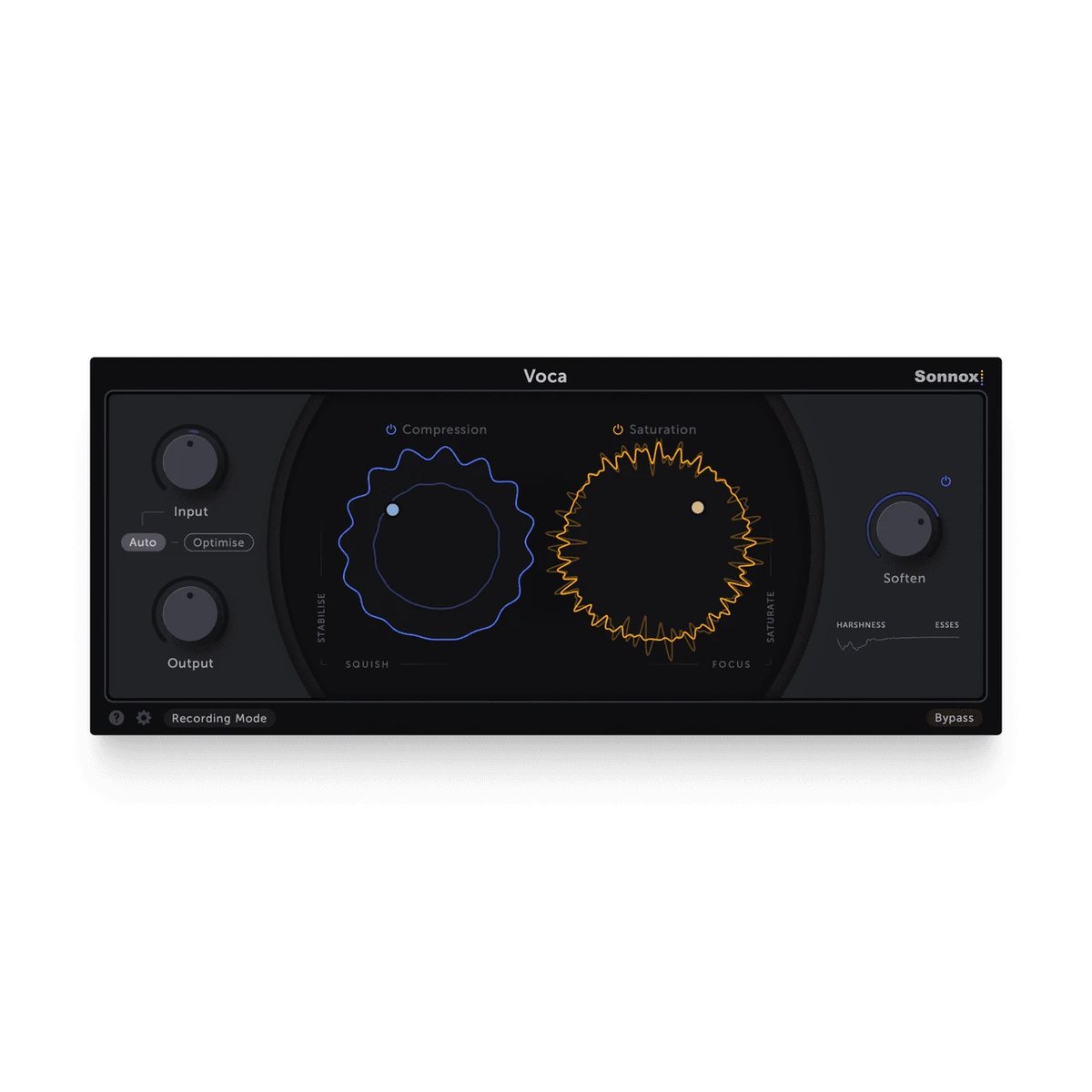
Voca is a vocal-focused plug-in from Sonnox. The official description calls it a complete vocal chain in one window, covering levelling, de-essing, compression, saturation and tone shaping. Instead of lining up several plug-ins, it is meant to reach a balanced state quickly, which the user then refines by hand.
The compression section is described as inspired by classics such as the 1176 and LA-2A. It can move from slow, bouncy compression to an upfront, energetic character through its controls. Rather than asking for threshold, ratio and time constants one by one, it uses an interface built around vocal sound shaping.
Saturation works together with a Focus control that places the vocal further forward or further back in the mix. Soften reduces harshness and sibilance. Auto-Input Volume levels phrases before the compression, which can reduce the time spent on clip gain or automation beforehand.
Formats are AU, VST3 and AAX on macOS and VST3 and AAX on Windows, and hosts such as Pro Tools 11 or later are supported. Authorization uses an iLok account, with two activations per license. The official site also offers a free trial.
Key features
Compression inspired by the 1176 and LA-2A
Described as inspired by classics such as the 1176 and LA-2A. It can move from slow compression to a more forward character through its controls.
Saturation and Focus
Saturation adds harmonics for body and density. With the Focus control, the vocal can be pushed forward or set back in the mix.
Soften
Reduces harshness and sibilance. It may allow harshness to be tamed without loading a separate de-esser.
Auto-Input Volume
Levels the vocal before compression. It may reduce the work of evening out phrase or section differences with clip gain or automation.
Everything in one window
Levelling, de-essing, compression, saturation and tone shaping are in one window, so a base can be built without switching among plug-ins.
iLok authorization
As a Toolbox product, each license allows two activations, on a local machine, an iLok device or iLok Cloud (one activation at most on iLok Cloud).
Specifications
| Item | Details |
|---|---|
| Type | Vocal chain (compression, saturation, de-essing) |
| Formats (macOS) | AAX Native, AU, VST3 |
| Formats (Windows) | AAX Native, VST3 |
| OS | macOS 10.12+ (Intel / Apple silicon, 64-bit) / Windows 10+ |
| Hosts | Pro Tools 11+, any host supporting AU or VST3 |
| Authorization | iLok account, 2 activations per license |
What is included and system requirements
- Voca plug-in
- Formats: AAX Native, AU, VST3 on macOS; AAX Native, VST3 on Windows
- Requirements: macOS 10.12+ / Windows 10+
- Authorization: a free iLok account is needed (iLok2/iLok3 or iLok Cloud can also be used)
How to use it
- Buy from Sonnox or a retailer and authorize the license through an iLok account.
- Install the plug-in and rescan plug-ins in the DAW.
- Load Voca as an insert on the vocal track.
- Start with Auto-Input Volume to even out level differences between phrases.
- Use the compression controls to choose a slower or a more forward character.
- Set Saturation and Focus to place the vocal forward or back.
- Raise Soften gradually to reduce harshness or sibilance.
- Listen with the other tracks and revisit the balance.
Where it may come in handy
Building a vocal base
It may be tried to bring a recorded vocal quickly to a mixable state.
Softening a harsh voice
Soften may help with vocals that feel harsh in the upper range.
Recordings with large level differences
Auto-Input Volume may be tried on takes whose phrase levels vary widely.
Speech and other sources
Retailer reviews mention uses beyond singing, so it may be tried on speech as well.
Who it may suit
- Users who want to handle vocals with fewer plug-ins
- Users who want to reduce threshold and ratio fiddling
- Users looking for a way to soften harsh vocals
- Users comfortable with iLok authorization
Good to know before you buy
- An iLok account is needed; at most one of the two activations can be on iLok Cloud.
- Retailer reviews mention relatively high CPU use.
Price
Please check the official page for the price.
More of the same kind
We have introduced 35 vocal processors. Here are some of the others.
- Harrison Consoles Vocal Flow
- LANDR LANDR FX Voice
- Leapwing Audio UltraVox 2
- iZotope iZotope VocalSynth 2
- Synchro Arts VocAlign 7
- Antelope Audio InTune Chorus
We have introduced 11 other products from Sonnox.
- Sonnox VoxDoubler
- Sonnox Oxford TransMod
- Sonnox Broadcast Bundle
- Sonnox Oxford Envolution
- Sonnox ListenHub
For a side-by-side comparison scored on the same criteria, see our comparison of vocal processors.
See the full list in Product database: Effects.
Sources: sonnox.com pluginboutique.com (checked 2026-10-27)










Comments