
Disclosure: This page may contain affiliate links. Prices were checked on the date shown and may change.
An introduction to iZotope iZotope VocalSynth 2, based on information from the maker and distributors: what it does, how to use it and who it may suit. It is not scored.
Color and shape vocals with five blendable creative must-haves and stompbox-style studio effects.
— iZotope official site
What is iZotope VocalSynth 2?
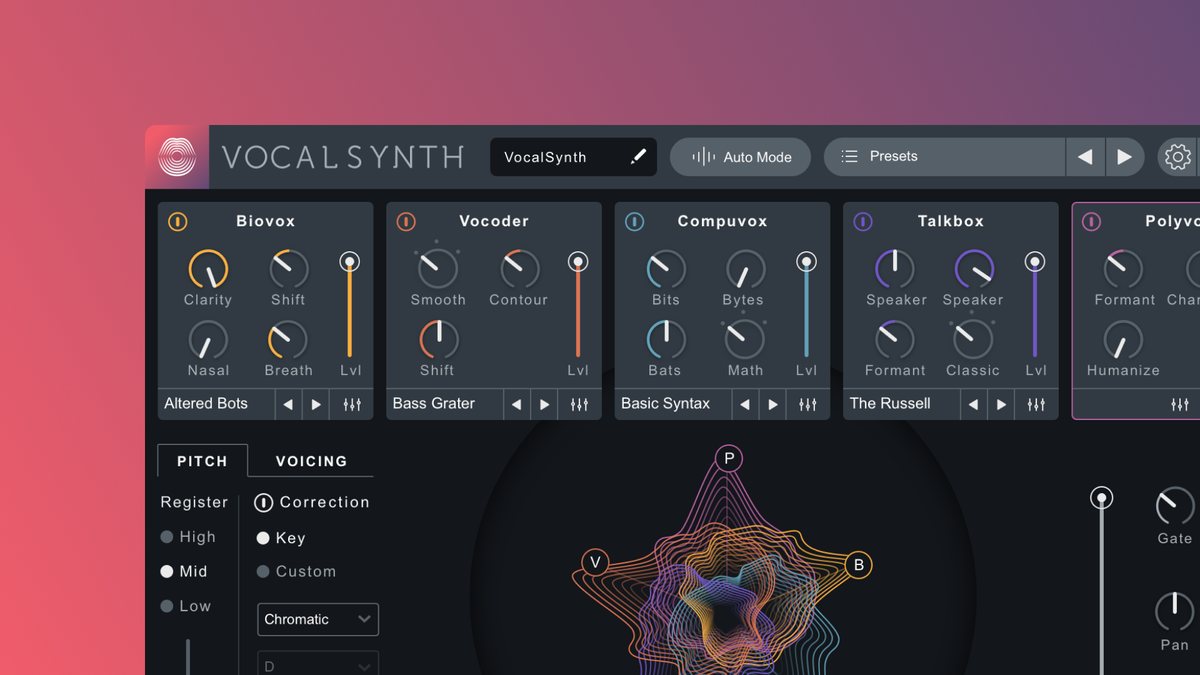
VocalSynth 2 is a creative vocal effect from iZotope. It blends five modules, Vocoder, Compuvox, Polyvox, Talkbox and Biovox, to color and shape a voice. The official site classifies it as a vocal synthesizer plug-in.
Among the five modules, Biovox is a new effect based on a model of the human vocal tract. It is described as adjusting vocal characteristics such as nasality, vowel shape and formants on any audio source. Compuvox covers robotic, bit-crushed style effects.
After the modules comes a chain of seven stompbox-style effects that can be reordered by drag and drop: Shred, Ring Mod, Chorus, Distort, Filter, Transform and Delay. A visual display called the Anemone reacts to the vowels in the signal.
There are three operating modes: Auto, MIDI and Sidechain. Auto offers pitch correction to a key and additional voices, MIDI sets pitch from played notes, and Sidechain uses audio you supply as the carrier. Communication with other iZotope products is also built in.
Key features
Five modules
Vocoder, Compuvox, Polyvox, Talkbox and Biovox can be blended. Robot voices, harmonies and talkbox-style sounds are all reachable from one plug-in.
Biovox
An effect based on a model of the human vocal tract. The official site says it adjusts nasality, vowel shape and formants on any audio source.
Seven stompbox effects
Shred, Ring Mod, Chorus, Distort, Filter, Transform and Delay can be reordered. Chorus and Ring Mod are the pedal-style effects added in this version.
Three modes
Auto provides automatic pitch correction and extra voices, MIDI sets pitch from played notes, and Sidechain uses another sound as the carrier. You switch according to the task.
Anemone display
A colorful animation that moves with the character of the vowels. It is described as working as a meter based on spectral analysis.
Expansion libraries and inter-plugin communication
Four artist preset packs and a 15-preset iZotope expansion are included. It also communicates with plug-ins such as Neutron, Ozone and Tonal Balance Control.
Specifications
| Item | Details |
|---|---|
| Maker | iZotope |
| Type | Vocal synthesizer (creative effect) |
| Formats | AAX, AU, VST2, VST3 (64-bit only) |
| Mac OS | macOS Sonoma 14.7.x, Sequoia 15.7.x, Tahoe 26.1.x (Intel and Apple silicon) |
| Windows OS | Windows 10 (22H2), Windows 11 (24H2) |
| Modules | Biovox, Vocoder, Compuvox, Talkbox, Polyvox |
| Effects | Shred, Ring Mod, Chorus, Distort, Filter, Transform, Delay (seven) |
| Trial | Available (try it from the official site) |
What is included and system requirements
- VocalSynth 2 (five modules and seven effects)
- Four artist preset packs: Deezle, Jonny Hawkins of Nothing More, Computer Magic and KillaGraham
- 15 additional presets from iZotope
- Supported hosts listed officially: Logic Pro 11, Pro Tools 2024, Ableton Live 12, Cubase 14, Nuendo 14, Studio One 7, Reaper 7, FL Studio 2024, Adobe Audition 2025, Premiere Pro 2025, DaVinci Resolve 19 and Reason 13
How to use it
- Download the installer from your iZotope account and install it.
- Start your DAW and insert VocalSynth 2 on the vocal track.
- Choose a mode: Auto, MIDI or Sidechain. Auto may be the easiest place to start.
- In Auto mode, set the key and scale of your song.
- Pick the modules you want from Biovox, Vocoder, Compuvox, Talkbox and Polyvox and blend their amounts.
- Reorder the stompbox effects by dragging and enable only the ones you need.
- In MIDI mode, send MIDI from a MIDI track to the plug-in and set pitch with chords or a melody.
- In Sidechain mode, send the sound you want as the carrier to the sidechain input and layer it with the voice.
Where it may come in handy
Vocoder and talkbox-style voices
You could play a keyboard in MIDI mode to give the voice its pitch. It may be useful when you want a classic effect without hardware.
Robot or glitchy voices
The bit-crush style effects in Compuvox could be tried for space-age hooks or digitally processed vocals.
Adding backing vocals and harmonies
Auto mode offers pitch correction and additional voices, so it may be considered for adding thickness to a lead vocal.
Processing non-vocal material
The official site describes using the sidechain to make other audio appear to talk, so guitars and synths could also be tried.
Who it may suit
- People who want vocoder or talkbox-style voices inside their DAW
- Producers who want processed textures or harmonies on a vocal
- People who want to give non-vocal sounds voice-like character
- Users who already work with iZotope tools such as Neutron and Ozone
Good to know before you buy
- Supported formats are 64-bit AAX, AU, VST2 and VST3. Plugin Boutique's text says VST2 is not supported, so check iZotope's official information for the current status.
- To use Sidechain mode, you need to set up the sidechain input in your DAW.
- The official OS list starts at macOS 14.7.x and Windows 10 (22H2). It may not run on older systems.
- A trial download is available on the official site.
How it differs from similar products
We do not pick a winner; the official figures are placed side by side.
Polyverse Manipulator
VocalSynth 2 has five modules and seven stompbox effects, and works in Auto, MIDI and Sidechain modes. Manipulator combines ten effects, and its official page says it can handle up to four polyphonic voices of pitch from MIDI input.
Price
$199 (iZotope official site, checked 2026-10-27). Prices can vary by region and promotion, so check the official page before buying.
See iZotope VocalSynth 2 on the product page
More of the same kind
We have introduced 35 vocal processors. Here are some of the others.
- BLEASS BLEASS Vox
- LANDR LANDR FX Voice
- UJAM VOXCRAFT
- W. A. Production VocalShaper
- Waves Renaissance Vox
- Waves Sync Vx
We have introduced 15 other products from iZotope.
- iZotope Vocal Doubler
- iZotope Vinyl
- iZotope Equinox
- iZotope Tonal Balance Control 3
- iZotope Neutron 5 Elements
For a side-by-side comparison scored on the same criteria, see our comparison of vocal processors.
See the full list in Product database: Effects.
Sources: izotope.com pluginboutique.com (checked 2026-10-27)










Comments