
Disclosure: This page may contain affiliate links. Prices were checked on the date shown and may change.
An introduction to Tuned Plugins VocalTune, based on information from the maker and distributors: what it does, how to use it and who it may suit. It is not scored.
VocalTune ensures precise, natural tuning with zero latency, making it the go-to tool for both live performance and studio production.
— Tuned Plugins official site
What is VocalTune?
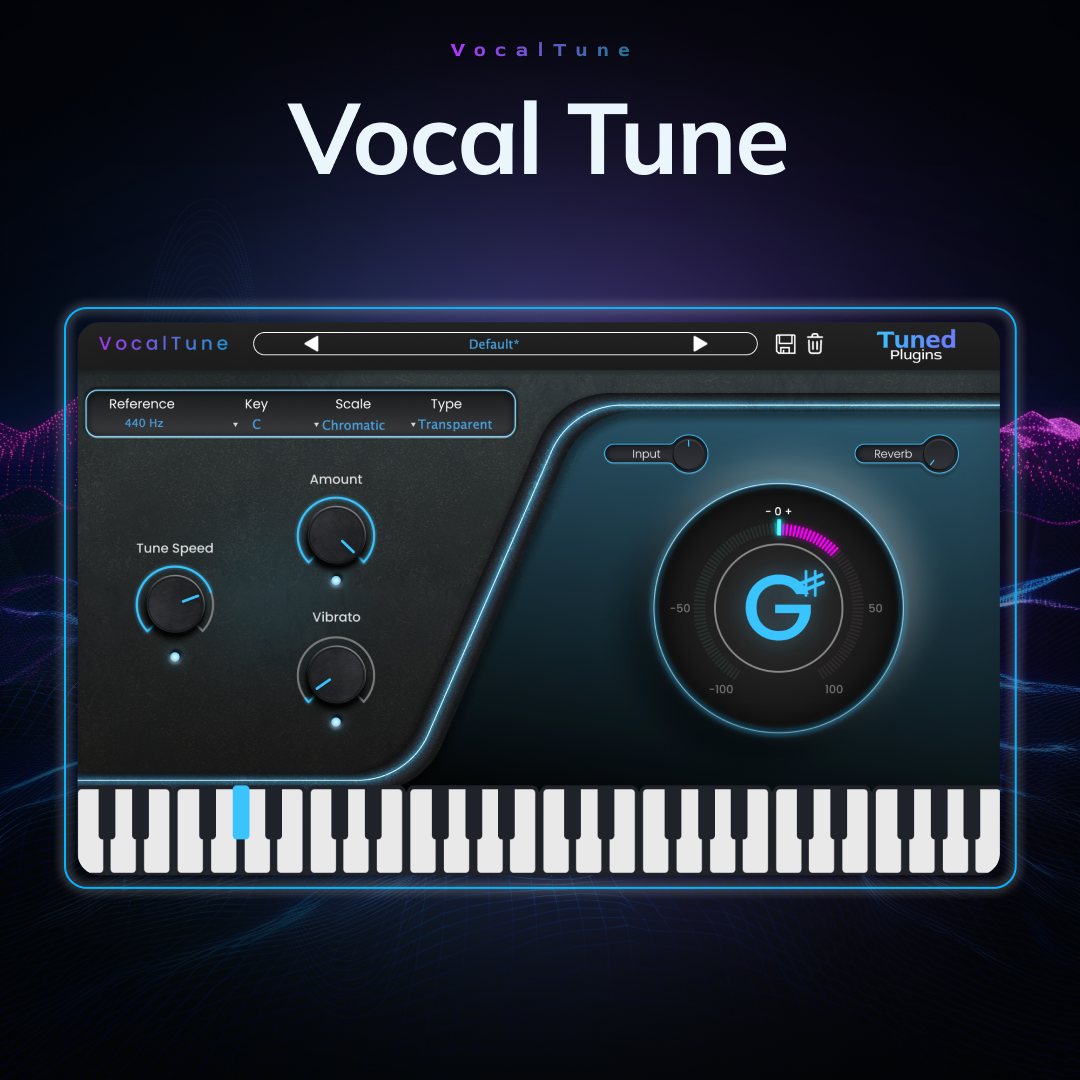
VocalTune is a real-time pitch correction plug-in from Tuned Plugins. The official page says it runs with zero latency and suits both live performance and studio work.
You set the scale and key, and choose a reference pitch such as A=440 Hz. Two tuning types are offered: Transparent for natural correction and Modern for a more pronounced effect.
Tune Speed ranges from subtle correction to a robotic effect. In Modern mode, formant can be adjusted to make the voice brighter or deeper.
Vibrato and reverb controls are built in, and the official page also offers it as part of the Vocal Essentials Bundle with Vocal Chain and Tuned Reverb.
Key features
Zero-latency processing
The maker describes processing without latency, which may suit tuning while recording.
Scale and key settings
Scales such as major and minor can be chosen, with A=440 Hz as the default reference.
Transparent and Modern
Switch between natural correction (Transparent) and a more obvious effect (Modern).
Tune Speed
Controls how fast correction is applied; faster settings give a robotic sound.
Formant and vibrato
Formant can be adjusted in Modern mode, and vibrato adds pitch modulation.
Built-in reverb
A reverb control is built in to smooth tuned vocals.
Specifications
| Item | Details |
|---|---|
| Type | Pitch correction (real time) |
| Plug-in formats (Mac) | VST3, AU, AAX |
| Plug-in formats (Windows) | VST3, AAX (64-bit) |
| Supported OS | macOS 10.15 or later, Windows 10 or later (official) |
| CPU | 2 GHz Intel dual core or AMD equivalent |
| RAM | 8 GB (16 GB recommended) |
| Trial | 14-day free trial (official) |
What is included and system requirements
- VocalTune plug-in (Mac: VST3, AU, AAX; Windows: VST3, AAX)
- 14-day free trial on the official site
How to use it
- Buy from the official site or a retailer and install.
- Rescan in your DAW and insert VocalTune on the vocal track.
- Set the song's key and scale.
- Choose Transparent or Modern tuning.
- Adjust Tune Speed to decide how strongly correction acts.
- In Modern mode, shape the tone with formant.
- Add vibrato and reverb as needed.
Where it may come in handy
Tuning vocals while recording
With low latency, it may suit checking results as you sing.
Finishing with natural correction
Transparent mode may fit light correction.
Robotic vocal effects
Modern mode with fast Tune Speed gives an obvious effect.
Who it may suit
- People looking for simple real-time pitch correction
- Those who want both natural and obvious correction
- Anyone who prefers to try a trial first
Good to know before you buy
- The official page lists macOS 10.15+ and Windows 10+, while the Plugin Boutique page says Windows 8 and above, so the figures differ.
- The official spelling of the name is VocalTune.
- A sale is currently shown on the official site.
Price
Please check the official page for the price.
See VocalTune on the product page
More of the same kind
We have introduced 10 pitch correction tools. Here are some of the others.
- Waves Waves Tune LT
- GVST GSnap
- United Plugins TrapTune
- Synchro Arts RePitch 2
- Auburn Sounds Graillon 3 Free Edition
- Universal Audio Topline Vocal Tune
We have introduced 1 other product from Tuned Plugins.
For a side-by-side comparison scored on the same criteria, see our comparison of pitch correction tools.
See the full list in Product database: Effects.
Sources: tunedplugins.com pluginboutique.com (checked 2026-10-27)










Comments