
Disclosure: This page may contain affiliate links. Prices were checked on the date shown and may change.
An introduction to United Plugins United Plugins VoxDucker, based on information from the maker and distributors: what it does, how to use it and who it may suit. It is not scored.
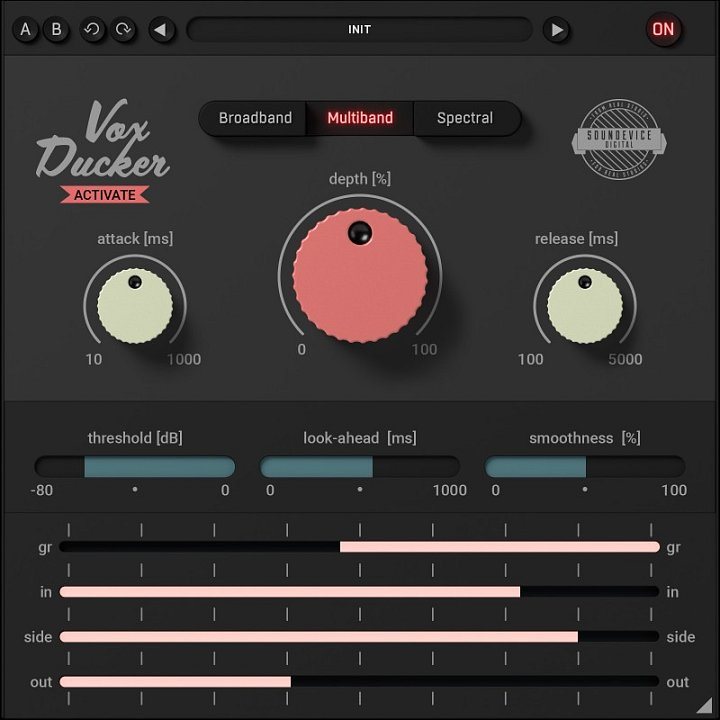
VoxDucker, which can automatically suppress the backing track in three different ways
— United Plugins official site
What is United Plugins VoxDucker?
VoxDucker is a ducking plug-in from United Plugins. It automatically lowers the level of a backing track, such as background music, while a narration or vocal is present. It is presented for work that mixes voice with music, such as video, podcasts, broadcast and audiobooks.
You insert VoxDucker on the track you want to duck, usually the music, and send the voice track to its sidechain input. The plug-in listens to the voice and lowers the music accordingly. The official page says it is preset so that in most cases you only need to adjust the Depth control.
There are three ducking modes to choose from. The description says they focus the reduction on frequencies present in the sidechain signal so that more of the ducked signal is preserved. You can switch between the modes and compare them for the situation at hand.
It is described as usable beyond vocals, for example ducking bass when the kick sounds or rhythm guitar when the lead sounds. Activation does not require iLok or an internet connection; it uses license files.
Key features
Three ducking modes
Three modes can be switched between. They focus the reduction on frequencies in the sidechain signal so that more of the ducked signal is kept.
Depth-focused operation
It is preset so that in most cases you mainly adjust Depth, and more detailed controls are available when you want to fine-tune.
Extensive metering
Meters show the amount of ducking and the input, output and sidechain levels, so you can see how much is being reduced.
Pairing with Voxessor
The official page suggests Voxessor on the voice track and VoxDucker on the backing track, so voice processing and music ducking work together.
Not only voice
The page says it can be used on other combinations such as bass and kick or rhythm guitar and lead, so it can be considered wherever sounds compete.
License-file activation
No iLok, dongle or internet connection is needed, and the page says a purchaser can use it on all of their own computers.
Specifications
| Item | Details |
|---|---|
| Maker | United Plugins |
| Type | Ducker (sidechain-driven level control) |
| Modes | Three ducking modes |
| Processing | Internal 64-bit, any sampling rate |
| Mac formats | VST2, VST3, AAX, AU |
| Mac OS | macOS 10.10 or later (Apple silicon supported, 64-bit only) |
| Windows formats | VST2, VST3, AAX |
| Windows OS | Windows 8 to Windows 11 (32/64-bit) |
| Authorization | License file (no iLok or internet needed) |
| Trial | 15-day unlimited trial |
What is included and system requirements
- VoxDucker (three ducking modes)
- Formats: VST2, VST3, AAX and AU on Mac; VST2, VST3 and AAX on Windows
- Intel / AMD processor with SSE2 support
- Free updates after purchase (stated on the official page)
- 15-day unlimited trial version to try before buying
How to use it
- Prepare a DAW that supports sidechain inputs.
- Insert VoxDucker on the track you want to lower, such as background music.
- Route the output of the voice track to VoxDucker's sidechain input in your DAW.
- Adjust Depth to decide how far the music drops when the voice is present.
- Switch between the three ducking modes and compare how they sound.
- Check the amount of ducking and the sidechain level on the meters.
- Fine-tune the response with the detailed controls if needed.
- Finally, listen to confirm that the music returns naturally when the voice pauses.
Where it may come in handy
Narration for video and podcasts
It may be useful when you want background music to drop automatically as narration enters, one of the main uses the page describes.
Vocal and backing balance
It can be considered when you want part of the accompaniment to drop only while a vocal is singing.
Kick and bass overlap
Ducking bass when the kick sounds is mentioned on the official page and may be tried when organizing low frequencies.
Lead and rhythm instruments
Lowering rhythm guitar when a lead instrument plays is also mentioned as a use.
Who it may suit
- People who layer voice and background music for video, podcasts or broadcast
- People who want ducking set up quickly
- People who prefer licensing that does not use iLok
- People who want to check it with a 15-day trial before buying
Good to know before you buy
- A DAW or application that supports sidechain inputs is required.
- The license is activated with a license file, and iLok is not needed.
- The official site and Plugin Boutique show different prices, so check each page before buying.
- A 15-day trial is available from the official site.
How it differs from similar products
We do not pick a winner; the official figures are placed side by side.
United Plugins Voxessor
VoxDucker is a ducker that lowers music or other tracks in response to a sidechain voice. Voxessor is the company's plug-in placed on the voice track itself, and the VoxDucker page presents the two as a pair.
Price
Please check the official page for the price.
See United Plugins VoxDucker on the product page
More of the same kind
Other introduction articles of the same kind.
- IK Multimedia T-RackS Leslie
- Tone Empire LAM16 Preamp
- AIR Music Technology Tape Echo
- IK Multimedia AmpliTube Metal
- Acon Digital Remix:Drums
- Zynaptiq MORPH 3 PRO
We have introduced 34 other products from United Plugins.
- United Plugins Bassment Core
- United Plugins DIFIX
- United Plugins Voxessor
- United Plugins FireCobra
- United Plugins Cryostasis
See the full list in Product database: Effects.
Sources: unitedplugins.com pluginboutique.com (checked 2026-10-27)










Comments