
Disclosure: This page may contain affiliate links. Prices were checked on the date shown and may change.
An introduction to United Plugins Voxessor, based on information from the maker and distributors: what it does, how to use it and who it may suit. It is not scored.
Voxessor covers all processes needed to treat the voice and works with incredible speed.
— United Plugins official site
What is Voxessor?
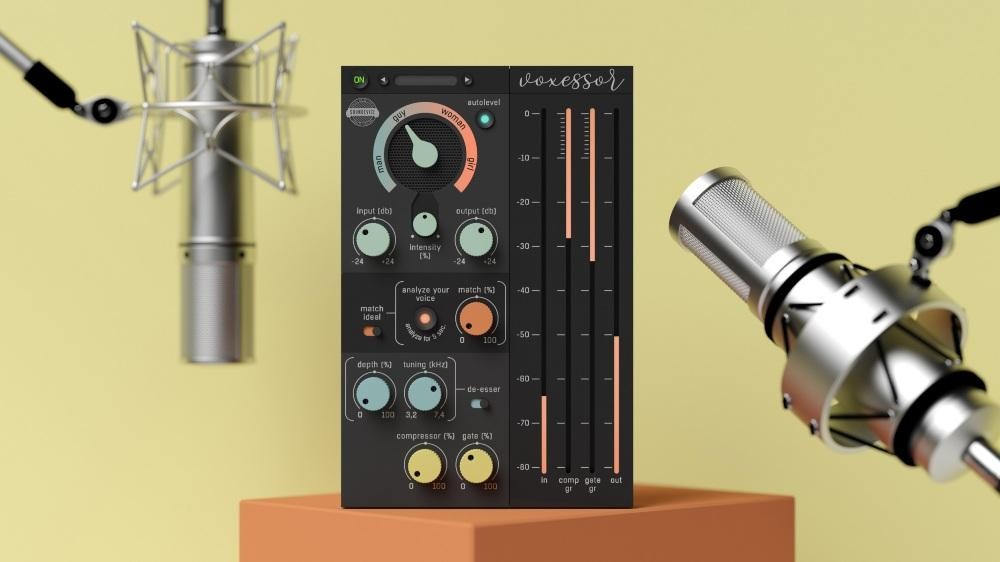
United Plugins Voxessor is a plug-in for treating the speaking voice, such as narration and dialogue. Plugin Boutique's page says it covers all the processes needed to treat recorded speech for films, podcasts, YouTube videos, commercials and e-books.
The EQ lets you sweep from the manliest to the girliest setting with one control and set up within seconds. With Intelligent Matching, analysing your voice for a few seconds detects the speaker's character, and the Match function EQs it toward an ideal voice.
The dynamics section is a one-knob compressor and a one-knob gate tuned for dialogue. The de-esser lets you choose the frequency band that matches the speaker's sibilants, and it also fixes volume imperfections automatically and compensates gain automatically.
Key features
EQ sweep
One control sweeps through settings so you can find the frequencies that suit the speaker quickly.
Intelligent Matching
A few seconds of analysis detects the voice character and EQs toward an ideal voice.
Automatic leveling
Fixes volume imperfections from the performance, handy for long recordings.
One-knob compressor and gate
Tuned for dialogue and voice-overs, and usable on vocals too.
De-esser
Choose the frequency band that fits the speaker's sibilants.
Simple activation
No iLok, dongle or internet access; it activates with licence files.
Specifications
| Item | Details |
|---|---|
| Type | Voice processing (EQ, dynamics, de-esser) |
| Processing | 64-bit, any sample rate including 192 kHz or higher |
| Mac | macOS 10.10 or later (M1 and macOS 11 supported, 64-bit) |
| Windows | Windows 8 to 11 (32/64-bit) |
| Activation | Licence files (no iLok or dongle) |
What is included and system requirements
- Voxessor
How to use it
- Insert Voxessor on the voice track.
- Find the setting that suits the voice with the EQ control, or analyse with Intelligent Matching.
- Set dynamics with the compressor and gate knobs.
- Choose the sibilance band in the de-esser.
- Compare with the automatic gain compensation on.
Where it may come in handy
Narration and voice-over
The first use the page names.
Podcasts and video
For podcasts, YouTube videos and commercials.
E-books and documentaries
Automatic leveling suits long recordings.
Who it may suit
- People who want to prep voice quickly
- People recording narration and dialogue
Good to know before you buy
- Intelligent Matching finds an EQ setting toward the detected voice character; check the result by ear.
- This article is based on the Plugin Boutique product page, which carries the maker's description. Check the maker or retailer pages for the latest specifications and prices.
Price
$142 (Plugin Boutique, checked 2026-11-10). Prices can vary by region and promotion, so check the official page before buying.
See Voxessor on the product page
More of the same kind
Other introduction articles of the same kind.
- Waves Feedback Hunter
- Mastering The Mix ANIMATE
- AIR Music Technology Tape Echo
- W. A. Production Fundamental Bass
- Thenatan Audio TRIO
- Lunatic Audio Narcotic
We have introduced 34 other products from United Plugins.
- United Plugins QuickBass
- United Plugins Lofinity
- United Plugins United Plugins VoxDucker
- United Plugins FireSpacer
- United Plugins Cryostasis
See the full list in Product database: Effects.
Sources: pluginboutique.com (checked 2026-11-10)










Comments