
Disclosure: This page may contain affiliate links. Prices were checked on the date shown and may change.
An introduction to Tokyo Dawn Labs OD DeEdger, based on information from the maker and distributors: what it does, how to use it and who it may suit. It is not scored.
DeEdger introduces a new way of reducing the hardness of audio signals without negatively altering the original signal qualities.
— Tokyo Dawn Labs official site
What is OD DeEdger?
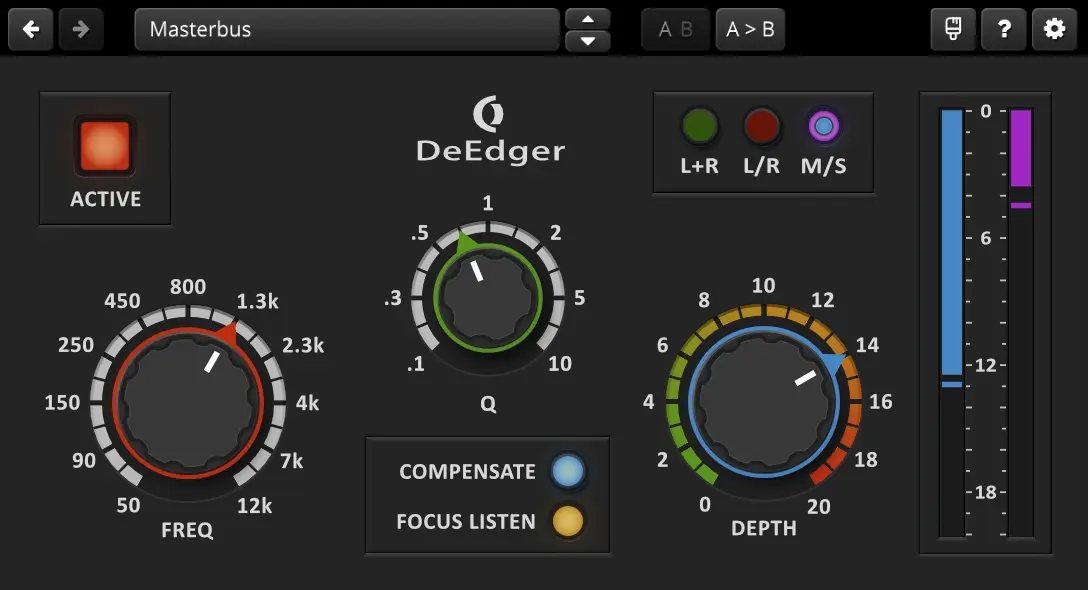
OD DeEdger from Tokyo Dawn Labs is an effect designed to reduce the hardness of audio, the sharp, edgy quality that can make a track feel harsh. It is presented as a tool for both mixing and mastering.
Its operation is threshold-free. Instead of setting a level at which processing starts, you rely on a design that is meant to handle any input level, signal type and dynamic range. According to the maker, processing is applied only where hardness is detected.
The idea came from a professional mastering engineer, Jan Ohlhorst. His products were first made for his own mastering work under the Ohlhorst Digital brand and were later made available to the public. The maker says the concept targets the needs of modern mastering and has also proved useful in mixing.
Time- and frequency-dependent mechanisms work together to keep the process transparent. It is intended for complex stereo material, from single tracks to subgroups, and can be left in a set-and-forget configuration. The maker also describes the CPU load as low.
Key features
Threshold-free operation
There is no threshold to tune to the input level. This may help when you want to reuse a setting across material of different levels or reduce per-track adjustment.
Processing only where hardness is detected
The idea is to act only when hardness is detected, leaving other parts as they are. This may suit cases where you want to avoid over- or under-processing.
Preserves dynamic impact and musicality
The maker lists keeping dynamic impact and musicality while reducing hardness as a key point. It may help when smoothing a harsh mix during finishing.
Stereo material and subgroups
It is described as suitable for complex stereo material, including individual tracks and subgroups, so you might try it on a drum bus or mix bus.
Low CPU load and simple interface
The maker describes the CPU load as low and the interface as intuitive, which may make multiple instances easier to manage.
Set and forget
After the initial setup it can be left alone, so you could keep it in a chain as a finishing safeguard without constant attention.
Specifications
| Item | Details |
|---|---|
| Version | 1.5.4 (as listed by the maker) |
| Formats | VST2 / VST3 / AU / AAX (varies by OS) |
| Operating systems | Windows 7 or later, Mac OS X 10.13 or later, Linux x86-64 (GLIBC 2.35 or later) |
| License | Personal / small business license, free updates |
| Demo | Demo edition available (automatic recall is blocked) |
What is included and system requirements
- VST2, VST3, AU and AAX formats (formats vary by OS)
- Installers or archives for Windows, macOS and Linux
- User manual published on the maker's site
- Demo edition for checking operation before purchase
How to use it
- Download the demo from the maker's site and confirm it runs in your DAW.
- Insert OD DeEdger on a track, a subgroup or the master bus.
- Start with the default settings and listen to how the hardness changes during playback.
- On material that still sounds harsh, adjust the controls little by little with the manual at hand.
- Compare bypassed and processed audio to check that the character has not changed too much.
- Once satisfied, save the setting and keep using it.
Where it may come in handy
Mastering finish
You could try it on a track whose upper range feels hard at the finishing stage. Since the product grew out of mastering work, this may suit it.
Mix bus or drum bus
You might try it on a bus where overlapping sounds feel harsh. It is meant to be set once and left.
Vocal or guitar tracks
It is said to work on individual tracks too, so it may be worth trying on sources where hardness tends to appear.
Who it may suit
- People who want to smooth harshness with little effort
- People who want another tool for the finishing stage of mixing or mastering
- People who want to avoid tuning a threshold
Good to know before you buy
- The license is for personal or small business use and updates are free.
- The demo edition blocks automatic recall.
- The maker lists the price in euros; please check the maker's site before purchase.
Price
Please check the official page for the price.
See OD DeEdger on the product page
More of the same kind
Other introduction articles of the same kind.
- IK Multimedia ReSing MAX
- New Audio Technology Spatial Audio Designer In-One
- Waves Waves CLA Nx
- Klevgrand STARK
- MAAT LINSurround
- MeldaProduction MConvolutionMB
We have introduced 4 other products from Tokyo Dawn Labs.
- Tokyo Dawn Labs TDR Molot GE
- Tokyo Dawn Labs TDR SlickEQ M
- Tokyo Dawn Labs TDR VOS SlickEQ GE
- Tokyo Dawn Labs Tokyo Dawn Labs TDR Nova GE
See the full list in Product database: Effects.
Sources: tokyodawn.net pluginboutique.com (checked 2026-10-27)










Comments