
Disclosure: This page may contain affiliate links. Prices were checked on the date shown and may change.
An introduction to MeldaProduction MConvolutionMB, based on information from the maker and distributors: what it does, how to use it and who it may suit. It is not scored.
MConvolutionMB is a zero-latency convolution plugin that's ideal for processing recorded, or generated impulse responses (IRs).
— MeldaProduction official site
What is MConvolutionMB?
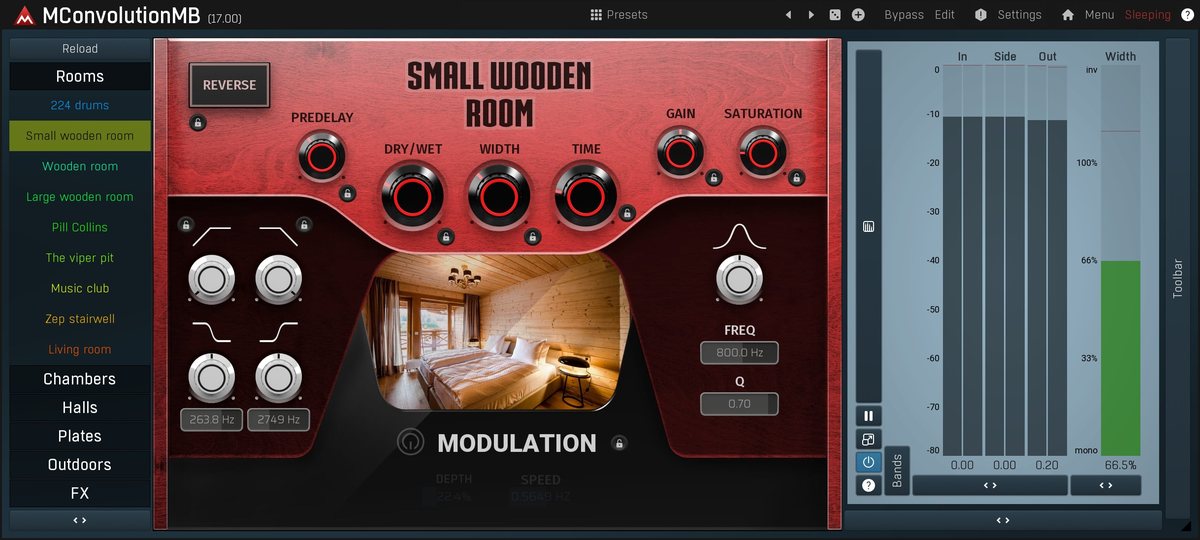
MConvolutionMB is MeldaProduction's multiband convolution plugin. It processes recorded or generated impulse responses and can simulate halls, rooms, boxes, microphones and even other plugins.
IRs can be loaded as files or generated by the built-in reverb and filter generator. The file manager browses the internal IR library and your file system, and supports WAV, FLAC and MP3.
You can split into 1 to 6 independent bands, assign two IRs per band and change their ratio with a slider. Attaching the slider to a modulator creates dynamic reverbs automatically.
Up to four modulators work as LFOs, followers, ADSR envelopes or pitch detectors, and it handles up to eight channels of surround.
Key features
File manager with stitching
Browse internal and personal IR libraries and combine files automatically for multichannel layouts such as true-stereo.
Built-in generators
Generate reverbs and filters inside the plugin as well as loading IRs.
Two IRs per band
Assign two sources (file, reverb or filter) per band and change the ratio.
1 to 6 bands
Split into up to six bands with analog, linear-phase or hybrid crossovers.
Four global modulators
Work as LFO, follower, ADSR or pitch detector.
Surround and MIDI
Up to eight channels of surround and MIDI learn.
Specifications
| Item | Details |
|---|---|
| Bands | 1 to 6 |
| IR formats | WAV, FLAC, MP3 |
| Surround | Up to 8 channels |
| Processing | 64-bit, recommended max 384 kHz |
| Windows | Windows 8/10/11 (64-bit) |
| Mac | macOS 10.14+ (Apple Silicon supported) |
| Formats | VST, VST3, AAX, plus AU on Mac |
What is included and system requirements
- MConvolutionMB plugin
- Internal IR library
- Preset management and online preset exchange
How to use it
- Create an account on the MeldaProduction site and get the installer.
- Choose the formats to install.
- Load it on a track or send in your DAW.
- Pick an IR in the file manager.
- Set the band count and crossover if you want to split bands.
- Connect a modulator to the IR ratio if needed.
Where it may come in handy
Depth for drums and vocals
Using different IRs per band, such as a shorter low end and a longer high end.
Cabinet and mic IRs
IRs that simulate boxes and microphones can be loaded.
Sound design
Modulators may suit moving reverbs.
Who it may suit
- Those who build reverbs from IRs
- People who want different reverb per band
- Users doing surround work
Good to know before you buy
- There are many controls, so it may take time to learn.
- See the PDF manual for details.
- A free trial is offered on the official site.
Price
$54 (Plugin Boutique, checked 2026-10-27). Prices can vary by region and promotion, so check the official page before buying.
See MConvolutionMB on the product page
More of the same kind
Other introduction articles of the same kind.
- Blue Cat Audio Blue Cat's DP Meter Pro
- McDSP SA-2 Dialog Processor v7
- W. A. Production BeatQuake
- LANDR LANDR FX Acoustic
- Waves Retro Fi
- Mellowmuse Mellowmuse ATA Auto Time Adjuster
We have introduced 32 other products from MeldaProduction.
- MeldaProduction MMorph
- MeldaProduction MHarmonizerMB
- MeldaProduction MMicSim
- MeldaProduction MVintageRotary
- MeldaProduction MTrackAlign
See the full list in Product database: Effects.
Sources: meldaproduction.com pluginboutique.com (checked 2026-10-27)










Comments