
Disclosure: This page may contain affiliate links. Prices were checked on the date shown and may change.
An introduction to Dawesome (Tracktion) Dawesome Abyss II, based on information from the maker and distributors: what it does, how to use it and who it may suit. It is not scored.
Abyss II is built on a simple yet radical premise: a synth designed around how we actually experience sound.
— Dawesome (Tracktion) official site
What is Dawesome Abyss II?
Abyss II is a synthesizer from Tracktion under the Dawesome brand. It treats sound as colour rather than as numbers and algorithms, so you can explore using words like warm, cold, dark or brilliant, an approach aimed at musicians rather than engineers.
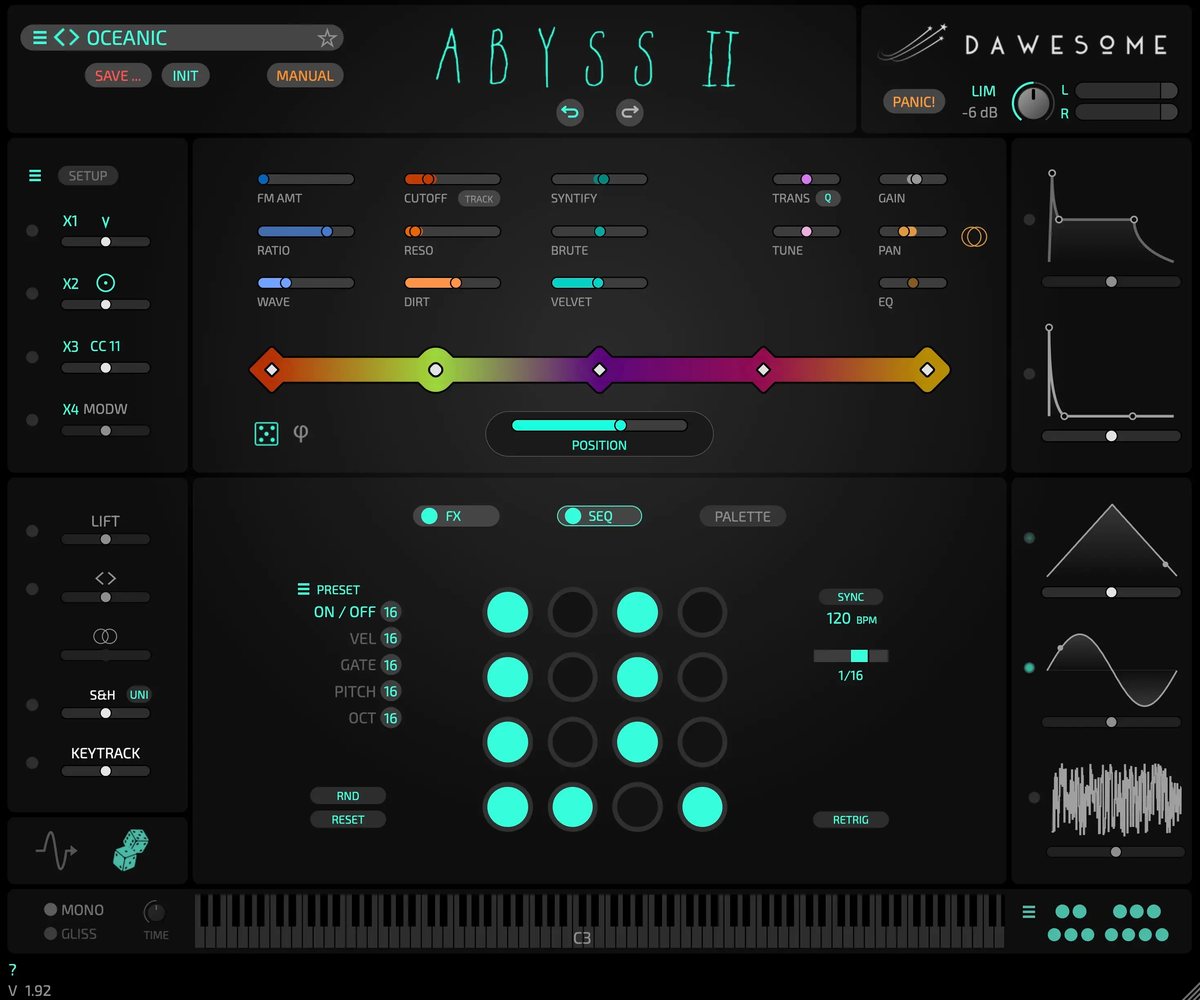
Tones are made on a screen called the gradient, where you pick and place sound-colours. Dropping your own samples onto the gradient extracts spectral tone-colours from them, and you can build custom palettes from audio files or whole folders.
Three controls, BRUTE, VELVET and SYNTIFY, shape the tone, warmth and aggressiveness. A modular FX engine has four slots with 20 effect modules, and a poly-rhythmic sequencer allows independent step counts.
It includes over 400 presets, with more than 200 new patches and 200 upgraded from Abyss 1, which can be imported by drag and drop. It supports full MPE, and the developer describes it as light on CPU. A 90-day unlimited trial lets you try it before buying.
Key features
Sound-as-colour engine
Built around how people perceive sound, it lets you make tones by choosing and arranging colours, so you can choose by whether it sounds interesting rather than by parameter knowledge.
Sample-to-colour extraction
Dropping samples onto the gradient extracts spectral tone-colours. The developer says field recordings, vocals or guitar can be used as material.
Custom palettes
Audio files or entire folders can be turned into custom tone-colour palettes, which might let you build a personal sound set from your own library.
Modular FX engine
Four free slots can hold any of 20 custom effect modules. BRUTE, VELVET and SYNTIFY controls adjust tone, warmth and aggressiveness.
Poly-rhythmic sequencer
A sequencer with independent step counts lets you layer cycles of different lengths for evolving, shifting motion.
Wave Drag-Out and preset management
Rendered audio of played notes can be dragged straight into the DAW. Also included are a tagged preset browser with favourites, Abyss 1 import, undo/redo and a randomizer.
Accessibility and efficiency
A high-contrast mode was added, and the developer describes the engine as light on CPU. Full MPE is supported.
Specifications
| Item | Details |
|---|---|
| Type | Synthesizer (colour-based sound engine) |
| Presets | 400+ (200+ new, 200 upgraded from Abyss 1) |
| FX | 4 slots / 20 modules |
| Other | MPE, poly-rhythmic sequencer, Wave Drag-Out, Abyss 1 preset import |
| Formats | macOS: AU / VST3 / AAX; Windows: VST3 / AAX |
| OS | macOS 10.13 or later (64-bit Intel or Apple Silicon), Windows 10 and 11 (64-bit) |
| Trial | 90 days, unlimited |
What is included and system requirements
- Plug-in (macOS: AU, VST3, AAX; Windows: VST3, AAX)
- 400+ presets
- 90-day trial available
- User manual, learning guides and video tutorials on the official site
- A separate upgrade is available for Abyss 1 owners (noted on the Plugin Boutique page)
How to use it
- Install the plug-in from the trial download or the purchase installer.
- Open Abyss II in your DAW and browse presets using the tags.
- Choose colours on the gradient and move the position to hear the tone change.
- Drop your own samples onto the gradient to extract tone-colours.
- Use BRUTE, VELVET and SYNTIFY to adjust thickness and warmth.
- Add effects in the FX slots.
- Use the poly-rhythmic sequencer to add motion.
- Drag the rendered audio of a good sound into the DAW with Wave Drag-Out.
Where it may come in handy
Film and soundtrack work
Choosing sounds by words like warm or dark might suit picking tones to match a scene.
When synth knowledge is limited
Selecting by ear might let you design sounds without knowing oscillators or operators.
Tones from your own recordings
Dropping a phone recording onto the gradient might give you a unique tone-colour.
Slowly evolving sounds
Offsetting cycles in the poly-rhythmic sequencer might create slowly moving pads and textures.
Who it may suit
- People who prefer choosing sounds by ear over synth theory
- Those who want to build timbres from their own recordings
- Anyone seeking rich textures for music or video
- Users who want a long 90-day trial before buying
Good to know before you buy
- Plugin Boutique lists a regular price of $149 (on sale at the time of checking).
- A separate upgrade exists for Abyss 1 owners.
- The official site showed a sale banner, so the regular price from Plugin Boutique is given.
How it differs from similar products
We do not pick a winner; the official figures are placed side by side.
AudioThing Materia
Abyss II offers 400+ presets and 20 FX modules at a regular $149. Materia is an additive design with 96 partials at a regular $69 (official). Both can build tones from samples.
Price
$149 (Plugin Boutique, checked 2026-10-27). Prices can vary by region and promotion, so check the official page before buying.
See Dawesome Abyss II on the product page
More of the same kind
We have introduced 178 synthesizers. Here are some of the others.
- UVI Rumble
- Sugar Bytes Cyclop
- Baby Audio Baby Audio Atoms
- KV331 Audio SynthMaster One
- Native Instruments Blocks Primes
- Tracktion MOK MOK Waverazor
For a side-by-side comparison scored on the same criteria, see our comparison of synthesizers.
See the full list in Product database: Instruments.
Sources: tracktion.com pluginboutique.com (checked 2026-10-27)










Comments