
Disclosure: This page may contain affiliate links. Prices were checked on the date shown and may change.
An introduction to Baby Audio Baby Audio Atoms, based on information from the maker and distributors: what it does, how to use it and who it may suit. It is not scored.
Atoms uses cutting edge physical modeling technology to generate an endless variety of organic sounds.
— Baby Audio official site
What is Baby Audio Atoms?
Atoms is a physical-modeling synthesizer from Baby Audio. Baby Audio says it uses the technique that simulates acoustic instruments but goes beyond what is possible in the natural world, aiming at organic, otherworldly textures.
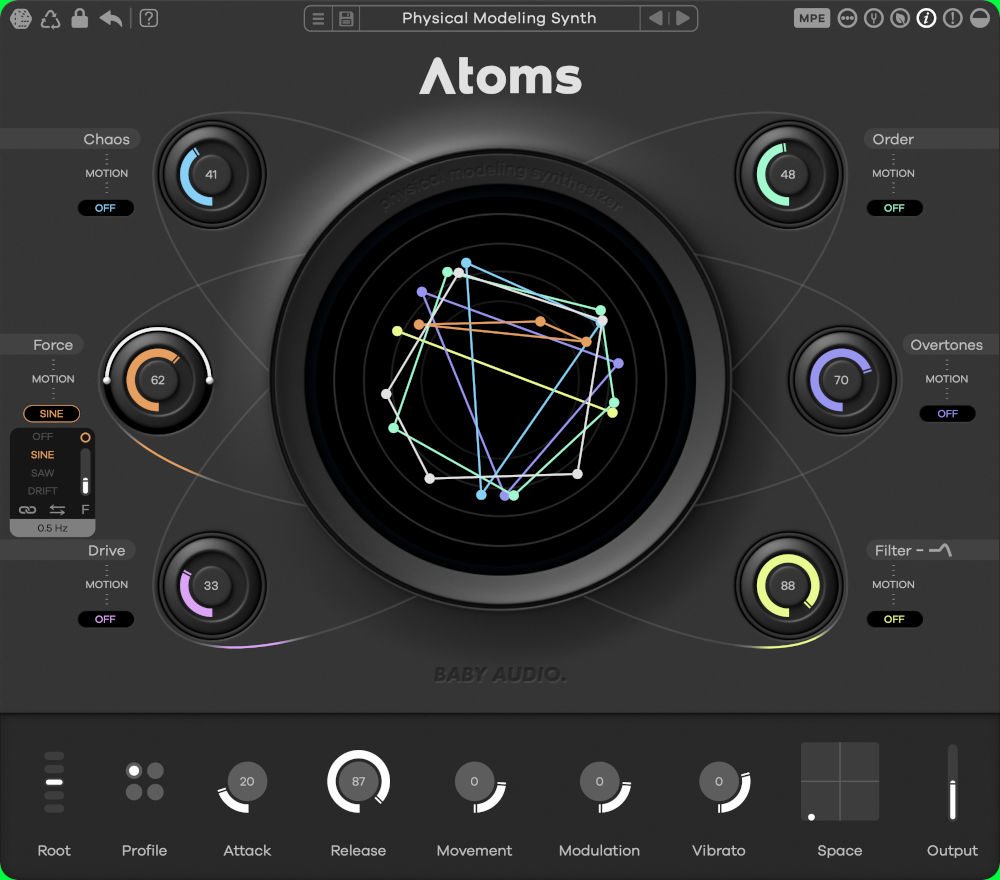
Its core is a simulation of a network of masses and springs. A virtual bow applies force to make the whole network vibrate and produce sound. Baby Audio compares it to a futuristic string instrument made in a science lab and put into a plug-in. The main controls are Chaos, Order, Force, Overtones, Drive and a filter, and the interface is simple.
All six main parameters can be modulated using four automation types, including polyphonic aftertouch. Rate, range and host-tempo sync can be set, and LFOs can run globally or per voice. The on-screen visualizer shows the behavior of the mass-spring network.
It ships with 250 presets. The randomizer is calibrated to consider relationships between parameters so results are more likely to be usable, and a Recycle button creates variations on the current sound. Parameters can also be locked.
Baby Audio's page lists demo videos by Solidtrax, Ice Choir, Zardonic and Hevy, and says existing customers see a loyalty discount. It says all major DAWs are supported, including Reason, and the site has a Trials section for trying products before buying.
Key features
Chaos and Order
Chaos increases the nonlinearity of the masses and springs for seasick pitch glides and detuning. Order adds damping that acts like a low-pass filter. Together they set instability and roundness.
Force and Overtones
Force is the pressure of the virtual bow, adding noisiness and sharper harmonics. Overtones moves the bowing position; near the boundary it yields bright overtones like a violin bowed close to the bridge.
Randomizer and Recycle
The randomizer is musically calibrated so each roll gives usable patches. Recycle creates sounds similar to the current one. Range limits and locks narrow the behavior.
Effects inside the model
Except for Space (reverb), effects work by altering the physical model rather than adding a separate chain. Chorus and vibrato come from moving the pickup position or spring stiffness.
Four profiles
Four network arrangements range from pristine detail to lo-fi. Root transposes the octave range, and Baby Audio says it covers basslines, leads and pads.
MPE and practical settings
MPE-based polyphonic aftertouch, a global tuner, an ECO mode, a PANIC button and two color themes are included. A compatible keyboard extends expression.
Specifications
| Item | Details |
|---|---|
| Type | Physical-modeling synthesizer |
| Main parameters | Chaos, Order, Force, Overtones, Drive, filter |
| Profiles | 4 |
| Presets | 250 |
| Effects | In-model effects plus reverb (Space) |
| Features | MPE (polyphonic aftertouch), ECO mode, mono/poly |
| Formats | VST, VST3, AU, AAX (64-bit) |
| OS | macOS 10.11+ (Apple silicon supported), Windows 10+ |
What is included and system requirements
- Atoms and 250 factory presets
- Formats: VST, VST3, AU, AAX
- OS: macOS 10.11+ (Apple silicon supported), Windows 10+
- Supported DAWs include Ableton Live, Pro Tools, Logic Pro, FL Studio, Cubase, Studio One, Bitwig, Reaper
- Expansion packs sold separately (Atoms Expansion Packs on Baby Audio's site)
How to use it
- Create a Baby Audio account and register the license.
- Download and run the installer.
- Open Atoms on an instrument track in your DAW.
- Roll the randomizer a few times to hear the range of results.
- Use Recycle to create variations of a sound you like.
- Move the six main parameters and assign automation for movement.
- Finish with Space (reverb) to set the ambience.
Where it may come in handy
Sound effects and ambience for media
Baby Audio calls the texture otherworldly, so it may be worth trying for sci-fi effects and atmospheres.
Accents in pop productions
With mono/poly modes, it may suit odd layers that fill gaps in a song.
Idea generation via the randomizer
When stuck, sounds from the randomizer may spark ideas.
Who it may suit
- People looking for unusual synth textures
- Those making sound for film or games
- Those who want to browse quickly with presets and randomization
Good to know before you buy
- Baby Audio also offers Sub to Own at $14.99/month.
- The regular price is $99; time-limited discounts appear on Baby Audio's site and Plugin Boutique.
- MPE features need an MPE-capable controller.
How it differs from similar products
We do not pick a winner; the official figures are placed side by side.
Imaginando FRMS
Atoms plays a mass-spring model with a virtual bow, with six main parameters and 250 presets. FRMS is granular, breaking an imported sample into up to 80 grains per voice, with 163 presets.
Price
$99 (Baby Audio official site, checked 2026-10-27). Prices can vary by region and promotion, so check the official page before buying.
Baby Audio also offers a Sub to Own plan at $14.99 per month.
See Baby Audio Atoms on the product page
More of the same kind
We have introduced 178 synthesizers. Here are some of the others.
- Arturia Jun-6 V
- Rob Papen Punch-BD
- UJAM Usynth STRANGER
- GForce Oberheim TVS Pro
- UJAM Usynth BOUNCE
- Native Instruments FORM
We have introduced 11 other products from Baby Audio.
For a side-by-side comparison scored on the same criteria, see our comparison of synthesizers.
See the full list in Product database: Instruments.
Sources: babyaud.io pluginboutique.com (checked 2026-10-27)










Comments