
Disclosure: This page may contain affiliate links. Prices were checked on the date shown and may change.
An introduction to Waves Clavinet, based on information from the maker and distributors: what it does, how to use it and who it may suit. It is not scored.
By multi-sampling every texture, articulation, and hammer strike in both muted and unmuted modes, Clavinet nails the classic tone of this keyboard king—but most importantly, it nails the feel.
— Waves official site
What is Clavinet?
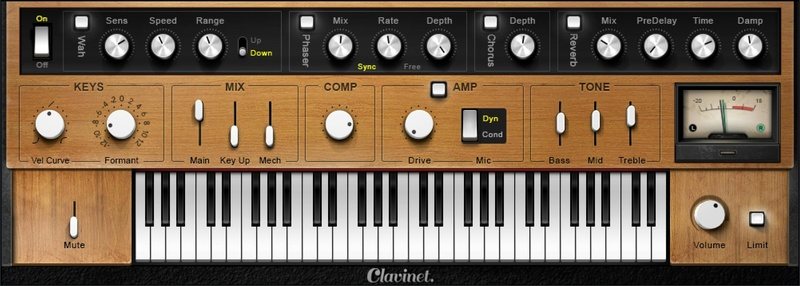
Waves Clavinet is a virtual instrument built around the D6 model clavinet, the keyboard heard on countless funk records. It packs the percussive, plucked-string action and the slightly gritty tone into one plugin.
According to Waves, the instrument is multi-sampled in both muted and unmuted modes, covering different textures, articulations and the hammer strike itself. The maker highlights finely graded response to how hard you play.
A clavinet is often used with effects such as wah, phaser and chorus. This plugin includes an envelope-follower autowah, phase, chorus, reverb, an amp simulator, EQ, compression and limiting, so you can go from choosing a sound to shaping it in a single window.
It runs as a VST, AU or AAX plugin and also as a stand-alone application, which suits using it as a single live keyboard. It is also part of the Waves Creative Access subscription.
Key features
Both muted and unmuted modes sampled
A clavinet's tone changes depending on whether the strings are damped. Waves says both modes were multi-sampled, which gives you room to play from tight, choppy parts to a more open ring.
Responsive velocity control
Waves describes the velocity response as exceptionally responsive. This matters for funk phrases where accents and ghost notes carry the groove.
Envelope-follower autowah
The built-in autowah opens and closes by following your playing dynamics, so you can get the familiar wah movement without adding an outside plugin.
Phase, chorus and reverb
Effects that add depth and modulation are included, so you can shape the space of the keyboard sound before reaching for other plugins in the DAW.
EQ, compression and limiting
EQ, compression and limiting are built in for a mix-ready sound, which may let you control level and tone without leaving the instrument.
Amp simulator with mic choices
An amp simulator with a choice of microphones gives an on-stage sound, useful when you want the feel of a played-through speaker.
Presets of classic sounds
Waves says the presets recreate classic sounds you will recognize from many hits, giving you a starting point before programming from scratch.
Specifications
| Item | Details |
|---|---|
| Type | Clavinet instrument (D6 model) |
| Formats (Mac) | VST / AU / AAX |
| Formats (Windows) | VST / AAX |
| macOS | Monterey 12, Ventura 13, Sonoma 14, Sequoia 15 |
| Windows | Windows 10 or later |
| Sample rate | Up to 96 kHz (per the official table) |
| Other | Also runs stand-alone |
What is included and system requirements
- Clavinet instrument (plugin and stand-alone)
- Built-in effects: autowah, phaser, chorus, reverb, amp simulator, EQ, compressor, limiter
- Presets
- Installed and licensed through the Waves Central app
How to use it
- Create a Waves account and register the serial number of your purchase.
- Download and install Waves Central.
- Log in to Waves Central, choose Clavinet under Install Products, then install and activate it.
- Open your DAW and load Clavinet on an instrument track.
- Step through the presets to find a keyboard sound close to what you want.
- Play at different velocities and listen to how the tone changes.
- Add autowah, phaser or the amp simulator to blend the sound.
- Finish with the EQ and compressor to settle level and tone.
Where it may come in handy
Funk and soul chops
You could draw sixteenth-note chops and ghost notes with velocity, and add the autowah to build riffs with a different texture from a guitar.
Home-recorded band arrangements
A demo made of guitar, bass and drums might gain a rhythmic keyboard part that fills the gaps, even if you do not own a clavinet.
Stand-alone live use
Because it runs stand-alone, you might plug a MIDI keyboard into a laptop and use it as a single keyboard sound on stage.
A touch of colour in beats and songs
A short layered phrase could change the character of a hip-hop or R&B track.
Who it may suit
- People who program funk and soul riffs
- Home-recording musicians adding keyboard parts to band demos
- People who want a keyboard sound with effects ready to go
- Waves Creative Access subscribers
Good to know before you buy
- License management uses Waves Central, which requires an account and serial number registration.
- Supported systems follow the official table: macOS 12 to 15 and Windows 10 or later. Windows formats are VST and AAX; AU is Mac only.
- Waves lists the product as included in its Creative Access subscription.
- The price shown is the regular list price of 79 US dollars; promotions vary over time.
How it differs from similar products
We do not pick a winner; the official figures are placed side by side.
Waves Codex Wavetable Synth
Clavinet is a sampled single instrument based on the D6 clavinet, with built-in autowah and an amp simulator. Waves Codex Wavetable Synth is a dual-oscillator wavetable synth with over 500 presets, a filter and a modulation matrix.
Price
$79 (Waves official site, checked 2026-10-27). Prices can vary by region and promotion, so check the official page before buying.
See Clavinet on the product page
More of the same kind
Other introduction articles of the same kind.
- Native Instruments REAKTOR 6
- Audio Modeling SWAM Flutes
- MeldaProduction Rewind
- Sonarworks SoundID VoiceAI Kids Voices Expansion Pack
- UJAM Usynth VORTEX
- Sound Particles SkyDust Stereo
We have introduced 215 other products from Waves.
- Waves API Collection
- Waves Playlist Rider
- Waves Bass Rider
- Waves Abbey Road EMI TG12345 Channel
- Waves Renaissance Bass
See the full list in Product database: Instruments.
Sources: waves.com pluginboutique.com (checked 2026-10-27)










Comments