
Disclosure: This page may contain affiliate links. Prices were checked on the date shown and may change.
An introduction to MeldaProduction Rewind, based on information from the maker and distributors: what it does, how to use it and who it may suit. It is not scored.
Rewind is a unique MSoundFactory instrument dedicated to the art of reverse sound.
— MeldaProduction official site
What is Rewind?
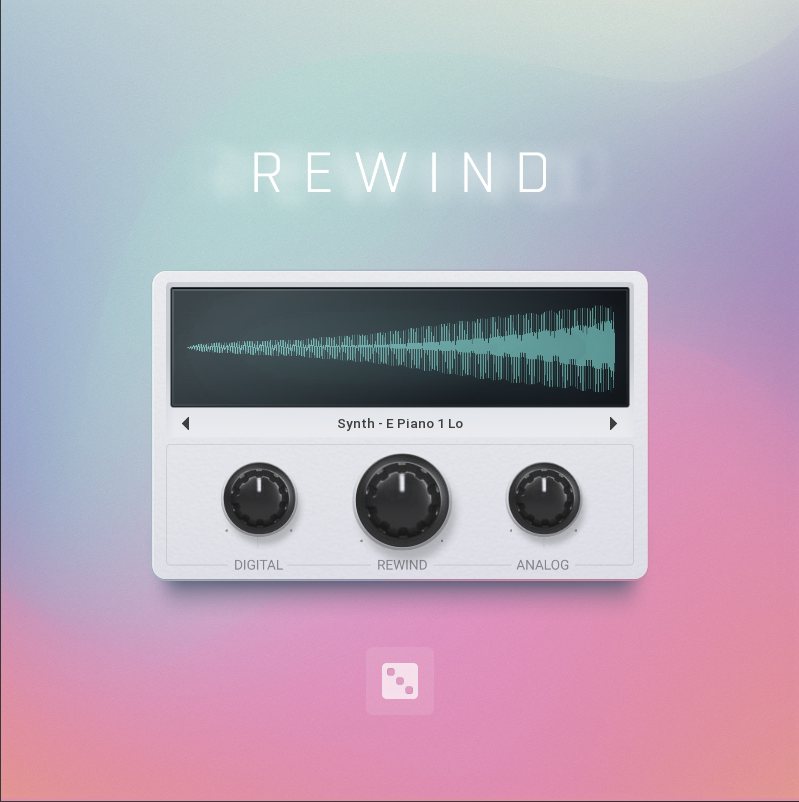
Rewind is an MSoundFactory instrument from MeldaProduction dedicated to reverse sound, combining a granular engine and a reverse tape loop to transform 128 included sources.
The granular section offers Position, Density, Size, Width, Chaos, Detune and Dust controls, breaking a sample into grains and playing them backwards for results from chime-like tones to ominous textures.
The Lo-Fi section has Digital (bit crushing) and Analog (warmth, saturation and pitch instability) knobs, and the tape loop provides Half, Double, Age, Wash and Regen controls.
It is free for owners of MSoundFactory or MSoundFactoryLE, and can also be bought separately for use with the free MSoundFactory Player.
Key features
128 sound sources
Pick one of the included sources as a starting point; the granular engine breaks it up and plays it backwards.
Granular engine
Position, Density and Size shape the grains, while Width, Chaos, Detune and Dust add spread, unpredictability and crackle.
Lo-Fi section
Digital provides bit-crushing and Analog adds warmth, saturation and pitch instability, placed pre- or post-filter.
Filter and envelopes
Low-pass, band-pass, high-pass and notch filters with separate amp and filter ADSR envelopes.
Tape loop
Captures synced audio and plays it backwards, with Rewind, Half, Double, Age, Wash, Regen and Fade.
Five effects with reorderable chain
Chorus, Rotary, Flanger, Delay and Reverb can be reordered in the Order panel, with a master section including a 3-band EQ.
Specifications
| Item | Details |
|---|---|
| Type | MSoundFactory instrument (reverse, granular) |
| Sources | 128 |
| Filter | Low-pass / Band-pass / High-pass / Notch |
| Effects | Chorus / Rotary / Flanger / Delay / Reverb |
| Requires | MSoundFactory, MSoundFactoryLE or the free MSoundFactory Player |
| Windows | Windows 8 / 10 / 11 (64-bit), VST / VST3 / AAX |
| macOS | macOS 10.14+ (64-bit), VST / VST3 / AU / AAX, Apple Silicon native |
| CPU | Intel/AMD with SSE2, or M1 |
What is included and system requirements
- Rewind (MSoundFactory instrument)
- 128 sound sources
- Supported systems: Windows 8-11 / macOS 10.14+
How to use it
- Create a MeldaProduction account and install MPluginManager.
- Sign in to MPluginManager and redeem the serial.
- Install Rewind from the PLUGINS tab.
- Open MSoundFactory or the MSoundFactory Player.
- Choose a source on the Intro screen.
- Set the broad character with the Rewind knob and Digital/Analog.
- Fine-tune the granular, tape loop and effect order on the detail pages.
- Try new settings with the randomizer.
Where it may come in handy
Film and game scoring
Reverse chimes and ominous textures could suit suspense.
Ambient and pads
Long granular tones may serve as background pads.
Lo-fi texture
The Digital and Analog knobs could add an aged character.
Who it may suit
- People who like reverse sounds
- Sound designers and composers for media
- Owners of MSoundFactory
Good to know before you buy
- Rewind needs MSoundFactory or the free MSoundFactory Player.
- Owners of MSoundFactory or MSoundFactoryLE can get it free, so check ownership before buying.
Price
Please check the official page for the price.
See Rewind on the product page
More of the same kind
Other introduction articles of the same kind.
- Sonarworks SoundID VoiceAI Kids Voices Expansion Pack
- Waves Clavinet
- Audio Modeling SWAM Violin
- Audio Modeling SWAM Clarinets v3
- Krotos Igniter
- UJAM Usynth DRIVE
We have introduced 32 other products from MeldaProduction.
- MeldaProduction MBitFunMB
- MeldaProduction MAutopanMB
- MeldaProduction MFilter
- MeldaProduction MeldaProduction MRingModulatorMB
- MeldaProduction MCombMB
See the full list in Product database: Instruments.
Sources: meldaproduction.com pluginboutique.com (checked 2026-10-27)










Comments