
Disclosure: This page may contain affiliate links. Prices were checked on the date shown and may change.
An introduction to TAL Software TAL-Sampler, based on information from the maker and distributors: what it does, how to use it and who it may suit. It is not scored.
TAL-Sampler is not just a sample player. It's a full featured analog modeled synthesizer with a sampler engine as sound source
— TAL Software official site
What is TAL-Sampler?
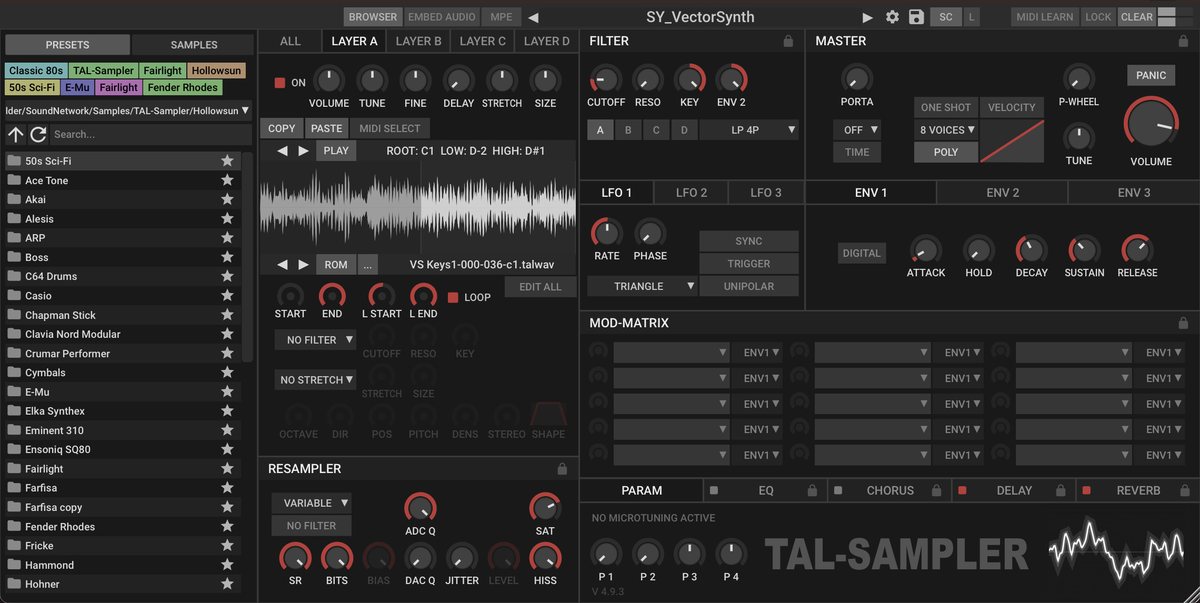
TAL-Sampler is a software sampler from TAL Software. The maker describes it as more than a sample player: an analog-modeled synthesizer that uses a sampler engine as its sound source, with a modulation matrix and self-oscillating filters.
TAL states plainly that it does not aim at something like a 40 GB piano library. The idea is to bring back the fun of old-style sampling: small samples, fast loading and an intuitive way to build your own presets.
A distinctive point is the choice of converters (DACs) modeled on vintage hardware samplers. According to TAL, it is not a simple bit crusher: the sample is truly down-sampled, processed according to the chosen DAC and up-sampled to the desired pitch.
It has four layers and plays four samples at once. It can import SFZ and SF2 files and includes a mapping editor. Windows, Mac and Linux are supported, and the demo adds a noise burst every minute.
Key features
DAC modes modeled on vintage samplers
Six modes are available: Emu II, AM6070, S1000, Sample Hold, Linear and Clean. In the Emu II and AM6070 F modes, a steep 96 dB low-pass reconstruction filter is applied.
Four layers and rich modulation
Besides four sample layers it has three AHDSR envelopes (with a digital/RC mode) and three LFOs. The September 2026 update (4.9.1) brought the matrix to 15 slots.
Self-resonating filters
The filter offers 24/12/6 dB low-pass, high-pass, band-pass, all-pass and notch types. TAL describes it as a zero-feedback delay filter that can self-oscillate.
Loading and editing samples
WAV, AIFF, MP3, OGG and FLAC files can be dragged in. It also offers loop-position modulation, a vintage-style real-time time stretcher and a sample browser.
SFZ and SF2 import
SFZ imports mappings and sample paths, and SF2 imports mappings and samples, up to four layers. This may let you use sound sets distributed in those formats.
Built-in effects and microtuning
Reverb, EQ and delay are built in. Microtuning (.tun import and MTS) and MPE are supported, so it may be usable with tunings other than the usual twelve-tone scale.
Ongoing updates
The maker's change log shows September to October 2026 updates: a click fix in the S1000 resampler mode, a new scope view, S&H LFO skew and a fix for a possible crash while loading presets. Updates are continuing.
Specifications
| Item | Details |
|---|---|
| Type | Software sampler (with analog-modeled synth) |
| Latest version | 4.9.5 (4 Oct 2026) |
| Plug-in formats | VST / VST3 / AU / AAX / CLAP |
| Windows | Windows 10 or higher (64-bit host) |
| Mac | macOS 10.11 or higher (64-bit host), Universal Binary 2 (Intel and Apple silicon) |
| Linux | 64-bit, Ubuntu 18 or similar |
| AAX | Pro Tools 10.3.6 or higher (64-bit) |
| Sample layers | 4 |
| Envelopes / LFOs | 3 AHDSR / 3 LFOs (triangle, saw, rectangle, random, noise) |
| Import formats | WAV / AIFF / AIF / MP3 / OGG / FLAC, SFZ, SF2 |
| Downloadable presets | More than 100 presets, Hollowsun library (1.2 GB) |
What is included and system requirements
- TAL-Sampler plugin (VST / VST3 / AU / AAX / CLAP)
- Factory presets (downloaded from the maker's site)
- Hollowsun sample library (1.2 GB, offered as a free preset download)
- User manual (PDF)
- Demo: a rising white noise is inserted every minute
How to use it
- Download the installer for your OS from the TAL Software product page.
- If you bought it from a reseller, register the serial on the official activation page and log in to your TAL account.
- Open your DAW and load TAL-Sampler on an instrument track.
- Drag and drop a sample you like.
- Choose a DAC mode and adjust the level and sample rate to set the character.
- Shape the sound with the filter and envelopes.
- Add layers to stack several samples.
- Load the downloadable presets to see how patches are built.
Where it may come in handy
Creating a vintage-sampler texture
You may add roughness to a clean, high-quality sample with a DAC mode. TAL itself describes lowering the sample level to reduce sample quality.
Using your own recordings as a synth
You may load recorded voices or ambient sounds and turn them into patches with the filter and envelopes. Loop-position modulation is also available.
Building a small drum kit
Combining a small downloadable kit such as 80s Core Drums with SFZ import may let you build a light, quick-loading kit.
Playing in a custom tuning
Microtuning and MPE support may suit music with altered tunings or expressive controllers.
Learning from downloadable presets
The maker's site lists downloads such as the Hollowsun library (1.2 GB), orchestra hit presets, drum kits and a mini sound set made from DX7 samples. You may open them as examples of how patches are built.
Who it may suit
- People who want vintage sampler textures inside the DAW
- People who want to load samples and shape them like a synth
- People looking for a light, fast tool rather than a large library
- People who want to reuse SFZ or SF2 sound sets
- People interested in the character of vintage hardware samplers
Good to know before you buy
- TAL states it does not aim at large multi-gigabyte libraries.
- The demo inserts white noise every minute.
- The current version requires Windows 10 or later; older versions for Windows 7 are in the maker's old-downloads section.
- Prices differ by store: the maker's page shows 80 USD with an introductory discount.
- The maker's site also links to many user-made sound packs. Check each provider's terms for third-party downloads.
Price
$69 (Plugin Boutique, checked 2026-10-27). Prices can vary by region and promotion, so check the official page before buying.
See TAL-Sampler on the product page
More of the same kind
We have introduced 4 samplers. Here are some of the others.
We have introduced 8 other products from TAL Software.
- TAL Software TAL-Dub-X
- TAL Software TAL-BassLine-101
- TAL Software TAL-J-8
- TAL Software TAL-Filter-2
- TAL Software TAL-Mod
See the full list in Product database: Instruments.
Sources: tal-software.com pluginboutique.com (checked 2026-10-27)










Comments