
Disclosure: This page may contain affiliate links. Prices were checked on the date shown and may change.
An introduction to TAL Software TAL-J-8, based on information from the maker and distributors: what it does, how to use it and who it may suit. It is not scored.
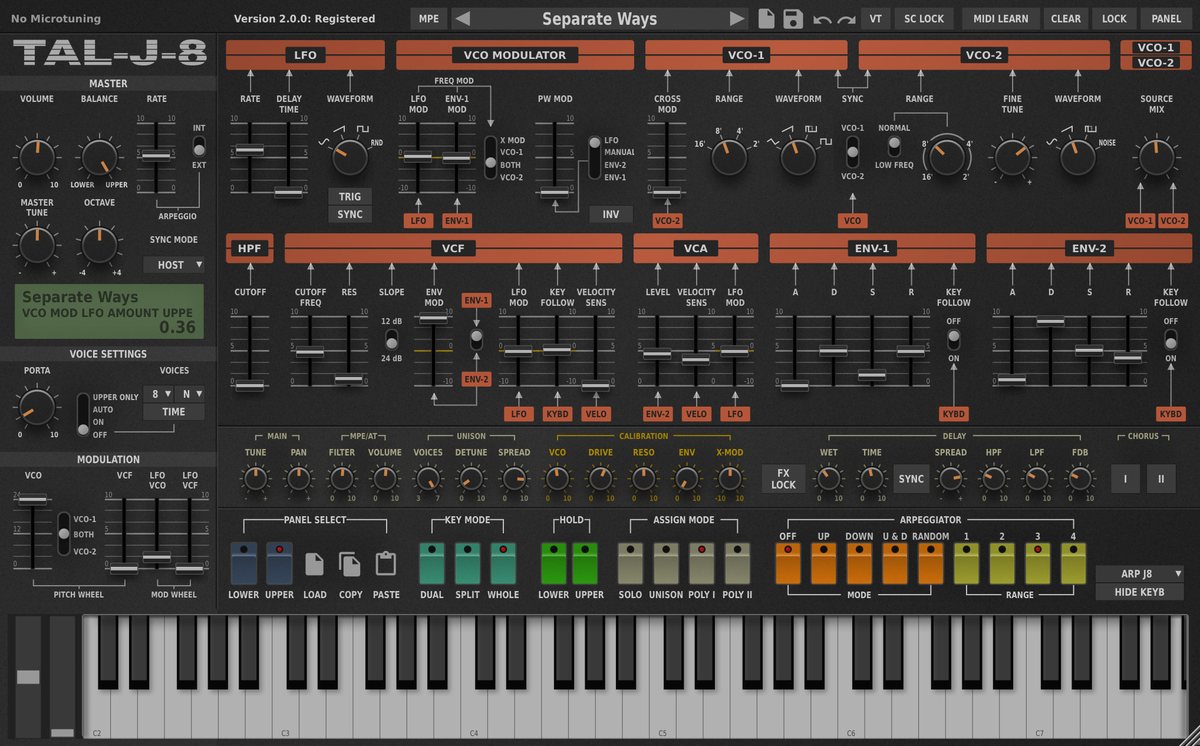
TAL-J-8 is a synthesizer plug-in that meticulously emulates the legendary Jupiter 8 and is calibrated after our hardware device
— TAL Software official site
What is TAL-J-8?
TAL-J-8 is a software synthesizer from TAL Software in Switzerland, modeled on the 1980s analog synth Jupiter 8. The company says it is calibrated against TAL's own hardware unit.
All sound is generated in real time without samples. It offers the same wide modulation possibilities as the hardware, plus a calibration section that can push the filter into extreme resonance and overdrive.
Unison works per VCO with an optional stereo spread, and the signal path is stereo throughout. MPE and microtuning are supported, so modern expressive controllers can be used.
It ships with 300+ factory presets by sound designers such as solidtrax, emptyvessel and Electric Himalaya. The demo version on the official site plays a rising white-noise sound every minute.
Key features
Tuned to a hardware reference
The company says it was calibrated against a real Jupiter 8. Waveforms are generated in real time rather than sampled, so knob moves can be followed in fine detail.
Calibration section
A section for pushing the filter into heavy resonance and overdrive. You may use it when you want extreme settings beyond the hardware.
VCO unison with stereo spread
Unison works per VCO and spread can be added. Because the signal stays stereo all the way, it may suit pads and chords where you want thickness. The amount of stereo spread is adjustable, and narrowing it gives a more focused, nearly mono sound.
MPE and microtuning
Per-note expression is possible with MPE keyboards and controllers. Microtuning supports importing .tun files and an MTS client.
300+ presets
More than 300 presets by several sound designers are included, and the site links to many free third-party preset packs.
Hardware voice behavior
The change log shows that hardware voice modes such as SOLO and POLY II, a round-robin voice mode and a MIDI panel mode have been added over time.
Resizable GUI and MIDI mapping
The window can be resized, which helps on high-resolution displays. MIDI mapping is supported, so knobs on your own controller can be assigned for hands-on tweaking.
Specifications
| Item | Details |
|---|---|
| Type | Analog synth emulation |
| Formats | VST / VST3 / AU / AAX / CLAP (Linux version available) |
| OS (official) | Windows 10 or later / macOS 10.11 or later (Intel and Apple silicon) / 64-bit Linux |
| AAX | Pro Tools 10.3.6 or later |
| Presets | 300+ |
| Latest version | 2.0.7 (25 Oct 2026) |
| Demo limitation | Rising white noise every minute |
What is included and system requirements
- TAL-J-8 (all formats)
- 300+ factory presets
- User manual (PDF)
- Resizable GUI
- MIDI mapping support
- Links to free third-party presets on the official site
- Older versions (such as 1.8.5) for download
- Platforms: Windows, macOS and Linux
How to use it
- Buy from the official site or a reseller and get a serial number.
- Log in to the official site and download the installer for your OS.
- Install the formats you use, such as VST3 or AU.
- Load it as an instrument in your DAW and enter the serial number.
- Pick a sound in the preset browser and play it.
- Move the oscillator and filter controls and listen to the changes.
- Adjust the unison and stereo spread for width.
- Use MIDI panel mode to map a hardware controller more easily.
Where it may come in handy
80s-style pop and synthwave
It may suit brass and pad sounds in an 80s style, and unison can add thickness. The preset authors listed by the company include sound designers known for brass and pad work.
Ambient and pads
The stereo signal path may help when building wide pads.
Playing with an MPE keyboard
With an MPE controller you may be able to reflect each finger's movement in filter and volume. Some controllers may need setup first.
Microtonal and non-12-tone music
Since .tun files can be imported, it may help when writing in scales other than equal temperament. It may also be easy to match this instrument's sounds to music in your own scale.
Who it may suit
- Those who want Jupiter 8-style sounds in a DAW
- Users who want to pick presets and start using them quickly
- People interested in MPE keyboards or microtuning
- Anyone who also wants to use it on Linux, not just Windows and macOS
Good to know before you buy
- The official site currently shows an introductory 20% discount; the regular price is $80 plus VAT.
- Plugin Boutique lists Windows 7 or later, which differs from the official Windows 10 or later.
- The AAX format needs Pro Tools 10.3.6 or later.
- The demo adds a rising white-noise sound every minute.
- The preset section of the official site links to many free preset packs by third parties. Check the terms on each provider's page.
How it differs from similar products
We do not pick a winner; the official figures are placed side by side.
TAL-BassLine-101
TAL-J-8 reproduces the polyphonic Jupiter 8 with 300+ presets. TAL-BassLine-101 is a monophonic bass synth with a step sequencer of up to 96 steps and a 6-voice poly mode. The official site lists both at $80 plus VAT.
Price
$80 (TAL Software official site, checked 2026-10-27). Prices can vary by region and promotion, so check the official page before buying.
See TAL-J-8 on the product page
More of the same kind
We have introduced 178 synthesizers. Here are some of the others.
- AIR Music Technology Vacuum Vintage
- Moog Music Moog Mariana
- Eventide Generate
- Klevgrand Pipa
- UJAM Usynth DUST
- Arturia KORG MS-20 V
We have introduced 8 other products from TAL Software.
- TAL Software TAL-Mod
- TAL Software TAL-BassLine-101
- TAL Software TAL-Pha
- TAL Software TAL-Dub-X
- TAL Software TAL-Reverb-2
For a side-by-side comparison scored on the same criteria, see our comparison of synthesizers.
See the full list in Product database: Instruments.
Sources: tal-software.com pluginboutique.com (checked 2026-10-27)










Comments