
Disclosure: This page may contain affiliate links. Prices were checked on the date shown and may change.
An introduction to TAL TAL Drum, based on information from the maker and distributors: what it does, how to use it and who it may suit. It is not scored.
TAL-Drum is a powerful audio plug-in that combines the nostalgic charm of vintage drum machines with modern usability.
— TAL official site
What is TAL Drum?
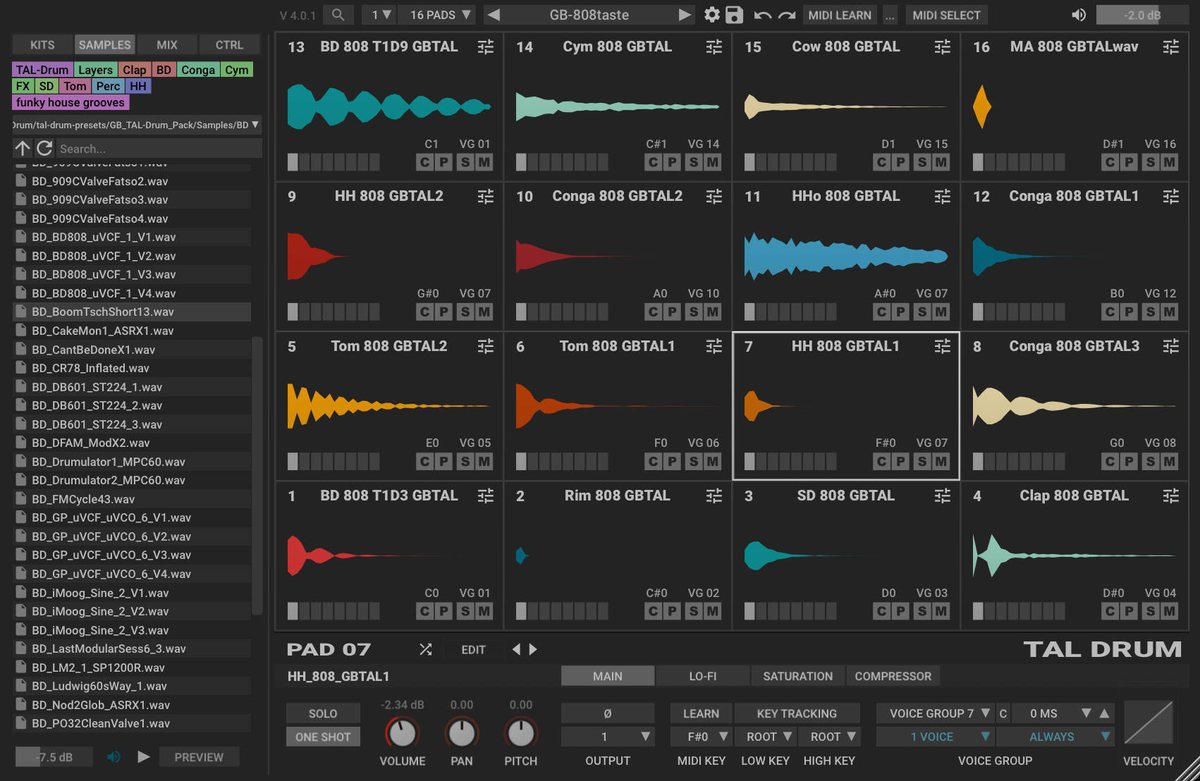
TAL Drum (TAL-Drum) is a sampler-style plug-in for playing drums, one-shots and short loops. It looks and works in a way reminiscent of 80s drum samplers, while its drag-and-drop workflow is modern. The developer, TAL Software, presents it as a tool that joins the charm of vintage drum machines with up-to-date usability.
Pads are at the center of the design. In the latest official version (v4 series) there are up to 64 pads, and each pad can hold up to 8 mappings, which are sample assignments. Mappings can be switched by velocity range or stacked together, and cycle or random round-robin modes can be set for repeated hits. The view can be set to 16, 32 or 64 pads.
For sound shaping, the lo-fi resampling is a main feature. It changes the internal sample rate and bit depth so that the sound is resampled with a rougher texture. There are several time-stretch methods (high-quality Crisp and Smooth modes plus a vintage AK4I-style cycle mode), a slice editor and in-plug-in recording, so sample preparation can be done in one plug-in.
The package includes more than 20 factory kits and over 600 samples by Goldbaby, emptyvessel, Solidtrax and Saif Sameer (the demo contains one kit). Up to 16 stereo outputs are available, and effects are kept minimal because the idea is to mix in the DAW. The installer is described as lightweight, copying only the plug-in itself.
Key features
Drag-and-drop workflow
Samples, pads and mappings can be dragged around the screen, and dragging a pad with Ctrl held makes a copy. Several pads or mappings can be selected with Ctrl-click and edited together, which may help when you want to assemble a kit quickly.
Up to 64 pads, 8 mappings each
The view can be switched between 16, 32 and 64 pads, and pads can be named and colored. Each pad takes up to 8 mappings that can be split by velocity range or layered. There are 64 voice groups, each with up to 16 voices.
Lo-fi resampling
This feature changes the internal sample rate and bit depth to give a resampled character. It may be useful when you want to add the roughness of older samplers to a clean sample. It is described as working in real time.
Time stretch and slicing
For stretching drum loops and similar material there are high-quality Crisp and Smooth modes and a vintage AK4I-style cycle mode. The slice editor offers auto-slice and equal slicing at a given BPM, and supports MIDI to host and BPM detection.
Modulation and round-robin
Each mapping has an LFO, a spline envelope, an amp AHDSR, two modulation AHDSRs and a parametric EQ, which can move pitch, pan, filter cutoff and other parameters. Cycle or random round-robin modes are available for repeated hits on the same note.
Recording, rendering and imports
Stereo audio from the main or sidechain input can be recorded directly in the plug-in, then trimmed and normalized. It can render a pad to a sample, load Battery 4 presets and rx2 files, and color pads automatically by detected pitch.
Specifications
| Item | Details |
|---|---|
| Type | Sampler-style drum instrument (plug-in) |
| Latest version | v4.0.2 (per the official page) |
| Pads | Up to 64 (16/32/64 views) |
| Mappings | Up to 8 per pad |
| Outputs | Up to 16 stereo |
| Factory kits | 20+ kits, 600+ samples |
| Formats | VST, VST3, AU, AAX, CLAP |
| Operating systems | Windows 10 or later (64-bit), macOS 10.11 or later (Universal Binary 2), Linux (64-bit) |
| Importable audio | wav, aif, flac, ogg, mp3 and more |
What is included and system requirements
- 20+ factory kits and 600+ samples by Goldbaby, emptyvessel, Solidtrax and Saif Sameer (the demo has one kit)
- The plug-in itself (VST, VST3, AU, AAX, CLAP)
- PDF user manual and factory presets (downloadable from the reel icon in the plug-in settings)
- Requirements: Windows 10 or later, macOS 10.11 or later, Pro Tools 10.3.6 or later for AAX; supports MTS, MPE and MIDI mapping
How to use it
- Buy a license from TAL Software or Plugin Boutique, then activate it and download the installer from the product page as instructed.
- Run the installer, which copies the plug-in to its location, then restart the DAW or rescan plug-ins.
- Load TAL Drum on an instrument track and download the factory presets from the reel icon in the plug-in settings.
- Drag and drop samples onto pads to assign kicks, snares and so on. Dragging a pad with Ctrl held makes a copy.
- Stack mappings if needed and set velocity ranges or round-robin so repeated hits vary.
- Adjust sample rate and bit depth in the lo-fi section and choose a time-stretch mode.
- Route pads you want to process separately to stereo outputs and add EQ or compression in the DAW mixer.
- Save the finished kit as a preset and render favorite pads to samples.
Where it may come in handy
Building kits for beatmaking
It may suit building your own kit by laying favorite one-shots across 64 pads. Drag-and-drop and pad coloring should make it easier to arrange things quickly.
Sampler-style texture
The lo-fi settings and time-stretch modes may suit aiming for a rough finish reminiscent of older drum samplers. Loops can also be sliced and reassigned to pads.
Moving from another sampler
Because Battery 4 presets and rx2 files can be loaded, it may help reuse kits you already have. After importing you can adjust round-robin and velocity layers.
Mixing drums on separate outputs
Up to 16 stereo outputs let you apply different effects to kick, snare and others in the DAW. It may suit people who prefer minimal built-in effects and mixing in the DAW.
Who it may suit
- Beatmakers who want to build drum patterns themselves
- People interested in the rougher character of older drum samplers
- Users who want to keep using Battery 4 or rx2 kits in another plug-in
- Producers who want to send each drum to its own track and mix in the DAW
Good to know before you buy
- The demo adds a rising white-noise sound every minute and includes only one factory kit.
- The official page describes the latest version (v4.0.2), while the Plugin Boutique description still shows older specs (32 pads, 4 layers, Windows 7 or later). Checking the official page before buying is advisable.
- Licenses are managed with a serial key that you download from the TAL user area and enter in the plug-in.
- The product contains only a few effects; the idea is to use EQ and compression in the DAW.
Price
$69 (Plugin Boutique, checked 2026-10-27). Prices can vary by region and promotion, so check the official page before buying.
See TAL Drum on the product page
More of the same kind
We have introduced 4 samplers. Here are some of the others.
See the full list in Product database: Instruments.
Sources: tal-software.com pluginboutique.com (checked 2026-10-27)










Comments