
Disclosure: This page may contain affiliate links. Prices were checked on the date shown and may change.
An introduction to Sugar Bytes Guitarist, based on information from the maker and distributors: what it does, how to use it and who it may suit. It is not scored.
Guitarist is a virtual guitar that's designed to emulate rhythm parts played on an electric guitar.
— Sugar Bytes official site
What is Guitarist?
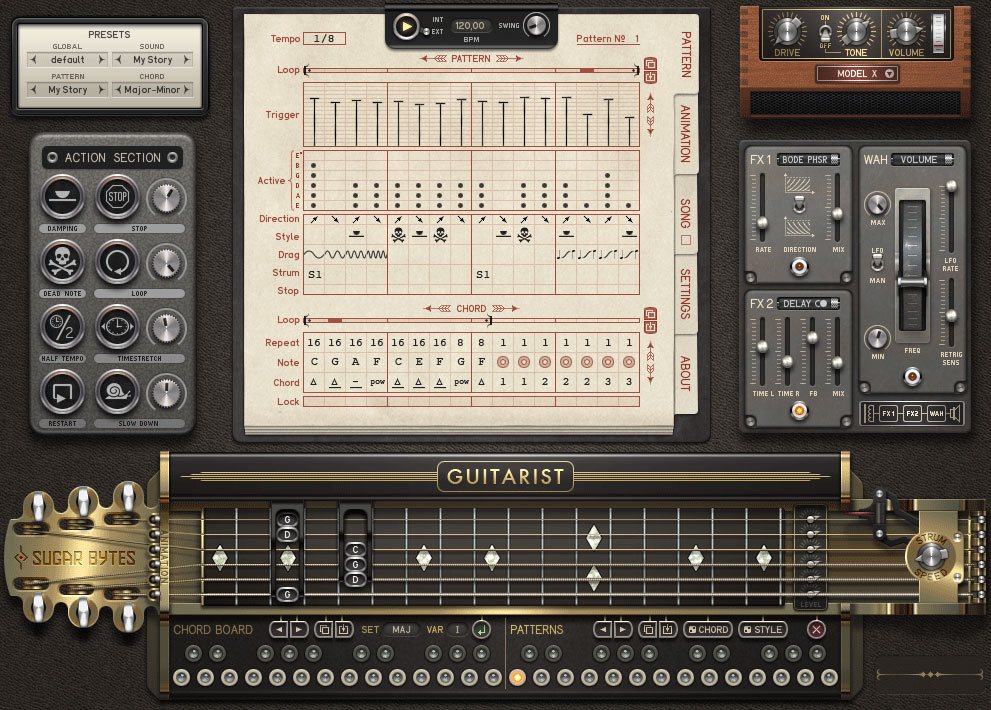
Guitarist is a virtual guitar from Sugar Bytes in Germany, designed to emulate rhythm parts played on an electric guitar. The player is turned into a step-sequencer system with detailed control over chords and fingering patterns.
The central Patterns page has 16 steps where you decide whether a chord triggers, which strings sound and whether the strum goes up or down. Each string can be played individually, from arpeggios to metal riffs, with damped and dead notes.
The sound sources are Fender's Stratocaster and Telecaster plus a Duesenberg Starplayer Special in Bright and Normal versions. Each guitar was recorded with about 2,000 samples, and round robin avoids repeating the same sample.
Amp models, effects and a wah pedal are built in, so you can sketch backing rhythm guitar inside a DAW, and a direct-out mode is provided for use with separate amp simulators.
Key features
16-step pattern sequencer
Each step sets whether a chord triggers, which strings play and the strum direction. Chord lanes below arrange the progression, which makes building a riff's rhythm easy to follow.
12 chord types and 3 fingerings
Choose a root note and one of 12 chord types, each with three fingering variations, and use step-repeat for longer patterns. Up to 24 user chords can be created by clicking on the fretboard.
Animations page
Each mechanical finger on the fretboard can be moved up or down by one to three semitones per step, adding harmonic colour to chords.
Action section
Buttons let you loop parts, add dead or damped notes and switch to half tempo instantly, helpful when changing the arrangement on the fly.
Two amps and 10 effects
Two amp models are joined by 10 effects in a modulation unit and a delay/reverb unit. The wah pedal has an LFO and can be controlled manually from a MIDI controller.
Four preset types
Presets are divided into Global, Sound, Pattern and Chord, so you can mix a chord progression from one with the picking from another. MIDI sequences can be exported to your DAW.
Per-string mute and detune
Strings can be detuned by a semitone using the pegs, and individual strings can be muted. This may help in trying drop-style low voicings or chords with specific strings removed.
Specifications
| Item | Details |
|---|---|
| OS | macOS 10.13+ (Apple Silicon supported) / Windows 7+ |
| Formats | macOS: AU, VST2, VST3, AAX, Standalone / Windows: VST2, VST3, AAX, Standalone |
| Bit depth | 64-bit only |
| Guitars | Stratocaster, Telecaster, Duesenberg Starplayer Special (Bright / Normal) |
| Samples | 2,000+ per guitar |
| Effects | 10 effects plus wah pedal |
| Pattern length | 16 steps |
| User chords | Up to 24 |
What is included and system requirements
- Guitarist virtual guitar
- Samples of four electric guitars (2,000+ each)
- Two amps, 10 effects and a wah pedal
- Global, Sound, Pattern and Chord presets
- The official changelog mentions an added acoustic guitar library in v1.1.1
How to use it
- After purchase, register your serial number on the Sugar Bytes site and download the installer.
- Log in with the credentials emailed on registration and change the password.
- Run the installer and choose the formats for your DAW.
- Restart the DAW, rescan plugins if needed and load Guitarist.
- Start with a Global preset and switch chords from the keyboard to hear the rhythm.
- Edit the 16 steps on the Patterns page to set the strings and strum direction.
- Build the progression in the lanes below, and create user chords by clicking the fretboard if needed.
- Export the MIDI sequence to your DAW to layer it with other instruments.
Where it may come in handy
Rough backing guitar for home recording
Even without playing guitar, you may be able to program chords and strums to sketch the feel of a backing part, or a placeholder that you replace with real guitar later.
Demos of vocal songs
Because you can swap the chord progression and pattern independently, it may suit quick arrangement tests.
Tone shaping with amp simulators
The direct output lets you run the guitar through your own amp simulator, while the built-in amps allow quick tests.
MIDI export as a writing aid
Sequences can be exported to the DAW as MIDI, which may serve as a guide for doubling the part on another instrument.
Who it may suit
- People without a guitar who want programmed electric rhythm parts
- Those who want detailed control over chord and strum patterns
- Producers who want to draft demos and arrangements quickly in a DAW
- People who want to try riffs and strums repeatedly while refining arrangements
Good to know before you buy
- It is designed to emulate rhythm parts on electric guitar, built around strum and chord patterns.
- It runs only in 64-bit environments.
- A demo is available on the official site for trying it before purchase.
- Serial registration takes place on the Sugar Bytes site.
- The official changelog notes a new acoustic guitar library in v1.1.1; check the store page for exactly what ships.
- Because pattern, chord and sound are saved separately, part of a favourite backing can be reused in another song.
Price
$129 (Plugin Boutique, checked 2026-10-27). Prices can vary by region and promotion, so check the official page before buying.
See Guitarist on the product page
More of the same kind
Other introduction articles of the same kind.
- AIR Music Technology Xpand!2
- Impact Soundworks Shreddage 3 Stratus Free
- UVI Orbit
- Sonarworks SoundID VoiceAI Expansion PackC-Pop Voices
- Samplemodeling The Trumpet v3
- ProjectSAM The Free Orchestra
We have introduced 10 other products from Sugar Bytes.
- Sugar Bytes Consequence
- Sugar Bytes Transfigure
- Sugar Bytes WOW2
- Sugar Bytes Factory
- Sugar Bytes Aparillo
See the full list in Product database: Instruments.
Sources: sugar-bytes.de pluginboutique.com (checked 2026-10-27)










Comments