
Disclosure: This page may contain affiliate links. Prices were checked on the date shown and may change.
An introduction to Blue Microphones (Logitech G) Yeti X, based on information from the maker and distributors: what it does, how to use it and who it may suit. It is not scored.
Yeti X is a state-of-the-art flagship USB microphone for professional gaming, Twitch streaming, podcasting and YouTube productions.
— Blue Microphones (Logitech G) official site
What is Yeti X?
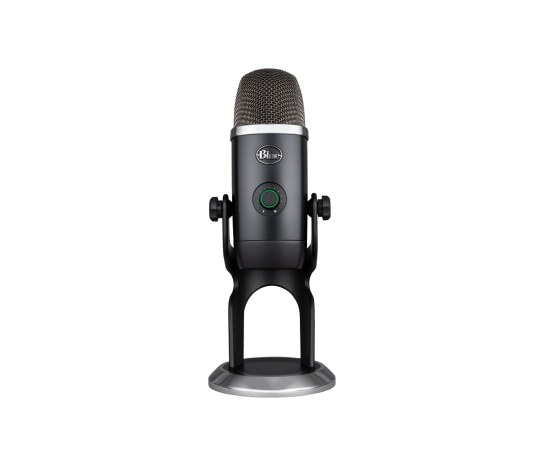
The Blue Yeti X is a USB condenser microphone for gaming, streaming, podcasting and YouTube production. Logitech's product page calls it a flagship USB microphone, and it works by simply plugging it into a computer over USB.
Inside are four of Blue's own 14 mm condenser capsules. Combined, they provide four pickup patterns that you can switch between: cardioid (mainly the front), omnidirectional (all directions), bidirectional (front and back) and stereo. The sample format is 48 kHz at 24-bit.
Controls are handled by a multi-function smart knob. One knob switches between headphone volume, microphone gain (input level), the monitoring balance and mute, and an 11-segment LED meter around it lets you see your voice level at a glance.
The free Logitech G HUB software lets you set the LED colour, gain, headphone volume and pickup pattern. It also unlocks the Blue VO!CE voice effects, with EQ, a limiter, pop reduction, a pitch shifter and more.
Key features
Four capsules, four pickup patterns
Four 14 mm condenser capsules provide cardioid, omnidirectional, bidirectional and stereo patterns, so you can choose for a solo stream, a face-to-face conversation or a recording that includes the room.
Smart knob with 11-segment LED meter
A single knob switches between headphone volume, gain, blend and mute. The surrounding LED meter shows your level so you can tell if your voice is too loud or too quiet during a live stream.
Blue VO!CE (G HUB)
Effects available in the G HUB software: EQ, a depopper, a limiter against clipping, and creative effects such as pitch shifter, echo, reverb and chorus.
Customisable lighting
G HUB lets you set the LED colour to match the look of your stream.
Headphone output for monitoring
A headphone output lets you hear yourself, and headphone volume and blend are set on the body's knob.
Desktop stand included
On its stand the microphone is about 28.9 cm tall. The microphone alone weighs about 519 g, and about 1.28 kg with the stand.
Specifications
| Item | Details |
|---|---|
| Type | USB condenser microphone |
| Capsules | Four Blue-proprietary 14 mm condenser capsules |
| Polar patterns | Cardioid, omnidirectional, bidirectional, stereo |
| Sample format | 48 kHz, 24-bit |
| Frequency response | 20 Hz to 20 kHz |
| Maximum SPL | 122 dB |
| Headphone output impedance | 13 ohms minimum, 16 ohms typical |
| Power (current) | 62 to 203 mA |
| Size (on stand) | 11 cm wide, 12.2 cm deep, 28.9 cm tall |
| Weight | Microphone about 519 g; about 1.28 kg with stand |
| Connection | USB |
What is included and system requirements
- Yeti X microphone
- Desktop stand
- USB cable
- Logitech G HUB (free software, downloaded separately)
How to use it
- Connect the Yeti X to your computer with the USB cable.
- Select the Yeti X as the input in your computer's sound settings.
- If you want the extras, download and install Logitech G HUB.
- Choose a pickup pattern: cardioid for one person, stereo or bidirectional for two.
- Set the gain with the smart knob and keep the LED meter from running too high.
- Plug in headphones and adjust the blend to check your own voice.
Where it may come in handy
Game streaming
The LED meter and mute on the body may suit streamers who want to control things at hand during a live show.
Podcasts and conversations
Bidirectional or stereo patterns could be used to record two people with one microphone.
YouTube voice-over
Cardioid is the basic choice for recording a single voice.
Who it may suit
- Streamers who want a plug-in USB microphone
- People who want to change pickup patterns on one microphone
- People who want to manage settings in Logitech G HUB
Good to know before you buy
- Software features such as Blue VO!CE require downloading G HUB.
- Retailer pages note that G HUB is not available for Linux.
- This article is based on the maker's and retailers' product pages. Check the maker or retailer pages for the latest specifications and prices.
Price
Please check the official page for the price.
See Yeti X on the product page
More of the same kind
We have introduced 100 microphones. Here are some of the others.
- 512 Audio Tempest
- Sony ECM-PCV80U
- 3Dio Free Space XLR
- Elgato Wave:3 MK.2
- LEWITT LCT 640 TS
- Earthworks SR25
For a side-by-side comparison scored on the same criteria, see our comparison of microphones.
See the full list in Product database: Microphones and accessories.
Sources: secure.logitech.com avlgear.com (checked 2026-11-09)









Comments