
Disclosure: This page may contain affiliate links. Prices were checked on the date shown and may change.
An introduction to Antinode CLEAR, based on information from the maker and distributors: what it does, how to use it and who it may suit. It is not scored.
Antinode Clear is a de-noise & de-reverb audio plug-in that is a breeze to use.
— Antinode official site
What is CLEAR?
Antinode CLEAR is a plug-in that removes noise and reverb from voice recordings. It was previously known as Supertone CLEAR, and the maker's page now presents it as Antinode Clear. It uses a neural network, a type of AI, to separate the voice from the background.
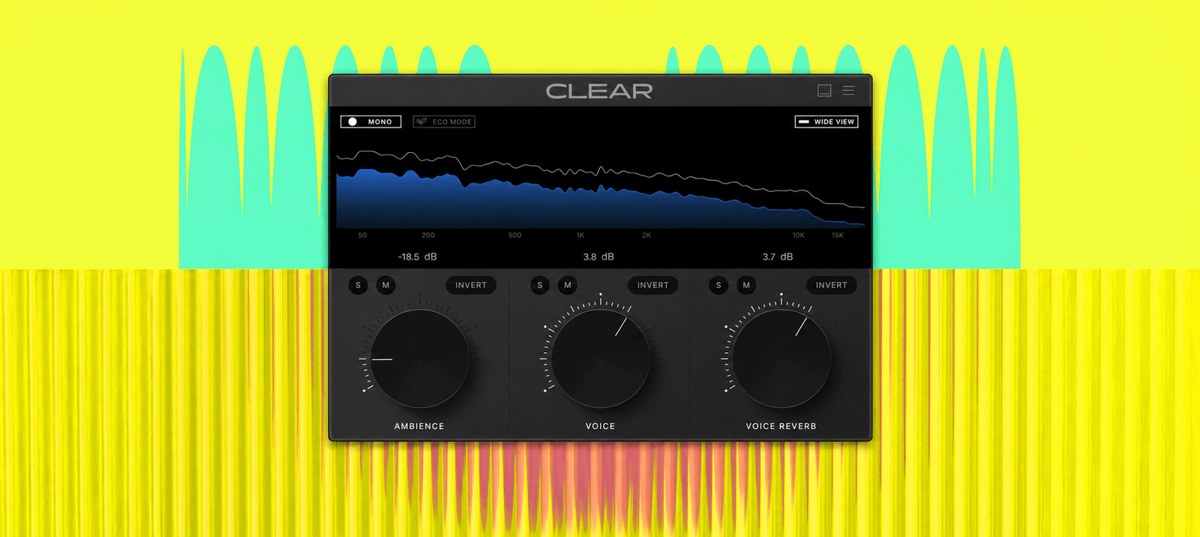
It divides audio into three channels, ambience, voice and voice reverb, and three knobs set the amount of each. It is described as able to reduce noise, reduce reverb, or even remove the dialogue and keep only the background ambience.
It processes in real time, so use during streams is also envisaged. The maker says it is used by post-production engineers, video editors, streamers and musicians.
Formats are AU, VST3, VST and AAX, with native support for 44.1, 48 and 96 kHz and for Apple Silicon. A free trial lets you try it before buying; in trial mode it outputs noise every 60 seconds and cannot save or load profiles.
Key features
Three-way separation
The AI separates audio into ambience, voice and voice reverb, and you can adjust the amount of each to improve clarity.
Three simple knobs
There are three knobs for voice, ambience and voice reverb. It is described as something you can adjust with a few twists instead of many detailed parameters.
Remove noise and reverb, or even the voice
As well as reducing noise and reverb, it can remove the dialogue to keep only the background ambience.
Real-time processing
It processes in real time so you can hear the result as you adjust, and streaming is named as a use.
Three-channel display
The combined and separated channels are shown on screen, with per-channel monitoring.
Broad compatibility
It supports Windows 10 or later (64-bit) and macOS 10.13 or later, including Apple Silicon, in AU, VST3, VST and AAX formats.
Specifications
| Item | Details |
|---|---|
| Type | Noise and reverb removal plug-in (voice separator) |
| Processing | Neural network that separates voice, ambience and voice reverb |
| Formats | AU, VST3, VST, AAX |
| Sample rates | 44.1 kHz, 48 kHz, 96 kHz |
| Supported OS | Windows 10 or later (64-bit), macOS 10.13 or later (Apple Silicon supported) |
| Recommended buffer size | 256 or higher |
| Trial | Outputs noise every 60 seconds; saving and loading profiles is disabled |
What is included and system requirements
- Antinode CLEAR (AU, VST3, VST, AAX)
- System: Windows 10 or later (64-bit), macOS 10.13 or later
- Trial: available before purchase (with limits)
How to use it
- Get CLEAR from the maker's page or a retailer and install it.
- Rescan plug-ins in your DAW.
- Insert CLEAR on the voice track you want to clean.
- Move the three knobs for voice, ambience and voice reverb.
- Lower ambience to reduce noise and lower voice reverb to reduce room reverb.
- Listen as you go, because heavy processing can make a voice sound unnatural.
Where it may come in handy
Cleaning voice for podcasts and streams
It may help with recordings that contain room reverb or ambient noise.
Video narration and interviews
It is intended for cleaning voice recorded on location with reverb and noise.
Keeping only the background
The maker's page also describes removing the voice to keep only the ambience.
Who it may suit
- People who want an easy way to reduce noise and reverb from voice
- Podcasters, streamers and video editors
- People who prefer not to fiddle with detailed parameters
Good to know before you buy
- The name has changed from Supertone CLEAR to Antinode CLEAR.
- Retailer pages report reviews that praise how easy it is, while some say it may not suit work that needs fine control.
- Heavy processing can change the character of a voice, so adjust while listening.
- This article is based on the maker's and retailers' product pages. Check the maker or retailer pages for the latest specifications and prices.
Price
$69 (Plugin Boutique, checked 2026-11-09). Prices can vary by region and promotion, so check the official page before buying.
More of the same kind
We have introduced 112 reverbs. Here are some of the others.
- Lexicon PCM Native Reverb Plug-in Bundle
- W. A. Production Mutant Reverb
- Wave Arts Convology XT
- Universal Audio EMT 250 Classic Electronic Reverb
- Relab Development LX480 Essentials
- Kuassa Efektor RV3604 Reverb
For a side-by-side comparison scored on the same criteria, see our comparison of reverbs.
See the full list in Product database: Effects.
Sources: supertone.ai pluginboutique.com (checked 2026-11-09)










Comments