
Disclosure: This page may contain affiliate links. Prices were checked on the date shown and may change.
An introduction to Wave Arts FinalPlug 7, based on information from the maker and distributors: what it does, how to use it and who it may suit. It is not scored.
Peak limiting and loudness compliance
— Wave Arts official site
What is FinalPlug 7?
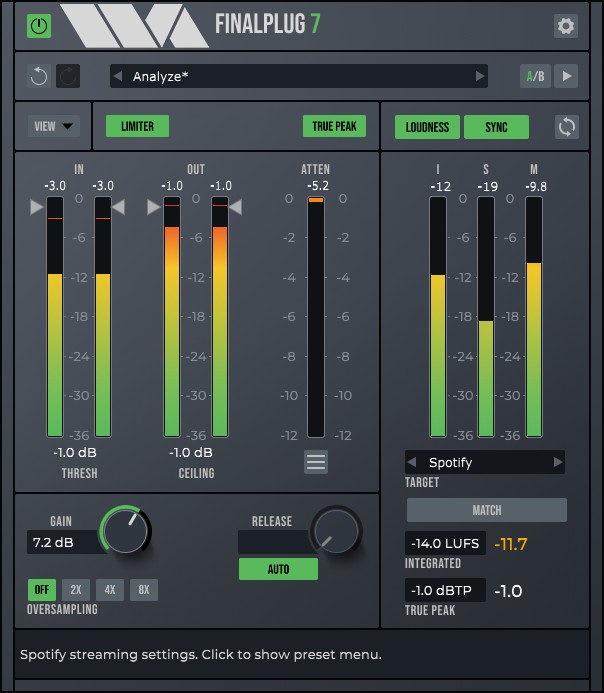
Wave Arts FinalPlug 7 combines a lookahead peak limiter with ITU BS.1770 loudness metering for mastering. It can be used as an insert for gain staging or volume maximisation, or at the end of a mastering chain.
The interface is simple. As a loudness maximiser you set an output ceiling such as -0.1 dB and lower the threshold to raise the volume. To meet loudness and true-peak delivery standards, choose the Analyze preset and then a delivery target specification.
It also has true-peak limiting, up to 8x oversampling, loudness and overflow state written as automation parameters, and bit-depth truncation from 4 to 24 bits with TPDF dithering and noise shaping. It is included in Power Suite 7 together with MasterVerb 7 and TrackPlug 7.
Key features
Peak limiter
Sonically transparent peak limiting for use as a peak limiter or volume maximiser.
ITU BS.1770 metering
Integrated loudness and true peak are displayed during playback and coloured when out of range.
MATCH button
Automatically configures the limiter to meet loudness and true-peak delivery targets.
Delivery target presets
Presets of common industry delivery targets, or make your own.
Up to 8x oversampling
True peak mode and up to 8x limiter oversampling.
Dithering
Truncation from 4 to 24 bits with TPDF dithering and noise-shaping options.
Specifications
| Item | Details |
|---|---|
| Formats | Mac: AU, VST3, AAX (macOS 10.13 or later; AAX needs Pro Tools 11 or later). Windows: VST2, VST3, AAX (AAX needs Pro Tools 10.3.5 or later, or 11 or later, depending on the product) |
| Main features | Peak limiter, ITU BS.1770 metering, MATCH button, Delivery target presets |
What is included and system requirements
- FinalPlug 7
- Formats: AU, VST3, AAX (Mac), VST2, VST3, AAX (Windows)
How to use it
- Insert FinalPlug 7 at the end of the master.
- Set the ceiling, for example -0.1 dB.
- Lower the threshold to raise the volume.
- To match a delivery spec, choose the Analyze preset and a target.
- Play the session, check the loudness and true-peak readouts and use MATCH to adjust.
Where it may come in handy
End of a mastering chain
The maker's page envisages it at the end of the chain.
Delivery standards
Checking and meeting loudness and true-peak targets.
Volume maximising
Raising volume with the threshold.
Who it may suit
- People who need to manage loudness to a delivery spec
- People who want a simple limiter
Good to know before you buy
- This article is based on the Wave Arts product page. Check the maker or retailer pages for the latest specifications and prices.
Price
Please check the official page for the price.
See FinalPlug 7 on the product page
More of the same kind
We have introduced 8 mastering tools. Here are some of the others.
- Techivation M-Exciter
- Safari Audio Mastering Console V2
- Fiedler Audio Mastering Console
- IK Multimedia IK Multimedia ONE T-RackS
- Waves Abbey Road TG Mastering Chain
- W. A. Production The King 2
We have introduced 8 other products from Wave Arts.
- Wave Arts Panorama 7
- Wave Arts Tube Saturator 2
- Wave Arts Dialog 2
- Wave Arts TrackPlug 7
- Wave Arts Convology XT
For a side-by-side comparison scored on the same criteria, see our comparison of mastering tools.
See the full list in Product database: Effects.
Sources: wavearts.com (checked 2026-11-09)









Comments