
Disclosure: This page may contain affiliate links. Prices were checked on the date shown and may change.
An introduction to Tone Empire OptoRED, based on information from the maker and distributors: what it does, how to use it and who it may suit. It is not scored.
OptoRED is a transparent Optical Attenuator (compressor) based on the classic American unit used on countless hit records.
— Tone Empire official site
What is OptoRED?
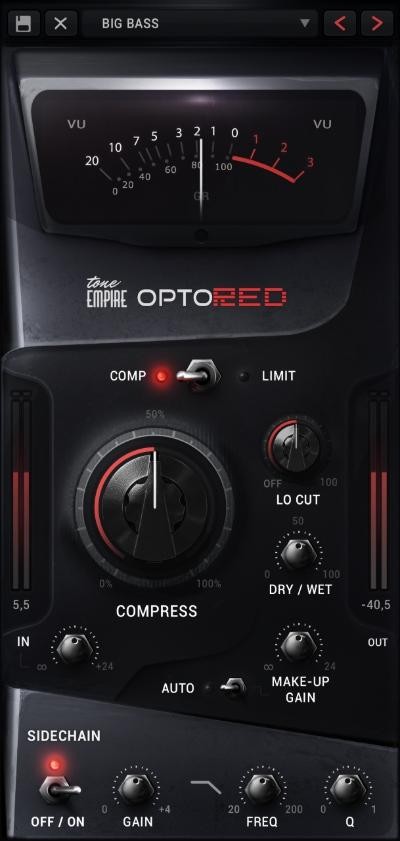
Tone Empire OptoRED is a transparent compressor plug-in based on the classic American optical compressor. A compressor narrows the gap between loud and quiet, and an optical design compresses gently using light. It is the first product in the company's new Enhanced Classics series.
It started as a 1:1 emulation and then went beyond the original's functions, the page says. It has a built-in side-chain circuit, a low-pass filter, automatic gain and a wet/dry mix, so it suits not only vocals and bass but also drums, synths, percussion and electronic and acoustic instruments.
The low-cut filter, a 12 dB shelving filter from off to 100 Hz, is meant for removing unwanted low frequencies while tracking. Unlike the original, it is described as super clean and imparting no colouration.
Key features
Optical compressor emulation
Starts from a 1:1 emulation of the classic American optical compressor.
Compressor and limiter modes
Switch between compressor and limiter.
Side-chain and low-pass
A built-in side-chain circuit and a low-pass filter.
Low cut
A 12 dB shelving low cut from off to 100 Hz for tracking.
Auto gain and mix
Auto gain on or off, and a wet/dry mix.
Clean design
Described as clean, without the colouration of the original.
Specifications
| Item | Details |
|---|---|
| Type | Optical compressor and limiter |
| Main features | Side-chain, low-pass, auto gain, wet/dry, low cut (up to 100 Hz) |
| Mac | macOS 10.13 or later (Intel and M1, 64-bit), VST3, AU, AAX |
| Windows | Windows 10 or later (64-bit), VST3, AAX |
What is included and system requirements
- OptoRED
How to use it
- Insert OptoRED on the track you want to compress.
- Choose compressor or limiter mode.
- Set the amount with the threshold knob, which works counter-clockwise.
- Use the low cut when tracking.
- Finish with auto gain and the wet/dry mix.
Where it may come in handy
Vocals and bass
The uses the original is known for.
Drums, synths and percussion
The page says it also suits drums and synths.
Compression while tracking
The page also describes using the low cut for tracking with a low-latency compressed signal.
Who it may suit
- People who want an optical compressor with clean sound
- People who also want side-chain and other extra functions
Good to know before you buy
- Statements such as being used on nearly every hit record are the maker's own copy.
- This article is based on the Plugin Boutique product page, which carries the maker's description. Check the maker or retailer pages for the latest specifications and prices.
Price
$79 (Plugin Boutique, checked 2026-11-10). Prices can vary by region and promotion, so check the official page before buying.
See OptoRED on the product page
More of the same kind
We have introduced 85 compressors. Here are some of the others.
- Solid State Logic SSL Native X-ValveComp
- Universal Audio UA 175B & 176 Tube Compressor Collection
- McDSP SPC2000
- McDSP MC2000 Multi-Band Compressor
- Antelope Audio SMT-100A
- W. A. Production Vocal Compressor
We have introduced 2 other products from Tone Empire.
For a side-by-side comparison scored on the same criteria, see our comparison of compressors.
See the full list in Product database: Effects.
Sources: pluginboutique.com (checked 2026-11-10)










Comments