
Disclosure: This page may contain affiliate links. Prices were checked on the date shown and may change.
An introduction to Solid State Logic SSL Native X-EQ 2, based on information from the maker and distributors: what it does, how to use it and who it may suit. It is not scored.
What is SSL Native X-EQ 2?
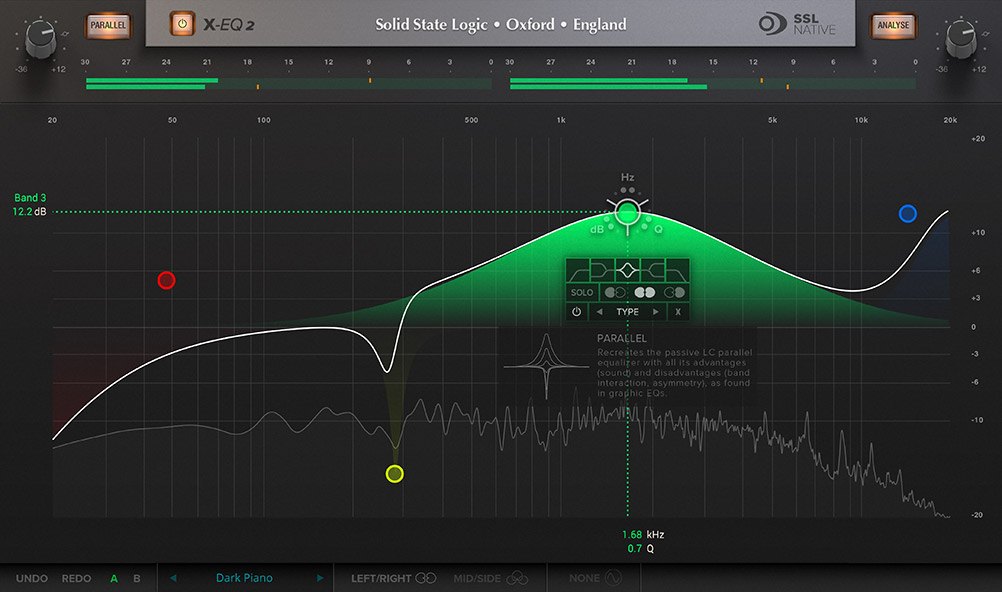
SSL Native X-EQ 2 is an EQ plug-in from Solid State Logic (SSL). It is a 24-band parametric EQ with 17 EQ types and filter shapes. The manufacturer explains that SSL's proprietary "anti-cramping" algorithms (which keep the high end from being squeezed) give an open, transparent sound (per the manufacturer).
Requirements: on Mac, macOS 11 to 13 (64-bit only, M1 Macs supported) in AU, VST2, VST3 and AAX Native formats; on Windows, Windows 10 to 11 (64-bit only) in VST2, VST3 and AAX Native formats. A free iLok account is required for authorization (per the manufacturer, from the Plugin Boutique product page).
Key features
24 bands and 17 EQ types
Each band can be switched between bell, shelf, low-pass and high-pass, with classic and customizable shapes (per the manufacturer).
Anti-cramping algorithms
They preserve high-frequency information that can be lost in a digital environment, according to the manufacturer.
Mid/side and separate left/right processing
You can process the center and sides separately, or the left and right channels independently. New spatial processing options, band soloing and the "Parallel" mode, which recreates the sound of old parallel passive EQ circuits, are also included (per the manufacturer).
Real-time frequency display and light CPU load
A real-time frequency analysis display is included, and the plug-in is DSP-optimized for light CPU use (per the manufacturer).
After you buy: installation and activation
This is the general flow for products bought at Plugin Boutique. Activation differs by product (serial number, a manufacturer account, iLok and so on), so check the instructions in your library after purchase.
- Log in to your Plugin Boutique account and find the product in “Library”.
- Download the installer (you can switch between the Windows and Mac versions). Depending on the product, you also get a serial number, an unlock code or a key file.
- Product-specific steps are under “…” → “Installation Instructions” next to the product in your library, and also near the bottom of the product page.
Price
Please check the official page for the price.
See SSL Native X-EQ 2 on the product page
Past sales
Sales we have confirmed so far. A sale with the same terms may not be held again.
| Ended | Regular | Sale | Discount | Store, date checked |
|---|---|---|---|---|
| Nov 1, 2026 | $149 | $15 | 89% off | Plugin Boutique, checked 10/24 |
More of the same kind
We have introduced 123 EQs. Here are some of the others.
- Three-Body Technology Transi-Q
- sonible sonible entropy:EQ+
- Sonnox Oxford EQ
- Sonnox Claro
- Antelope Audio Blonder Tongue Audio Baton
- Antelope Audio VEQ-STU 089
We have introduced 34 other products from Solid State Logic.
- Solid State Logic SSL X-DynEQ
- Solid State Logic SSL X-EQ 2
- Solid State Logic SSL Fusion Violet EQ
- Solid State Logic SSL G3 MultiBusComp
- Solid State Logic SSL Blitzer
For a side-by-side comparison scored on the same criteria, see our comparison of EQs.
See the full list in Product database: Effects.
Sources: pluginboutique.com help.pluginboutique.com support.pluginboutique.com (checked 2026-11-15)










Comments