
Disclosure: This page may contain affiliate links. Prices were checked on the date shown and may change.
An introduction to AudioThing Space Strip, based on information from the maker and distributors: what it does, how to use it and who it may suit. It is not scored.
Space Strip is a six-module multi-effect plugin built around simple, flexible routing.
— AudioThing official site
What is Space Strip?
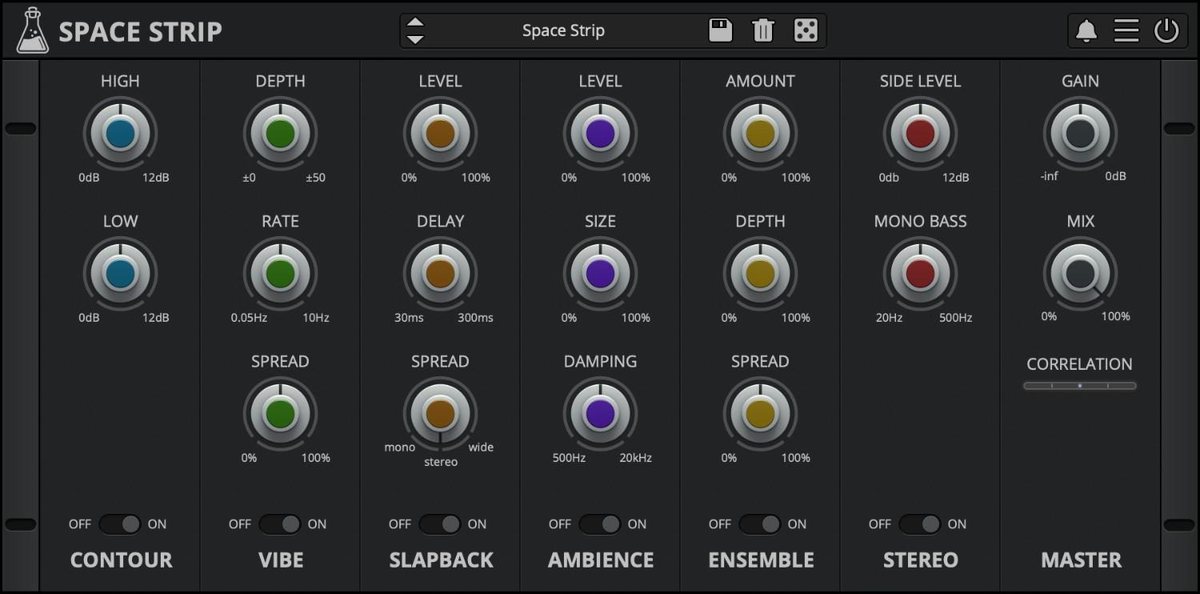
Space Strip is a modular multi-effect (channel-strip style) plug-in from AudioThing built from six modules that can be reordered by drag and drop. It is meant for shaping depth, movement and spatial balance.
The official description focuses on adding subtle space and character rather than heavy effects. It is said to work particularly well on synthesizers and keyboards, but can be used on other sources.
The six modules are Contour (2-band EQ), Vibe (stereo vibrato), Slapback (short echo), Ambience (short reverb), Ensemble (multi-voice chorus) and Stereo (stereo manipulation). All modules except Master can be rearranged.
It is designed to be light on CPU so it can be used across multiple tracks. It supports macOS, Windows and Linux, and an iOS/iPadOS version (AUv3 and standalone) is also offered.
Key features
Drag-and-drop module order
Modules can be reordered, for example Ensemble after Slapback or the reverse. Changing the order can change the result, so variations can be compared.
Contour (2-band EQ)
A 2-band EQ for tone shaping. It can sit before or after other modules to prepare a sound before spatial effects.
Vibe and Ensemble
Vibe is a stereo vibrato and Ensemble a multi-voice chorus. They can add movement and width to synths and keys.
Slapback and Ambience
A short echo and a short reverb create modest space, useful for adding depth without burying a sound.
Stereo module
Controls stereo spread and can be placed at the end of the chain to adjust overall width.
Light CPU use and presets
Described as lightweight and suitable for multiple tracks, with a preset system and randomizer to start from a close sound.
Specifications
| Item | Details |
|---|---|
| Maker | AudioThing |
| Type | Modular multi-effect (channel strip) |
| Modules | Contour, Vibe, Slapback, Ambience, Ensemble, Stereo (six) |
| Windows | Windows 7 to 11; VST2, VST3, AAX, CLAP (64-bit) |
| macOS | macOS 10.13 to macOS 26; VST2, VST3, AU, AAX, CLAP (Universal 2) |
| Linux | Ubuntu 20.04 LTS; VST2, VST3, CLAP (64-bit) |
| Requirements | 2 GHz CPU, 4 GB RAM |
| iOS | iOS/iPadOS version (AUv3, standalone) available |
| Demo | Free demo with 3 seconds of silence every 45 seconds and saving disabled |
What is included and system requirements
- Six modules (Contour, Vibe, Slapback, Ambience, Ensemble, Stereo)
- Preset system and randomizer
- Plug-in formats for macOS, Windows and Linux (VST2, VST3, AU, AAX, CLAP)
- A limited free demo is offered on the manufacturer site
How to use it
- After purchase, install following the instructions from the manufacturer or the Plugin Boutique library.
- Insert it on a synth or keyboard track in the DAW.
- Pick a preset close to the desired mood.
- Reorder the modules by drag and drop and compare the results.
- Shape tone with Contour and add space with Ambience or Slapback.
- Finish by adjusting width with Stereo.
Where it may come in handy
Adding depth to synths and keys
A light touch of Ambience and Ensemble may add depth without pushing a sound too far forward.
Giving pads some movement
Slowly moving Vibe may add drift to a quiet sound.
Light use across several tracks
Because it is described as light on CPU, it can be tried on several tracks that need similar spatial treatment.
Testing module order
The same settings can sound different when reordered, which makes it useful for comparing ideas.
Who it may suit
- People who want subtle space and movement on synths and keys
- People who like channel-strip style effects with reorderable modules
- People who want spatial effects on several tracks with low CPU use
- People who also want Linux or iOS versions
Good to know before you buy
- The free demo inserts 3 seconds of silence every 45 seconds and cannot save.
- The price field on the manufacturer page did not display, so the price is based on Plugin Boutique.
- The iOS/iPadOS version is listed separately on the App Store.
Price
$59 (Plugin Boutique, checked 2026-10-27). Prices can vary by region and promotion, so check the official page before buying.
See Space Strip on the product page
More of the same kind
We have introduced 51 channel strips. Here are some of the others.
- Waves SSL EV2 Channel
- Antelope Audio VEQ-4K BROWN
- United Plugins UniChannel
- Safari Audio Camel Strip V2
- Waves SSL E-Channel
- McDSP Channel G Compact
We have introduced 34 other products from AudioThing.
- AudioThing Dials
- AudioThing Echo Cube
- AudioThing AudioThing Phase Motion 2
- AudioThing SX1000
- AudioThing Wires
See the full list in Product database: Effects.
Sources: audiothing.net pluginboutique.com (checked 2026-10-27)










Comments