
Disclosure: This page may contain affiliate links. Prices were checked on the date shown and may change.
An introduction to Imaginando Imaginando FRMS, based on information from the maker and distributors: what it does, how to use it and who it may suit. It is not scored.
A granular synthesizer that turns any sample into a playable instrument.
— Imaginando official site
What is Imaginando FRMS?
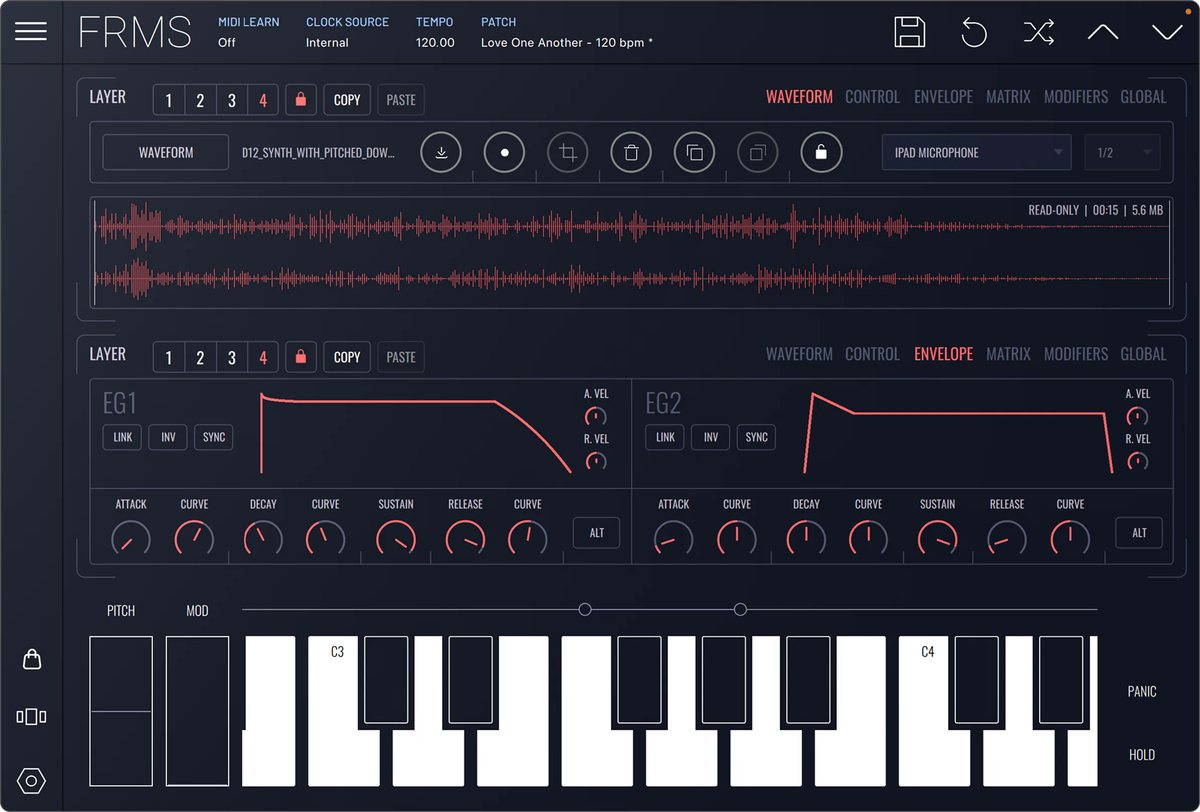
FRMS is a granular synthesizer from Imaginando of Portugal. It breaks any sample you import, such as a vocal, a field recording or a chord, into tiny grains and turns it into an instrument you play on the keyboard. The official tagline is that any sound can be endlessly reshaped.
Imaginando says up to 80 grains per voice can be stacked, so density can be set from a shimmering cloud down to a single tone with a knob. Position, density, length, spray, jitter and pitch act per grain, and you can lock the playhead to freeze a moment and stretch it indefinitely.
A patch holds up to four layers, each with its own engine, filter and envelopes. The filter is a non-linear, self-oscillating multimode design that includes a four-pole ladder. Modulation consists of a 24-slot matrix, four LFOs with tempo-sync, free-run and phase-lock modes, and two ADSR envelopes.
An FX rack with reverb and delay lets you go from importing a sample to a finished sound inside the plug-in. There are 163 factory presets and 18 expansion packs. Besides desktop there are iOS and Android versions, and it accepts WAV, AIFF and MP3 by drag and drop with automatic transient detection.
Imaginando's page explains a three-step workflow (drop a sample, break it into grains, play it like an instrument) and three lessons (sample to pad, density and spray, spectral freeze and time stretching). Expansion packs include Antique Shop, Ghost Signals, Aural Alchemy 2 and Sounds of Guitar.
Beyond desktop, it also runs on iOS and Android. Imaginando names sound designers and texture builders as its best-fit users. A free demo is available, so you can check the import workflow and the feel of grain controls before buying. Bundles start from €159, giving the option to buy alongside other Imaginando products.
Key features
Up to 80 grains per voice
You can add grains for a thick cloud or reduce them to a single tone. A single density knob changes texture, which may be easy to follow for first-time granular users.
Position scrub and freeze
Move freely through a sample, lock the playhead and spray grains around it. Freezing one moment and stretching it may suit ambient sustained sounds.
Spray, pitch and jitter
Three knobs scatter start points, detune grains and randomize length. Imaginando says any source can become something different.
Four layers and a 24-slot matrix
Each layer has its own engine, filter and envelopes, driven by a 24-slot modulation matrix. You could layer different samples.
Sample import and detection
WAV, AIFF and MP3 files are dragged in and transients are marked automatically. They can be played from the keyboard immediately, and MPE (per-voice pitch, slide, pressure) is supported.
163 presets and 18 expansion packs
Demos of pads, drones, vocal granulation and field-recorded percussion are published. Expansion packs are €9.99 each, listed on Imaginando's site.
Specifications
| Item | Details |
|---|---|
| Type | Granular synthesizer |
| Grains | Up to 80 per voice |
| Voices | Up to 8 (dynamic allocation) |
| Layers | Up to 4 per patch |
| Filter | Non-linear, self-oscillating multimode (including 4-pole ladder) |
| Modulation | 24-slot matrix, 4 LFOs, 2 ADSR |
| FX | Reverb, delay |
| Presets | 163 (plus 18 expansion packs) |
| Formats | AU, AUv3, VST, VST3 (Apple silicon native) |
| Platforms | macOS, Windows, iOS, Android |
What is included and system requirements
- FRMS and 163 factory presets
- A built-in sample bank (per the product page)
- Formats: AU, AUv3, VST, VST3
- Platforms: macOS, Windows, iOS, Android
- Free demo available (Imaginando); one license can be registered on up to five computers (per Plugin Boutique)
How to use it
- Log in with an Imaginando account and register your license.
- Download and run the installer.
- Load FRMS on an instrument track in your DAW.
- Play presets first to hear the pad and drone textures.
- Drop your own audio, such as a vocal or field recording, onto the window.
- Move position and density and freeze on a moment you like.
- Adjust spray and jitter, then finish with reverb and delay.
Where it may come in handy
Ambient and drone
Using frozen, stretched sounds as sustained material may suit the base of ambient tracks.
Vocal manipulation
It may suit breaking your own voice into grains and playing it like an instrument.
Reworking field recordings
Environmental sounds can be mixed into a track as texture.
Who it may suit
- People who want to turn their own recordings into instruments
- Those interested in ambient music and sound design
- Those who want to try granular synthesis easily
Good to know before you buy
- Plugin Boutique's description appears to reflect older specs (4 voices, 20 grains per layer). This material follows Imaginando's current page (80 grains, up to 8 voices).
- A free demo is available.
- Imaginando lists €89; Plugin Boutique lists $94.
How it differs from similar products
We do not pick a winner; the official figures are placed side by side.
Baby Audio Atoms
FRMS is granular and based on imported samples, with 163 presets and 18 expansion packs. Atoms is physical modeling with no samples, with 250 presets.
Price
about $100 (converted from €89.00) (Imaginando official site, checked 2026-10-27). Prices can vary by region and promotion, so check the official page before buying.
See Imaginando FRMS on the product page
More of the same kind
We have introduced 178 synthesizers. Here are some of the others.
- Cherry Audio P-10 Synthesizer
- u-he Zebra 3
- Arturia Arturia Synthx V
- Stagecraft Software Cenere
- AIR Music Technology Fabric Vintage Andromeda
- Minimal Audio Current
For a side-by-side comparison scored on the same criteria, see our comparison of synthesizers.
See the full list in Product database: Instruments.
Sources: imaginando.pt pluginboutique.com (checked 2026-10-27)










Comments