
Disclosure: This page may contain affiliate links. Prices were checked on the date shown and may change.
An introduction to Klevgrand Haaze 2, based on information from the maker and distributors: what it does, how to use it and who it may suit. It is not scored.
Haaze is an audio plugin that makes the positioning feel more natural, understandable and pleasant for the ears.
— Klevgrand official site
What is Haaze 2?
Haaze 2 is a stereo tool from Klevgrand. The product page describes it as a stereo enhancer that brings any mono signal to life, for controlling stereo width and placing a sound within a stereo mix.
The page says that regular left-right panning does not resemble real acoustics, which becomes clear on headphones when you place a mono sound in a stereo mix. Haaze aims to make the perceived position more natural.
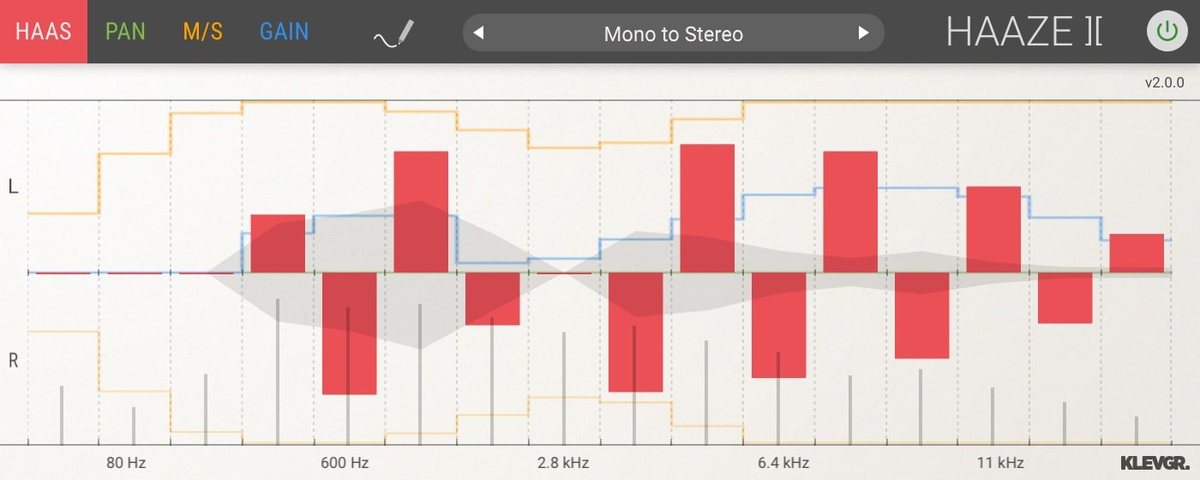
It splits the signal into 16 frequency bands. On each band you can delay the left or right signal, pan it left or right, or adjust the width of that band, for example keeping lower frequencies more focused in the middle than the highs.
Haaze can also diffuse a mono signal to make it wider. Many presets are included for getting started, and the page says it works on both headphones and loudspeakers with good mono compatibility.
Key features
16 independent bands
The signal is split into 16 bands, each with its own settings, so you can keep lows narrow and highs wide, for example.
Haas: per-band L/R delay
A left-right time difference is set per band, using the perception that a sound seems to come from the side it reaches first.
Pan (Split EQ)
Each band can be panned left or right, placing different frequency regions in different positions.
M/S: per-band width
Mid/side processing adjusts the width of each band, which can also be used to focus low frequencies in the center.
Draw mode and gain
A draw mode lets you plot the adjustment curve, and per-band gain compensates level changes after processing.
Meters and presets
A stereo width meter and a level meter per band are included, along with many presets.
Specifications
| Item | Details |
|---|---|
| Type | Stereo tool (stereo enhancer) |
| Bands | 16 bands |
| Functions | Haas (L/R delay), Pan, M/S (width), Gain, draw mode |
| Meters | Stereo width meter, per-band level meter |
| OS | macOS 10.10 or later (optimized for M1), Windows 7 SP1 or later |
| Formats | AU, VST (VST2 / VST3), AAX (64-bit); iPad: AUv3 |
What is included and system requirements
- Haaze 2 plugin
- Many presets
- macOS 10.10 or later / Windows 7 SP1 or later
- AU, VST2, VST3, AAX (64-bit host)
How to use it
- Install with Klevgrand Helper and activate the license.
- Rescan plugins in your DAW.
- Insert Haaze 2 on the track you want to widen or position.
- Load a preset first and listen to the effect.
- In Haas mode, adjust the left-right time difference per band.
- Use Pan and M/S modes to shape position and width.
- Use draw mode to trace the band curve.
- Fold to mono and compare to check that the sound does not thin out.
Where it may come in handy
Widening a mono recording
It may be worth trying on a mono guitar or instrument recorded with one mic to make it sit in a stereo mix. The diffusion function adds spread.
Narrow lows, wide highs
Per-band width lets you keep lows centered and spread the highs, which may help balance the overall mix.
Checking placement on headphones
You can hear how a sound that feels stuck in the middle on headphones changes with a time difference.
Vocal doubles and backing vocals
It could be used to spread mono backing vocal material to positions that do not crowd the lead.
Who it may suit
- Those who want to place mono sounds naturally in stereo
- Users who want per-band control of width and position
- Home producers who often work on headphones
- Anyone who prefers starting from presets
Good to know before you buy
- The official page says Klevgrand plugins can be downloaded and tried free; the demo is the full version but with occasional audio dropouts.
- Widening too much can change how the sound behaves in mono, so checking mono compatibility is recommended.
- An iPad version (AUv3) is listed on the official page; check the details there.
How it differs from similar products
We do not pick a winner; the official figures are placed side by side.
Klevgrand Pana
Haaze 2 sets delay, pan and width per band across 16 bands and is listed at $59.99. Pana sets position with a single macro pan knob and is listed at $39.99.
Price
$59.99 (Klevgrand official site, checked 2026-10-27). Prices can vary by region and promotion, so check the official page before buying.
See Haaze 2 on the product page
More of the same kind
Other introduction articles of the same kind.
- Metric Halo MH MultibandExpander v4
- Fiedler Audio armada
- Universal Audio Vibe Analog Machines
- BEATSURFING CHEat code
- Waves X-Click
- Boz Digital Labs Mongoose 2
We have introduced 26 other products from Klevgrand.
See the full list in Product database: Effects.
Sources: klevgrand.com pluginboutique.com (checked 2026-10-27)










Comments