
Disclosure: This page may contain affiliate links. Prices were checked on the date shown and may change.
An introduction to Mellowmuse CS1V Console Channel, based on information from the maker and distributors: what it does, how to use it and who it may suit. It is not scored.
CS1V brings the warmth and depth of an analogue console to your tracks and mixes.
— Mellowmuse official site
What is CS1V Console Channel?
CS1V Console Channel is a Mellowmuse plug-in that adds the warmth and depth of an analog console channel to tracks and mixes.
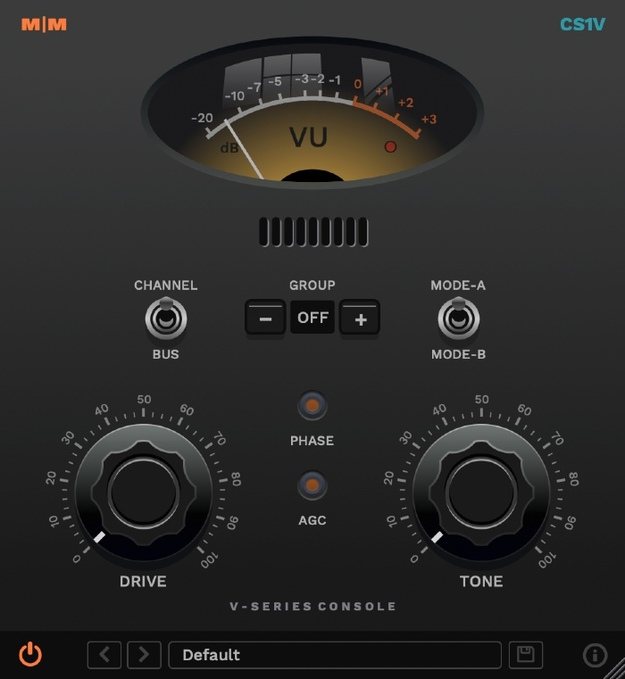
The Drive knob sets the amount of saturation and the Tone knob changes the preamp character: darker and heavier in the lows when turned counter-clockwise, with more high-frequency harmonics clockwise. Two preamp modes are provided; A is darker overall and B has a flatter frequency response.
The default Channel mode is meant for mono tracks. On stereo tracks or aux channels, the Buss setting adds a subtle amount of crosstalk as in a hardware mixer. Automatic gain control (AGC) lowers the output to match the source volume.
The Group control lets instances with the same number be controlled together. A phase switch, VU metering, 4x oversampling and 64-bit internal processing are also included. VST, VST3, AU and AAX are supported.
Key features
Drive and Tone
Drive sets saturation and Tone sets preamp character. These two knobs may let you decide how much warmth or brightness to add.
Preamp modes A and B
A is darker and B has a flatter response. You might switch between them to see which suits the source.
Channel and Buss modes
Channel is for mono tracks and Buss is for stereo tracks or aux. Buss adds subtle crosstalk, which may suggest the feel of a hardware mixer.
AGC
When on, output is lowered to match the source volume. It may help when you want to compare tone without being misled by loudness changes.
Group control
Instances with the same number are controlled together. It may be handy when applying the same treatment across drums or backing vocals.
Specifications
| Item | Details |
|---|---|
| Type | Console channel (preamp) |
| Formats | VST / VST3 / AU / AAX |
| OS | Windows 10 or later, Mac OS X 10.9 or later (64-bit) |
| Oversampling | 4x |
| Internal processing | 64-bit |
What is included and system requirements
- CS1V Console Channel plug-in
- System: Windows 10 or later, Mac OS X 10.9 or later (64-bit)
- Formats: VST, VST3, AU, AAX
- A trial is available (Plugin Boutique)
How to use it
- If a trial is available, test it beforehand to check operation.
- After purchase, install with the installer.
- Insert CS1V on a track in your DAW.
- Choose Channel for mono tracks and Buss for stereo or aux.
- Raise Drive a little to set saturation.
- Set character with Tone and preamp mode A or B.
- Turn on AGC if you want to match levels.
Where it may come in handy
Adding warmth to vocals or guitar
It may suit adding console-style warmth to already-recorded tracks.
Gluing drums or backing vocals
With Group control you may apply the same coloration across several tracks.
Light flavor on aux or buses
Use Buss mode on stereo tracks or aux channels to add a slight sense of width.
Who it may suit
- People who want to add analog console character to tracks
- People who want to apply the same coloration across several tracks
- People who want to try a trial before buying
Good to know before you buy
- The listed system requirements use older OS versions. Check the maker's information if you use a newer OS.
How it differs from similar products
We do not pick a winner; the official figures are placed side by side.
Slate Digital Virtual Preamp Collection
CS1V packs drive, tone, modes A and B and VU metering into a single channel. Virtual Preamp Collection contains two preamp modules, FG-73 and FG-76.
Price
Please check the official page for the price.
See CS1V Console Channel on the product page
More of the same kind
Other introduction articles of the same kind.
- Native Instruments Molekular
- Universal Audio API Vision Channel Strip Collection
- Slate Digital Fresh Air
- W. A. Production Zqueezer
- Eventide H9 Plug-in Series Bundle
- Waves InPhase LT
We have introduced 7 other products from Mellowmuse.
- Mellowmuse Mellowmuse ATA Auto Time Adjuster
- Mellowmuse IR1A Convolver
- Mellowmuse Mellowmuse CP2V
- Mellowmuse CP1A Compressor
- Mellowmuse Mellowmuse EQ3V
See the full list in Product database: Effects.
Sources: pluginboutique.com (checked 2026-10-27)










Comments