
Disclosure: This page may contain affiliate links. Prices were checked on the date shown and may change.
An introduction to Moog Moogerfooger MF-105S MuRF, based on information from the maker and distributors: what it does, how to use it and who it may suit. It is not scored.
The MF-105S MuRF is a re-invention of Moog Music’s classic MF-105 analog effects pedal.
— Moog official site
What is Moogerfooger MF-105S MuRF?
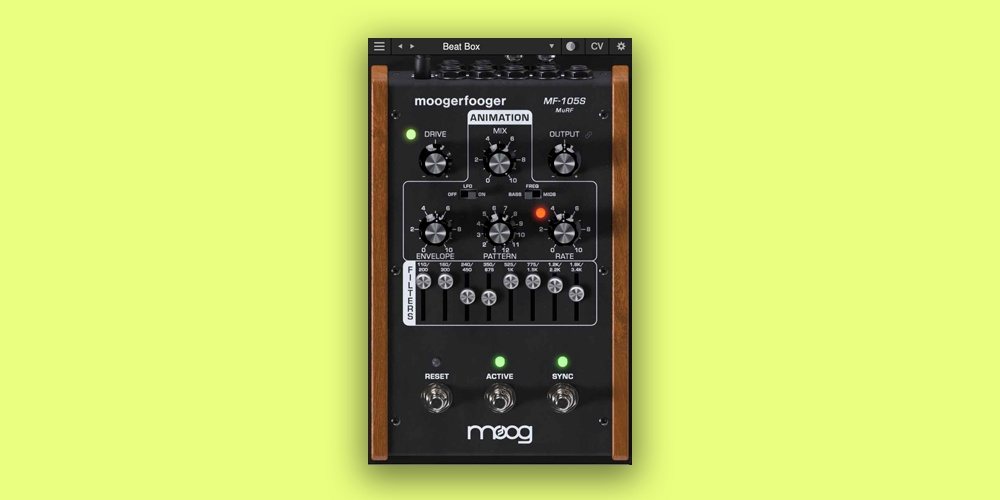
The MF-105S MuRF is a plugin re-creation of Moog Music's MF-105 MuRF analog effects pedal. MuRF stands for Multiple Resonant Filter Array, and the plugin carries forward the idea of the original, which was introduced in 2004.
At its core is an array of eight resonant filters that can be voiced for bass or mid-frequency response. The eight filters divide the spectrum, and their levels are moved over time to give the incoming sound motion.
The second pillar is the ANIMATION section, in which pre-programmed envelope sequences move the levels of the eight filters. Guitar, voice, synthesizers or any other source can serve as input, in line with how Bob Moog and his team designed the original.
The plugin version adds CV inputs, stereo operation, multiple simultaneous instances and presets. It is offered in AAX, AU and VST3 formats on both macOS and Windows.
Key features
Eight-band resonant filter array
The input is passed through eight resonant filters that can be voiced for bass or mid-frequency response. Because the emphasis differs per band, it may help when you want to color a sound or build band-by-band movement.
ANIMATION module
A set of pre-programmed envelope sequences moves the levels of the eight filters in turn. Rhythmic motion can be created inside the plugin, so you may be able to add movement without a separate sequencer.
PATTERN EDITOR
You can edit the original ANIMATION patterns or create your own. This was not on the hardware unit, and the manufacturer lists it as an addition in the plugin version.
MODE (stereo spread)
You can send all eight filters to both left and right channels, or split the filters across the channels for a stereo spread. It might be worth trying on a mono source that needs width.
ENVELOPE MODE
This switches between the original envelope shapes and a new alternate bank of envelopes. It gives you another option when you want a different feel of motion from the same pattern.
CV inputs with attenuation
CV inputs are provided for Animation Pattern Rate, Internal LFO Rate, Envelope Shape, LFO Amount and Mix, and the modulation amount can be attenuated. The manufacturer also describes linking several Moogerfooger plugins so that they modulate each other.
Presets and multiple instances
Presets can be saved and recalled, and several instances can run in one project. The official pages state that all parameters can be automated in the DAW.
Specifications
| Item | Details |
|---|---|
| Formats | AAX / AU / VST3 |
| Supported OS | macOS 11.7 or newer (Intel / Apple Silicon), Windows 10 or newer (64-bit) |
| Original hardware | MF-105 MuRF, introduced in 2004 |
| iOS version | Sold separately as AUv3 (listed on the official store) |
What is included and system requirements
- MF-105S MuRF plugin (Mac/PC version)
- Presets
- Formats: AAX, AU, VST3
- System requirements: macOS 11.7 or newer, Windows 10 or newer (64-bit)
How to use it
- Buy the plugin from the official Moog Music software store or Plugin Boutique and obtain the installer.
- Run the installer and install the AAX, AU or VST3 format you need.
- Insert MF-105S MuRF as an effect on a track in your DAW.
- Start by choosing a preset and listen to the motion applied to your input.
- Set MODE to the stereo option and compare how the filters sound when split between the channels.
- Change the ANIMATION pattern rate to find a motion that fits the tempo of your song.
- Edit a pattern you like in the PATTERN EDITOR and save it as a preset.
- If you own other Moogerfooger plugins such as the MF-101S, try linking them with CV so they modulate each other.
Where it may come in handy
Adding motion to synths and drums
Passed through static synth pads or drum loops, the eight filters change level over time and may create band-by-band swells. Matching the pattern rate to the tempo lets you try changes that lock to the rhythm.
Voice processing and post-production
You could apply it to part of a vocal or narration to create a distinctive tone that emphasizes certain bands. Using it on just a few bars as seasoning may be worth trying.
Modular-style sound design
The CV inputs and links to other Moogerfooger plugins may let you experiment with effects shaping one another's movement, as in a modular synthesizer.
Who it may suit
- People interested in the thinking behind the Moogerfooger series
- Those who want to add band-by-band motion to synths or drums
- Users who enjoy CV linking and building their own patterns
- Anyone who wants to try the idea of the original hardware in software form
Good to know before you buy
- The price applies to the Mac/PC version; the iOS (AUv3) version is sold separately.
- The official page notes that a bundle covering the whole Moogerfooger plugin collection is available.
- Differences in sound need to be checked by ear; this article does not evaluate sound quality or compare with the original hardware.
How it differs from similar products
We do not pick a winner; the official figures are placed side by side.
Moogerfooger MF-101S Lowpass Filter
The MF-105S MuRF has an eight-band resonant filter array with ANIMATION, while the MF-101S has a 4-pole lowpass filter with an envelope follower. Both are priced at $79 for the Mac/PC version; the MF-105S lists five CV inputs and the MF-101S lists four.
Price
$79 (Moog official site, checked 2026-10-27). Prices can vary by region and promotion, so check the official page before buying.
See Moogerfooger MF-105S MuRF on the product page
More of the same kind
Other introduction articles of the same kind.
- Leapwing Audio Joe Chiccarelli
- Sugar Bytes Transfigure
- Polyverse Music I Wish
- Native Instruments Molekular
- Safari Audio Meaw: Chain
- FLUX:: Ircam Trax
We have introduced 2 other products from Moog.
See the full list in Product database: Effects.
Sources: software.moogmusic.com pluginboutique.com (checked 2026-10-27)










Comments