
Disclosure: This page may contain affiliate links. Prices were checked on the date shown and may change.
An introduction to NoiseWorks VoiceAssist, based on information from the maker and distributors: what it does, how to use it and who it may suit. It is not scored.
VoiceAssist Standard is an all-in-one vocal processing plugin that combines intelligent leveling, AI-powered gating, breath control, and de-essing in a single offline-analysis pass.
— NoiseWorks official site
What is VoiceAssist?
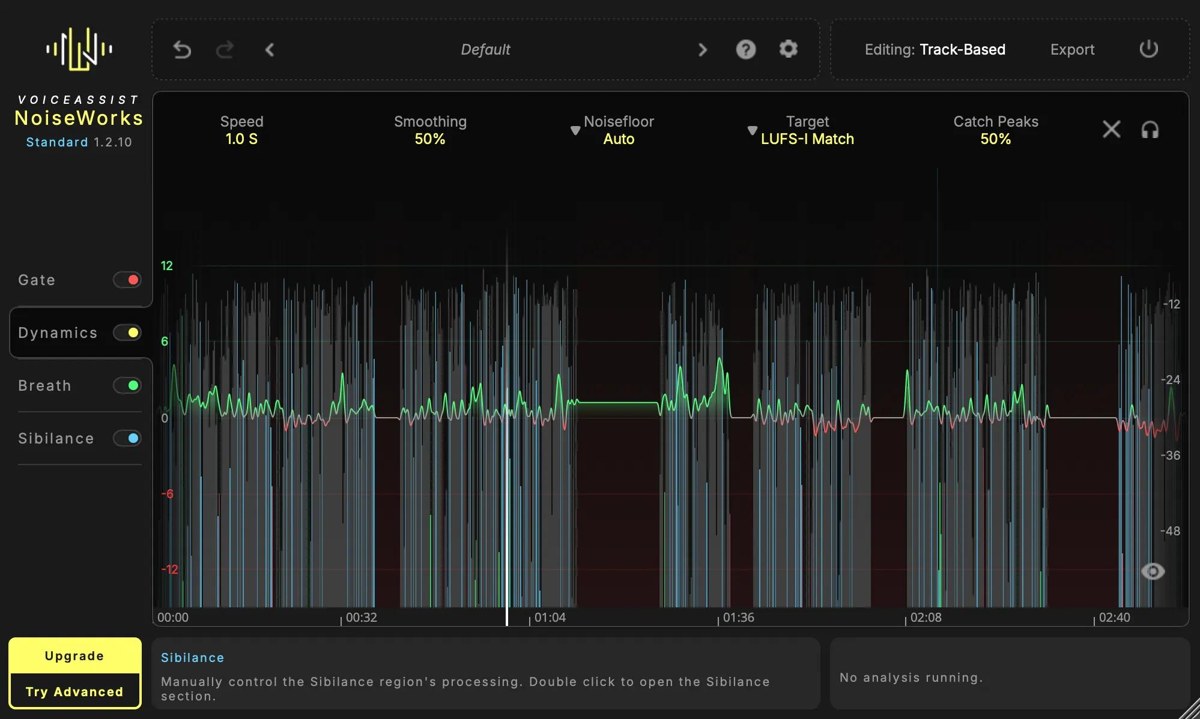
NoiseWorks VoiceAssist is a tool that bundles vocal and dialogue prep work (levelling, noise control, breaths and sibilance) into one plug-in. Plugin Boutique's page describes it as replacing the typical four-plug-in chain of gain rider, gate, de-breather and de-esser with one workflow.
Processing is offline analysis rather than real-time. It works through ARA, which lets the plug-in analyse a whole recording in cooperation with the DAW, or through Transfer Mode, so it sees the full recording before adjusting, which is described as giving smoother, more transparent results. The result is written as editable volume automation.
It comes in three editions. Basic is vocal levelling only, Standard adds AI-powered gating, breath control and de-essing, and Advanced adds further tools such as noise build-up and room reflection control, Recover Highs, low-end stabilisation and resonance reduction.
On Mac it requires macOS 12 or later (Intel and M1/M2/M3 native) in VST3, AU, AAX and standalone. On Windows it requires Windows 10 or later in VST3, AAX and standalone.
Key features
Offline analysis writes automation
It analyses the whole recording first and writes editable volume automation, and manual edits are said to remain when settings change.
Levelling (Dynamic)
Speed, smoothing, noise floor, target modes (LUFS-I and LUFS-S) and Catch Peaks.
AI gate (Standard and up)
A gate that detects voice and silence instead of using a fixed threshold, with a traditional threshold mode available.
Breath control
Breaths are detected automatically and can be adjusted globally or per section.
De-essing
Sibilance is detected and reduced, with a volume-based or spectral approach, and it accounts for levelling changes so chain order is not an issue.
Advanced extras
Tools for noise build-up and room reflections, Recover Highs, low-end stabilisation, resonance reduction and a pitch-based low cut.
Specifications
| Item | Details |
|---|---|
| Type | Vocal and dialogue processing (offline analysis) |
| Editions | Basic (levelling), Standard (plus gate, breath, de-esser), Advanced (plus noise, reflections, Recover Highs, low end, resonance and more) |
| Integration | ARA, Transfer Mode |
| Formats (Mac) | VST3, AU, AAX, standalone (macOS 12 or later, Intel and M1/M2/M3) |
| Formats (Windows) | VST3, AAX, standalone (Windows 10 or later, Intel i5 or equivalent) |
| Price (Plugin Boutique) | Basic $49, Standard $149, Advanced $299 (sale prices shown) |
What is included and system requirements
- VoiceAssist (choose Basic, Standard or Advanced)
- DAWs: Pro Tools, Logic, Cubase, Reaper, Studio One, Nuendo, LUNA, Ableton Live, FL Studio and others (via ARA or Transfer Mode)
How to use it
- Install it and rescan plug-ins in your DAW.
- Insert VoiceAssist as an ARA plug-in on the vocal clip (use Transfer Mode in DAWs without ARA).
- Run the analysis of the whole recording.
- Look at the volume automation written out and edit it by hand if needed.
- In Standard and Advanced, adjust the strength of gate, breath and de-ess sections.
- Manual edits remain when you re-analyse.
Where it may come in handy
Prepping vocals
Levelling volume, breaths and sibilance across takes and comps in one pass.
Podcast and dialogue editing
Plugin Boutique's page lists podcast editors and film and TV post-production editors as users.
Levelling rap vocals
The page describes using the Fast speed for aggressive levelling.
Who it may suit
- Mix engineers who want to cut down vocal prep work
- People editing podcasts and dialogue
- People who want a single plug-in instead of a gain rider, gate, de-breather and de-esser
Good to know before you buy
- It is an offline-analysis tool, not a real-time plug-in, so it does not suit processing live input.
- It needs an ARA-capable DAW or Transfer Mode.
- An upgrade path from DynAssist to VoiceAssist is also mentioned.
- This article is based on the maker's product page and the Plugin Boutique page. Check the maker or retailer pages for the latest specifications and prices.
Price
$149 (Plugin Boutique, checked 2026-11-09). Prices can vary by region and promotion, so check the official page before buying.
See VoiceAssist on the product page
More of the same kind
Other introduction articles of the same kind.
- Blue Cat Audio Plug'n Script
- Almudio 3D Panner
- MeldaProduction MCenter
- NUGEN Audio MasterCheck
- Waves CLA Bass
- Waves OneKnob Louder
See the full list in Product database: Effects.
Sources: pluginboutique.com (checked 2026-11-09)










Comments