
Disclosure: This page may contain affiliate links. Prices were checked on the date shown and may change.
An introduction to Robotic Bean Portatron, based on information from the maker and distributors: what it does, how to use it and who it may suit. It is not scored.
This machine brings the aesthetic of vintage 4-track tape recording to modern music production.
— Robotic Bean official site
What is Portatron?
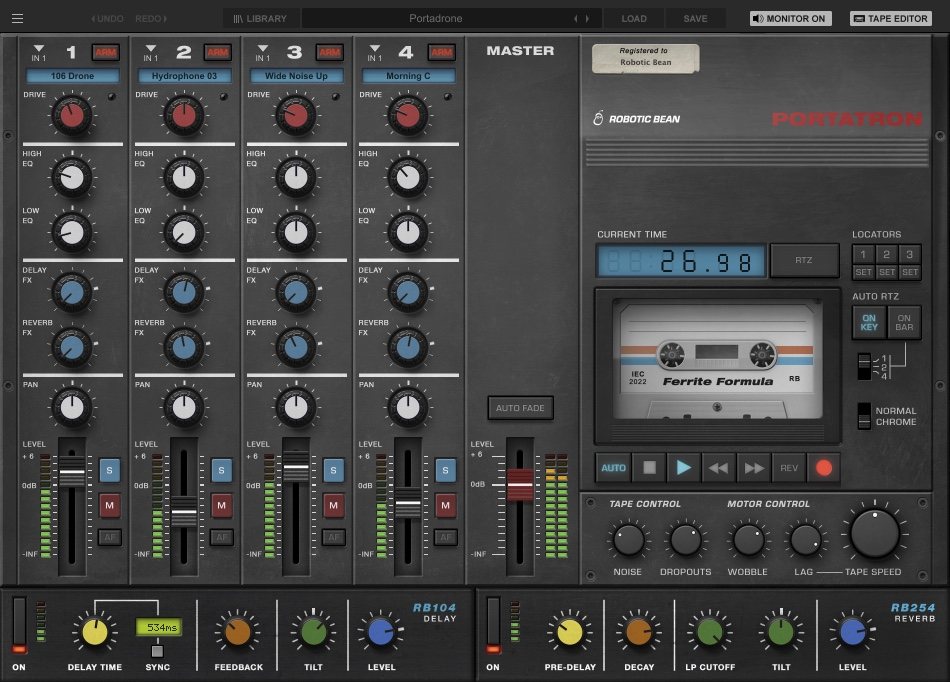
Portatron is a tape loop synthesizer from Robotic Bean. It recreates the feel of an old 4-track cassette recorder inside your DAW, letting you loop samples on four tape tracks or play them from a keyboard.
The maker lists three playback modes: a drone that plays along with the DAW transport, semi-synced loops that restart every 1, 2 or 4 bars, and monophonic Mellotron-style keyboard playing.
Version 2.0 lets you record audio from your DAW straight onto Portatron’s tape tracks. It also adds MIDI Learn for every knob and fader and a Portapack manager for handling sound bank collections.
Tape character is shaped with controls for tape speed, noise, dropouts, wobble and start/stop lag, and the tape type can be Normal or Chrome. Hundreds of samples are included, from piano and vibraphone to unusual sources such as hydrophones and shortwave radio, according to the maker.
Key features
Four tape tracks
Samples sit on four independent tracks, each with EQ, drive, level and pan, and shared delay and reverb sends are available.
Three playback modes
Drone, semi-synced loops (1, 2 or 4 bars) and monophonic keyboard play can be chosen, depending on whether the part should follow the song or float freely.
Record straight to tape
Any audio signal can be recorded onto up to four tracks at once, depending on the DAW. Arming, monitoring and recording happen inside the plugin, and each take is saved to disk as its own file.
Lofi controls
Tape speed (0-200%), noise, dropouts, wobble and lag can be adjusted. Normal and Chrome tape types and a Drive control for tape saturation are provided.
Tape editor
Samples can be resized, moved, looped, repitched, faded and reversed. Three locators and Return To Zero are provided, with automatic return on key or on bar.
Library and Portapacks
A library of hundreds of samples is included, and Portapack sound banks can be added. The manager can download free Portapacks in one click and point to folders on an external drive.
MIDI Learn and multi-outs
Any hardware controller can be mapped to any knob or fader. Multitrack and effects outputs let you process parts separately in the DAW.
Specifications
| Item | Details |
|---|---|
| Formats | VST3 / AU / AAX |
| OS | Windows 10+ / macOS 10.13+ |
| Disk space | 500MB |
| AAX | Pro Tools 11.3+ |
| Tracks | 4 |
| Tape speed | 0-200% |
| Demo | Functional for 20 minutes (saving allowed, loading patches not allowed) |
What is included and system requirements
- Portatron plug-in (VST3 / AU / AAX)
- Library of hundreds of samples
- Multitrack and effects outputs
- Portapack manager with free downloadable packs
How to use it
- Download the demo from the official site, or buy and install the plug-in.
- Load Portatron as an instrument in your DAW.
- Load samples from the library onto the four tracks.
- Choose a playback mode (drone, semi-synced loop or keyboard).
- Shape the character with tape speed, noise, wobble and dropouts.
- Send the audio you want to capture to the input, arm a track and record onto the tape.
- Assign knobs with MIDI Learn and move them during playback.
Where it may come in handy
Lo-fi backgrounds
Tape wobble and noise may help you build textured loops to sit under a song.
Reprocessing your own audio
Recording vocals or guitar back onto the tape may give a rough, worn texture.
Mellotron-style playing
The monophonic keyboard mode may let you play samples like a Mellotron.
Ambient drones
Drone mode may help you build an ambient bed from long samples.
Who it may suit
- Producers who want to make lo-fi loop material
- Players who want to re-record their own audio in a tape style
- People looking for an instrument that plays samples from a keyboard
- Users who want to expand a sound library over time
Good to know before you buy
- The demo is functional for 20 minutes; patches can be saved but not loaded from disk.
- Checkout is handled through FastSpring, according to the maker.
- The AAX version requires Pro Tools 11.3 or later.
- The number of tracks that can record at once depends on the DAW.
Price
$99 (Plugin Boutique, checked 2026-10-27). Prices can vary by region and promotion, so check the official page before buying.
See Portatron on the product page
More of the same kind
We have introduced 178 synthesizers. Here are some of the others.
- Cherry Audio P-10 Synthesizer
- GForce Software Oberheim OB-X
- Sound Particles SkyDust 3D
- AIR Music Technology Fabric Vintage Andromeda
- Arturia CZ V
- Applied Acoustics Systems AAS Player
For a side-by-side comparison scored on the same criteria, see our comparison of synthesizers.
See the full list in Product database: Instruments.
Sources: roboticbean.com pluginboutique.com (checked 2026-10-27)










Comments