
Disclosure: This page may contain affiliate links. Prices were checked on the date shown and may change.
An introduction to Slate Digital Custom Series Bundle, based on information from the maker and distributors: what it does, how to use it and who it may suit. It is not scored.
As a result, every band of the Custom Series EQ was inspired by a different original device, and has its own unique boost and attenuation design.
— Slate Digital official site
What is Custom Series Bundle?
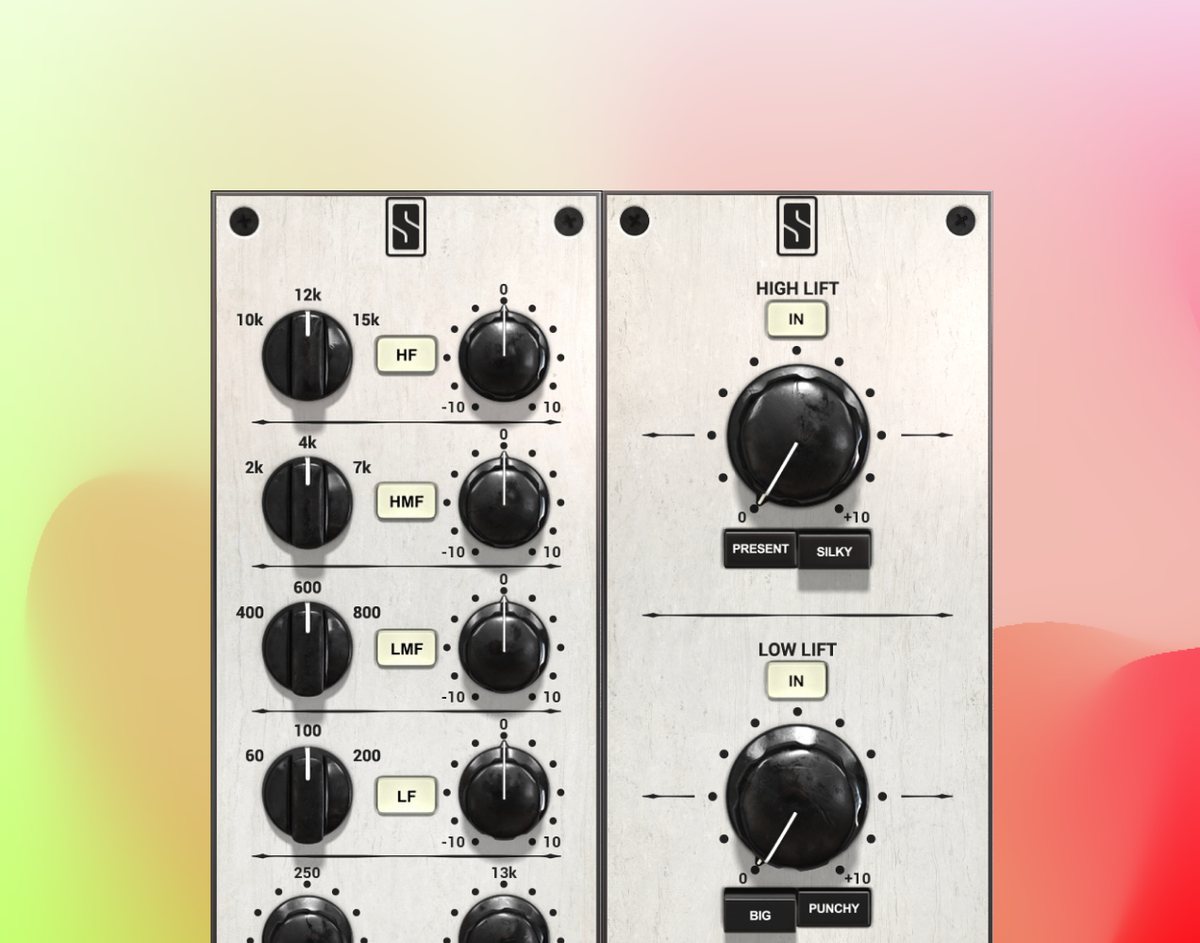
Slate Digital's Custom Series Bundle pairs the Custom Series EQ with Custom Series Lift, a boost-only parallel filter. The maker describes it as an EQ all-star team in a single bundle.
During development the company studied over a dozen classic analog equalizers and gathered the best attributes of each into one plugin. Every band takes its cue from a different original device, so boost and cut behave differently from band to band.
Each band also has its own analog-modeled output section that adds musical harmonics. The maker says that, although it is a hybrid design, the goal was an EQ that stays natural in use.
Unlike the hardware that inspired it, it is not bound by the limits of analog circuits. In the maker's examples, adding 10 dB at 15 kHz opens up dull tracks, cutting at 2 kHz tames brittle harshness in a vocal, and lifting 100 Hz adds low-end weight.
Key features
Each band modeled on a different original
Over a dozen classic analog EQs informed the design, and every band draws on a different one. Boost and cut circuits differ per band, so the response changes with the range you work in.
Analog-modeled output per band
Each band has its own output section that adds musical harmonics. It may suit moments when you want to shape tone and add a little warmth at the same time.
Adds top end without strain
The maker's example is a 10 dB boost at 15 kHz that does not turn strident. It may be a starting point for dull material that needs air.
Custom Series Lift: boost-only parallel filter
A boost-only parallel filter based on passive designs. It is blended with the original signal to add life and weight.
High Lift with Present / Silky
High Lift opens the top end for air and space. The Present and Silky buttons set whether the highs sit more forward or more smooth.
Low Lift with Big / Punchy
Low Lift adds low-frequency energy. The Big and Punchy buttons shape the transient and low-end information in two ways, which may help on bass guitar and kick drum.
Specifications
| Item | Details |
|---|---|
| Contents | Custom Series EQ and Custom Series Lift |
| Formats (Mac) | AU / VST / VST3 / AAX (64-bit host) |
| Formats (Windows) | VST / VST3 / AAX (64-bit host) |
| OS (Mac) | macOS 13 or later (Intel or Apple Silicon, 4 GB RAM) |
| OS (Windows) | Windows 10 / 11 (Intel or AMD, 4 GB RAM) |
| Licensing | iLok (free account required) |
What is included and system requirements
- Custom Series EQ plugin
- Custom Series Lift (boost-only parallel filter)
- Formats: AU / VST / VST3 / AAX on Mac; VST / VST3 / AAX on Windows
- Requirements: macOS 13 or later or Windows 10 / 11, 4 GB RAM or more
- A free iLok account is required
How to use it
- After purchase, download the installer from your Plugin Boutique or Slate Digital account.
- Prepare a free iLok account and activate the license on iLok Cloud, an iLok 2 or 3 dongle, or the local computer (Machine-ID).
- After installing, load Custom Series EQ on an insert in your DAW.
- Pick one range of interest and move boost and cut a little at a time to hear how it responds.
- To add weight or air, add Custom Series Lift and adjust High Lift or Low Lift.
- Switch the Present / Silky or Big / Punchy buttons to find the shape that fits the track.
- Compare against the bypassed signal to make sure you have not overdone it.
Where it may come in handy
Brightening a dull vocal
If a vocal sounds dark, High Lift or a boost on one of the high bands may add air. For harshness, a cut around 2 kHz is a place to start.
Adding weight to bass and kick
Low Lift adds low-end energy, and switching between Big and Punchy lets you search for a shape. It may help when a bass or kick feels thin.
Finishing a bus or master
For gentle broad tonal shaping, small boosts may help polish a bus. Plugin Boutique's review summary also mentions bus and mastering use.
Who it may suit
- Those who want analog-style boost and cut in a single plugin
- Those who want to add air or low-end weight quickly
- Those who want an EQ for vocals, bass, buses and more
- Those who already manage Slate Digital plugins with iLok
Good to know before you buy
- Licensing uses iLok; a free iLok account is required.
- Complete Access licenses allow two activations; individual plugin licenses can be activated on an iLok 2 or 3 dongle or the local computer (Machine-ID).
- The maker's description centers on tone shaping; for pinpoint surgical work you may want to pair it with another EQ.
- The maker does not actively test operating systems older than the stated minimum.
Price
$99 (Slate Digital official site, checked 2026-10-27). Prices can vary by region and promotion, so check the official page before buying.
See Custom Series Bundle on the product page
More of the same kind
We have introduced 34 filters. Here are some of the others.
- MNTRA Mntra FLTRS
- Soundtoys FilterFreak
- McDSP McDSP FilterBank Native v7
- Solid State Logic Native X-Phase
- Rob Papen FilterField
- FabFilter FabFilter Micro
We have introduced 21 other products from Slate Digital.
- Slate Digital Rotary SD-147
- Slate Digital FG-Stress
- Slate Digital The Monster
- Slate Digital SD-3A
- Slate Digital FG-Dynamics
See the full list in Product database: Effects.
Sources: slatedigital.com pluginboutique.com (checked 2026-10-27)










Comments