
Disclosure: This page may contain affiliate links. Prices were checked on the date shown and may change.
An introduction to UVI Walker 2, based on information from the maker and distributors: what it does, how to use it and who it may suit. It is not scored.
Walker 2 is a comprehensive, flexible and easy to use sound design tool that delivers everything you need to create realistic or completely fantastical footsteps and movement sounds.
— UVI official site
What is Walker 2?
Walker 2 is a footstep foley designer from the French developer UVI. It is a sampled instrument for film, games and post-production that builds footsteps and movement sounds from combinations of shoe or foot type, surface and clothing material.
According to the official page, this is a ground-up redesign with a new engine and more than 45,000 newly recorded samples. It includes 14 types of shoes and 8 types of animal feet such as paws, hooves and talons; the product summary counts 22 shoe and foot types in total. Designed steps based on fire, metal, organic, rocks, water and wood, for creatures and robots, are also included.
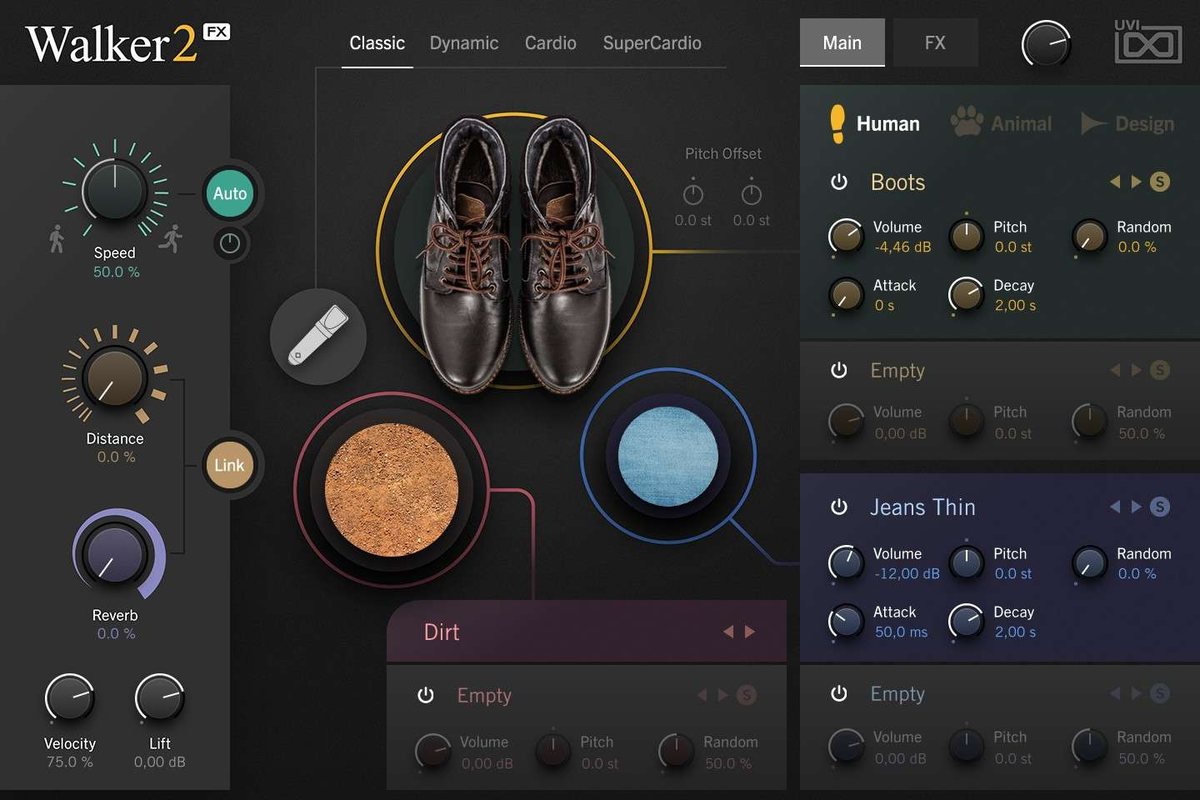
The sound is built in three layers: steps, surface and clothing, each with its own adjustable sub-layer. There are 32 surfaces including stairs and 24 clothing options such as casual outfits, jeans, leather, rain coats, a wool coat and a winter parka.
Controls for speed, distance, velocity and lift let the footsteps be performed in detail to match the action on screen. It runs in the UVI Workstation (free) or in Falcon.
Key features
More than 45,000 new recordings
Both regular steps and lift samples are recorded, with discrete takes for slow, normal and fast paces, which may help when matching natural footsteps to picture.
Three layers: feet, surface, clothing
Foot type, surface and clothing material are chosen separately and each sub-layer has its own level, so changing the surface and clothing can adapt the same shoe to a different scene.
32 surfaces
Carpet, concrete, wood floors and decks, dirt, grass, forest, glass, gravel, hay, linoleum, metal, sand, tile, terracotta, water and stairs are included. The official page notes that not every shoe is available on every surface.
24 clothing options
Cloth movement sounds such as casual outfits, jeans, leather, rain coats, silk, wet suit, wool coat and winter parka can be added. Sub-layers for worn items such as backpacks, chains and firearms are also described.
Built-in EQ, compressor and reverb
A 3-band EQ with low and high cuts, a compressor, a limiter and a convolution reverb with 46 impulse responses are built in, placing steps in spaces from small rooms to outdoors.
User sample support
In Falcon, users can import their own samples into the Walker 2 engine, which may help when handling self-recorded steps with the same controls.
Specifications
| Item | Details |
|---|---|
| Type | Footstep foley instrument |
| Content | 45,295 samples and 106 presets |
| Size | 2.58 GB (FLAC lossless; 4.89 GB in WAV) |
| Sample resolution | 48 kHz (recorded at 96 kHz) |
| Feet, surfaces, clothing | 22 foot types, 32 surfaces, 24 clothing materials |
| Licensing | 3 activations per license on any combination of machines or iLok dongles |
| Host | UVI Workstation 3.1.5 or Falcon 2.5.7 or later |
| Requirements | iLok account (free, dongle not required); internet connection for activation |
| Supported OS | macOS 10.14 Mojave through macOS 27; Windows 10 to 11 (64-bit) |
| Recommended | 3 GB disk space, 4 GB RAM, SSD or 7,200 rpm drive |
| Formats | Audio Units, AAX, VST, VST3, standalone |
What is included and system requirements
- Walker 2 sound bank (45,295 samples and 106 presets)
- 22 foot types, 32 surfaces, 24 clothing materials and sub-layers
- 3-band EQ, compressor, limiter and a 46-IR reverb
- Requires UVI Workstation (free) or Falcon to run
- Manual and sound bank installation guide
How to use it
- Prepare a free iLok account (a dongle is not required).
- Prepare UVI Workstation (free) or Falcon.
- After purchase, install the sound bank and activate it.
- Open UVI Workstation or Falcon in the DAW and load Walker 2.
- Choose the foot type, surface and clothing.
- Set the space with one of the four mic options and a reverb impulse response.
- Move the speed, distance, velocity and lift controls to play steps against the picture.
Where it may come in handy
Foley for picture
It may help build footsteps that follow a character on screen by choosing shoes, surface and clothing close to the scene.
Sound design for games and film
The designed steps for creatures and robots can be used to build movement sounds that do not exist in real life.
Personal video projects
When recording footsteps yourself is difficult, it may help to audition different surfaces.
Combining with your own samples
In Falcon, self-recorded steps could be handled with the same controls.
Who it may suit
- People working on sound for film, games or post-production
- People who want to create footsteps without recording foley themselves
- People looking for creature or robot steps
- Falcon users looking for a footstep add-on
Good to know before you buy
- Walker 2 runs inside UVI Workstation (free) or Falcon; it is not a standalone plug-in.
- A free iLok account is required, and activation needs an internet connection.
- The size is 2.58 GB (FLAC), and 3 GB of free disk space is listed for installation.
- User sample import is described as a Falcon feature.
Price
$199 (UVI official site, checked 2026-10-27). Prices can vary by region and promotion, so check the official page before buying.
See Walker 2 on the product page
More of the same kind
Other introduction articles of the same kind.
We have introduced 9 other products from UVI.
Sources: uvi.net pluginboutique.com (checked 2026-10-27)










Comments