
Antinode Audio’s Clear (formerly Supertone Clear) is a plug-in that reduces noise and room ring with just three knobs: voice, ambience and voice reverb. With AI voice separation, you can keep only the voice, or the other way around, remove the voice.
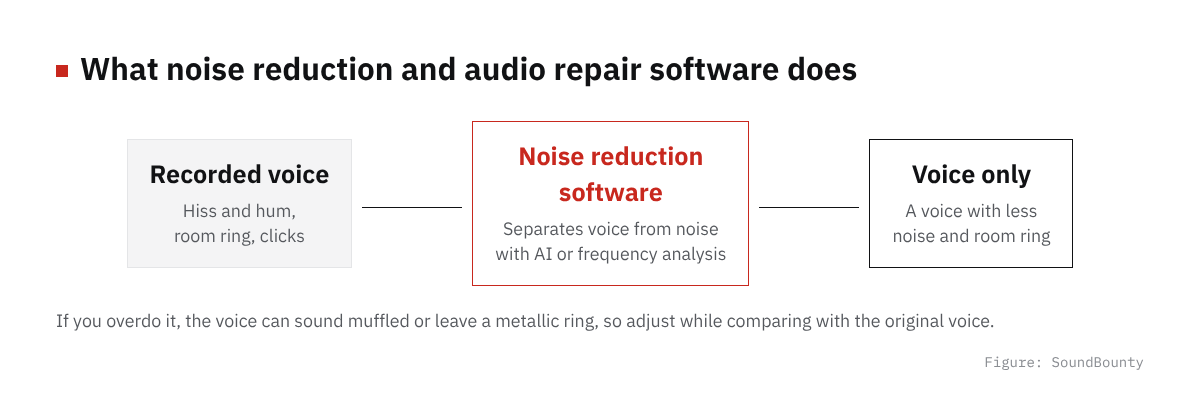
Noise reduction and audio repair software is a tool for reducing, after the fact, noise that got into a recording, such as air conditioner noise, room ring and hum.
In this article we compare Clear with 13 noise reduction and audio repair programs and rate how well it serves its purpose on three criteria. The basis is official manufacturer information.
Disclosure: This article contains affiliate links. If you buy through them, SoundBounty may earn a commission at no extra cost to you. Prices and sale information are as of the date we checked them and can change.
Score 3.0 / 5 (average of the 13 products compared: 2.9)
- Specs last checked
- 2026/09/25
- Noise control for vocal recordings
- Noise + room ring
- Sound separation
- Voice separation
- Speed
- 3 knobs
- Price (store, date)
- $69 [Official, checked Oct 26]
Summary
Among the 13 noise reduction and audio repair programs, Clear is rank B. The ranks run S, A, B and C, and B is third from the top. Averaging the scores for each criterion (out of 5, with the one criterion that matters most for the purpose counted double) gives 3.0.
Strengths
- Streaming and real time (5 points): you can reduce noise on the spot while streaming or recording.
Things to keep in mind
- Noise control for vocal recordings (2 points): the kinds of noise it deals with are limited.
Who it suits: people who want to reduce the room ring and everyday noise of a home-recorded vocal quickly with three knobs.
Main features of Clear
Adjust voice, ambience and reverb with three knobs
Clear is a plug-in (formerly named Supertone Clear) that reduces noise and room ring with only three knobs: Voice, Ambience and Voice Reverb. The official page says a few turns of the knobs give you a clearer voice. Its strength is that you can use it without detailed settings.
AI separates the voice from everything else
It separates the voice from noise and ring with AI (a neural network) trained to separate voices. The official page lists few unnatural artifacts after processing as a feature. You can also do the reverse, removing the voice and keeping only the surrounding sound.
Real time, so it also suits streaming
Because processing is real time, you can use it for streaming and hear the result on the spot. The official page also lists streamers as an example of its users. It supports the VST2 format, so it can be loaded directly into the streaming software OBS.
Where it is useful
- Reducing air conditioner and outside noise to get a clear voice when streaming or playing games
- Reducing the room ring in a vocal or narration recorded at home
- Reducing the background noise that got into video footage afterwards
Rating by criterion
Noise control for vocal recordings: 2 / 5
We look at how it deals with noise that often gets into home recordings.
It can reduce noise and room ring. There is no dedicated processing for hum, clicks or lip noise.
If “noise control for vocal recordings” matters most to you, RX 12 Advanced and RX 12 Standard (5 points) are a better fit.
Sound separation: 3 / 5
We look at features that separate the voice from the backing, or separate by part.
It separates voice and surrounding sound with AI, and you can adjust the amount of each.
Speed: 3 / 5
We look at features that make repair work faster.
You can adjust with only three knobs: voice, ambience and voice reverb.
Streaming and real time: 5 / 5
We look at whether it can reduce the noise in a voice in real time while streaming or recording.
The official page states that it processes in real time and suits streamers who want to deliver a clean voice.
How we score (Noise reduction and audio repair software)
| Criterion | Basis | 5 pt | 4 pt | 3 pt | 2 pt | 1 pt |
|---|---|---|---|---|---|---|
| Noise control for vocal recordings | How it deals with noise that often gets into home recordings | Deals with background noise, hum, clicks and room ring, and even lip noise, breaths, sibilance and plosives | Deals with most of those | Deals with the basics: background noise, hum, clicks and room ring | Only some | — |
| Sound separation | Features that separate voice from backing, or by part | Voice extraction, part separation, removal of bleed and separation of scenes are all included | Three of those | One or two of those | — | No separation features |
| Speed | Features that make repair work faster | Automatic suggestions, spectral editing and batch processing, plus features that match ambience and EQ | Automatic suggestions, spectral editing and batch processing | A feature that automatically suggests repair settings | — | — |
| Streaming and real time | Whether it reduces noise in a voice in real time while streaming or recording | Works in real time, and use for streaming is stated officially | Voice noise reduction is available as a real-time plug-in with no delay (zero latency) | Can be used as a plug-in (amount of delay not stated) | Mainly editing after recording (only the preview of processing is real time) | Cannot be used in real time |
Each criterion is scored from 1 to 5 on how well the product serves one goal: reducing the noise in a vocal you recorded at home. Scores follow the conditions in the table above, and the rank is based on an average in which "Noise control for vocal recordings" counts double. The basis is official manufacturer information. Sound quality and CPU load are not measured, so they are not scored; reviews from trade magazines are introduced in the articles for reference. Price is not part of the score. Features that cannot be confirmed from the manufacturer's or a retailer's description are scored as if absent. "Streaming and real time" is a criterion that answers the common search for "noise reduction that works for streaming". The "OBS (streaming)" column in the table shows whether the official page lists the VST2 format that the streaming software OBS Studio can use (○). OBS does not support the VST3 format. It is not part of the score.
Clear system requirements and getting started
| Operating system | Windows 10 or later (64-bit) / Mac (macOS 10.13 or later, Apple silicon native) |
|---|---|
| Plug-in formats | VST, VST3, AU, AAX |
| Other | One-time purchase (you can use it for good with a single purchase) |
| Trial | Free trial available (noise is mixed in every 60 seconds, and settings cannot be saved) |
| OBS (streaming) | Works as it is (VST2 is listed) |
Checked on the manufacturer’s official pages on September 27, 2026.
Compared with other noise reduction and audio repair programs
Click a heading to sort. On a phone, the table scrolls sideways.
| Product | RankAvg. score | Noise control for vocal recordings | Sound separation | Speed | Streaming and real time | Free | OBS (streaming) | Price (store, date) |
|---|---|---|---|---|---|---|---|---|
| iZotopeRX 12 Elements | B 2.8 | Basic noise | None | Automatic suggestions | Voice De-noise (no delay) | — | × (VST3 only) | $99 [PB, checked Oct 26] |
| iZotopeRX 12 Standard | S 4.4 | Down to lip noise and breaths | Voice extraction and separation | Suggestions + spectral editing | Voice De-noise (no delay) | — | × (VST3 only) | $399 [PB, checked Oct 26] |
| iZotopeRX 12 Advanced | S 4.8 | Down to lip noise and breaths | Down to separating scenes | Also matches ambience and EQ | Voice De-noise (no delay) | — | × (VST3 only) | $1,399 [PB, checked Oct 26] |
| SteinbergSpectraLayers Pro 13 | A 4.0 | Room ring and sibilance too | Separates every part of a song | Automatic processing + batch | Mainly editing after recording | — | × | $359.99 [PB, checked Oct 26] |
| SteinbergSpectraLayers Elements 13 | C 2.4 | Noise, hum, clicks | Vocal separation | Spectral editing | Mainly editing after recording | — | × | $89.99 [PB, checked Oct 26] |
| Acon DigitalRestoration Suite 2 | C 2.2 | Noise, hum, clicks | None | Automatic mode | Plug-ins (DeNoise and others) | — | ○ | $99 [PB, checked Oct 26] |
| Antinode AudioClear | B 3.0 | Noise + room ring | Voice separation | 3 knobs | Stated for streaming | — | ○ | $69 [Official, checked Oct 26] |
| WavesClarity Vx | B 2.6 | Background noise | Voice separation | One knob | Real time | — | △ (via Waves' StudioRack) | $39.99 (sale; regular $199) [PB, checked Oct 26] |
| WavesNS1 | B 2.6 | Background noise | Voice separation | One fader | Real time | — | △ (via Waves' StudioRack) | Not listed |
| WavesWNS | C 2.2 | Background noise + room ring | None | Suggests settings | Real time | — | △ (via Waves' StudioRack) | Not listed |
| WavesClarity Vx Pro | B 2.6 | Background noise + reflections | Voice separation | One knob + details | Real time | — | △ (via Waves' StudioRack) | Not listed |
| WavesZ-Noise | C 2.2 | Noise, hum | None | Automatic tracking mode | Plug-in | — | △ (via Waves' StudioRack) | Not listed |
| Bertom AudioDenoiser Classic | C 2.2 | Noise | None | Manual adjustment | Zero latency | Free | × (VST3 only) | Not listed |
Features checked on each manufacturer's official website on September 25, 2026. Check the store page behind the buy button for the price.
Read next
- Clarity Vx: features and rating (rank B)
- NS1: features and rating (rank B)
- Restoration Suite 2: features and rating (rank C)
- WNS: features and rating (rank C)

Comments