
How monitor speakers for home recording and DTM sound changes a lot with how the woofer size suits your room, and with placement. This article sorts out how to choose, centered on size, room size and placement, while comparing seven standard models. We do not give prices; check the current price at the store you buy from.
Disclosure: This article contains affiliate links. If you buy through them, SoundBounty may earn a commission at no extra cost to you. Information is as of the date we checked it and can change.
Four points for choosing monitor speakers
1. A guide to woofer size and room size
For monitor speakers, the diameter of the woofer (the unit for low sounds) changes how much bass they can play and the size of the speaker itself. The 3 to 3.5-inch class (such as the PreSonus Eris 3.5 2nd Gen, IK Multimedia iLoud Micro Monitor and Genelec 8010AP) feels less imposing even on a desk, and suits a one-room apartment of under about 10 square meters and environments centered on near-field (close-range) monitoring on a desk. The 5-inch class (JBL 305P MkII, ADAM Audio T5V and Focal Alpha EVO 50) adds more bass but is also physically bigger, so you need space for stands or a dedicated shelf rather than a desk. The 6.5-inch class (Yamaha HS7) is a choice for environments with more room in volume, and people who want to check the low end solidly.
In general, the smaller the room, the more easily large-diameter speakers emphasize standing waves (the muddiness and swelling of the lows caused by room reflections). In a room with a lot of reflection, such as a one-room apartment, using a small to medium-diameter model at an appropriate volume can sometimes be easier to handle than forcing a large size.
2. Placement: an equilateral triangle and ear height
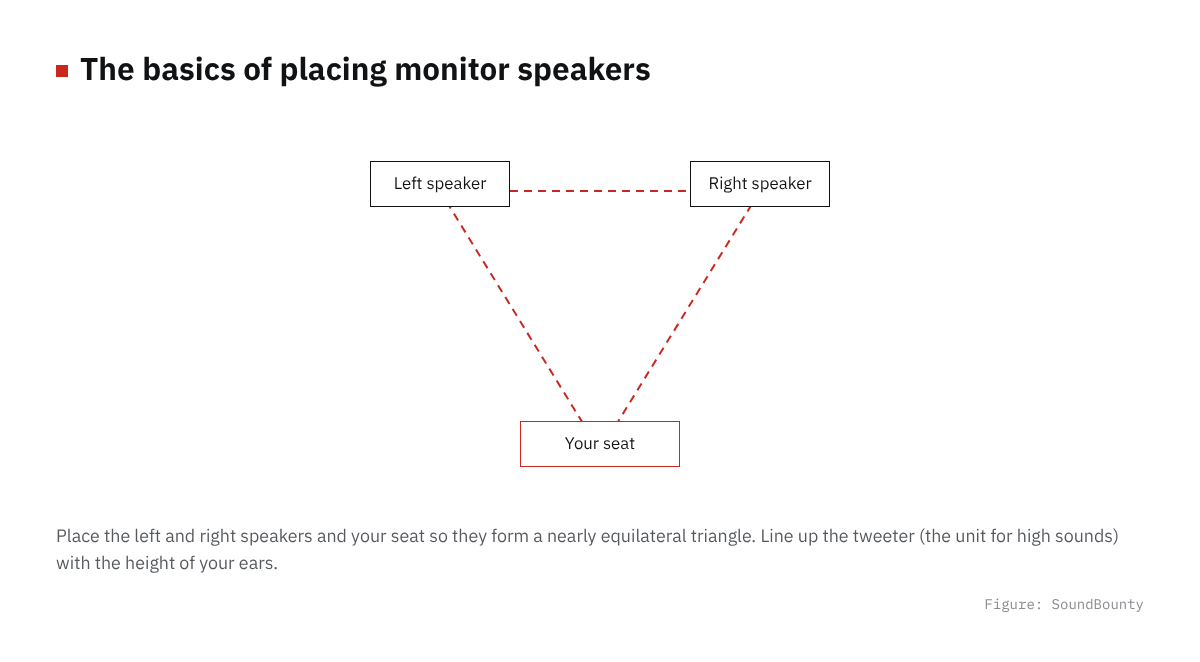
Figure: SoundBounty
The basic rule for monitor speakers is to place them so that the left and right speakers and the listening position (where you sit to work) form a nearly equilateral triangle. It is also recommended on many models to adjust the height with stands or platforms so the tweeter (the unit for high sounds) is at ear height. If you put them directly on a desk, the desk’s reflections can make the lows muddy and desk vibration can transfer to the speakers, so using isolators (anti-vibration pads) or speaker stands as well makes it easier to check with a steadier sound.
3. The rear port (bass reflex) and distance from the wall
Many of the models introduced here have an opening called a “bass reflex port” at the back or front, a structure that reinforces the bass. If you place a model with a rear port right up against a wall, the lows can be over-emphasized, so it is generally recommended to leave a few tens of centimeters from the wall. If you do not have much room to set them up, front-port models, and models with the room correction functions described below, become choices.
4. Whether it has room correction and trim functions
The Yamaha HS7 has two switches, “ROOM CONTROL” (corrects the bass emphasis caused by placing it near a wall) and “HIGH TRIM” (adjusts the amount of highs), so you can adjust its characteristics simply to suit where you place it. The Focal ALPHA EVO 50 also has a shelf function that lets you adjust the lows by ±6 dB in the range of 0 to 250 Hz. If your room is hard to change, choosing a model with such adjustment functions gives you more freedom of placement.
A comparison of seven models
| Model | Features | Who it suits |
|---|---|---|
| JBL 305P MkII | 5-inch (12.7 cm) woofer, 82 W, Image Control Waveguide controls the directivity. Sold individually | People who want to keep costs down for their first pair |
| PreSonus Eris 3.5 2nd Gen | A 3.5-inch woven composite woofer plus a 1-inch silk dome tweeter, 80 Hz to 20 kHz, a headphone jack on the front. Sold as a pair | People who want to place them small on a desk |
| IK Multimedia iLoud Micro Monitor [Black] | Two-way bass reflex, 50 W RMS in total. The maker advertises it as “the world’s smallest active studio reference monitor”. Sold as a pair | People whose desk space is especially limited |
| Yamaha HS7 [Black, single] | Two-way, 6.5-inch woofer, 43 Hz to 30 kHz, with ROOM CONTROL and HIGH TRIM switches. Sold individually | People who want standard characteristics and may use them in a slightly larger room |
| ADAM Audio T5V | A 5-inch woofer plus a U-ART ribbon tweeter, 45 Hz to 25 kHz. Sold individually | People who value the resolution of the highs |
| GENELEC 8010AP | 3-inch two-way with 25 W x 2 amplifiers built in, compact at 195 mm high x 121 mm wide x 115 mm deep and about 1.5 kg. Sold individually | People who want a serious monitor even in a small size |
| Focal ALPHA EVO 50 | Two-way, 60 W (35 W + 25 W), 45 Hz to 22 kHz, low shelf adjustment (0 to 250 Hz, ±6 dB). Sold individually | People who want to fine-tune the lows to suit the room |
On this site we also rate them by official specifications. See our monitor speaker comparison; reviews we have are JBL 305P MkII, JBL 104-BT, ADAM Audio T5V and ADAM Audio D3V.
How to choose by room size and use
For a one-room apartment centered on the desk, start with a small diameter
For a one-room apartment of under about 10 square meters, or when desk space is limited, the 3 to 3.5-inch class is an easy choice to handle. The PreSonus Eris 3.5 2nd Gen and IK Multimedia iLoud Micro Monitor are both small and designed for near-field work. The GENELEC 8010AP is also in the 3-inch class but is known as a serious monitor brand, and although it costs more than other small units, it is a candidate for people who want to combine it with saving desk space.
If you can have dedicated space, the 5 to 6.5-inch class
If you can prepare stands or a shelf, or work at a certain volume, raising the accuracy of checking the low end in the 5-inch or larger class is one way. The JBL 305P MkII costs less even among 5-inch models and suits a first pair. The ADAM Audio T5V has the resolution of the highs from its ribbon tweeter, the Yamaha HS7 has the range of adjustment to the placement environment from ROOM CONTROL and HIGH TRIM, and the Focal ALPHA EVO 50 has low shelf adjustment; as you go up in price, features that “let you fine-tune to the room” tend to be added.
If you cannot leave space at the wall or behind
If you have to place a model with a rear bass reflex port near a wall, take care that the lows are easily emphasized. Choosing a model with a correction function meant for placement near a wall, like the Yamaha HS7’s ROOM CONTROL switch, or choosing on the premise of adjusting with volume and an equalizer after placing, makes you less likely to fail.
Frequently asked questions
Q. Are ordinary PC speakers not good enough?
Ordinary PC speakers and TV speakers are often flavored to emphasize the lows and highs, and if you mix by that sound, the balance easily falls apart when you listen in other playback environments. Monitor speakers are designed not to emphasize particular bands excessively, so they are said to be easy to use as a production reference.
Q. Can I work on headphones alone?
Headphones reproduce the soundstage differently from speakers, and the feel of the amount of bass and of placement (the left-right and depth positions of sound) also differs. If possible, it is usual to use both speakers and headphones and check in several environments. At times when you cannot play speakers, such as late at night, it is good to use headphones as well.
Q. Do I need a subwoofer?
All the models introduced here are used without a subwoofer. For genres with bass instruments, where you want to check even lower bands solidly, you can add a dedicated subwoofer, but it is good to first check whether the bass reproduction of the monitor speakers you chose is enough on its own.
Q. Should I buy monitor speakers as a pair? Is a single one okay?
If you work while checking left-right placement, buying a pair (two) is basically the premise. For models sold individually in our comparison, you need to buy one at a time and get two. For models sold as a pair, such as the PreSonus Eris 3.5 2nd Gen and IK Multimedia iLoud Micro Monitor, the listing is a pair.
Summary
The order least likely to fail when choosing monitor speakers is: first decide the woofer size (3 to 3.5 inch, 5 inch or 6.5 inch) from the room size and available space, then narrow down by placement (equilateral triangle, ear height, distance from the wall) and, if needed, whether it has room correction. For saving space, the Eris 3.5 or iLoud Micro Monitor; to try 5 inches while keeping costs down, the JBL 305P MkII; and if you value the range of adjustment to the placement environment, the HS7 or ALPHA EVO 50 are candidates. Prices change, so check the latest price before you buy.
Read next
- Monitor speaker comparison
- How to choose monitor headphones
- A guide to acoustic treatment for home recording


Comments