
Disclosure: This page may contain affiliate links. Prices were checked on the date shown and may change.
An introduction to Audio Modeling SWAM Double Reeds, based on information from the maker and distributors: what it does, how to use it and who it may suit. It is not scored.
going beyond the limitations of traditional sample libraries
— Audio Modeling official site
What is SWAM Double Reeds?
SWAM Double Reeds (v3 on the official page) is a virtual double-reed woodwind collection from Audio Modeling of Italy. It includes four instruments: oboe, English horn, bassoon and contrabassoon.
Instead of stacking recorded samples, it uses physical modeling, which calculates how the instrument produces sound. The maker describes it as going beyond the limits of traditional sample libraries.
Dynamics, vibrato and the transitions between notes such as staccato and legato can be shaped in real time while you play. It is built for players using a MIDI keyboard or a breath controller.
It comes as standalone, AU, VST, VST3 and AAX, and supports NKS in VST3 form. In Japan it is distributed by Media Integration, and a small install size and light CPU use are among the stated points.
Key features
Physical modeling engine
Rather than replaying recordings, it calculates how the instrument makes sound. Changes in playing strength and phrasing carry into the tone, which may help when you want detailed expression.
Four instruments
Oboe, English horn, bassoon and contrabassoon are included. Covering high to low double reeds in one product may suit woodwind arrangement sketches.
Staccato and legato handling
Transitions such as staccato, legato and portamento are described as switchable without key switches. Expression follows how you play, which may make keyboard input easier.
Tuning and timbre controls
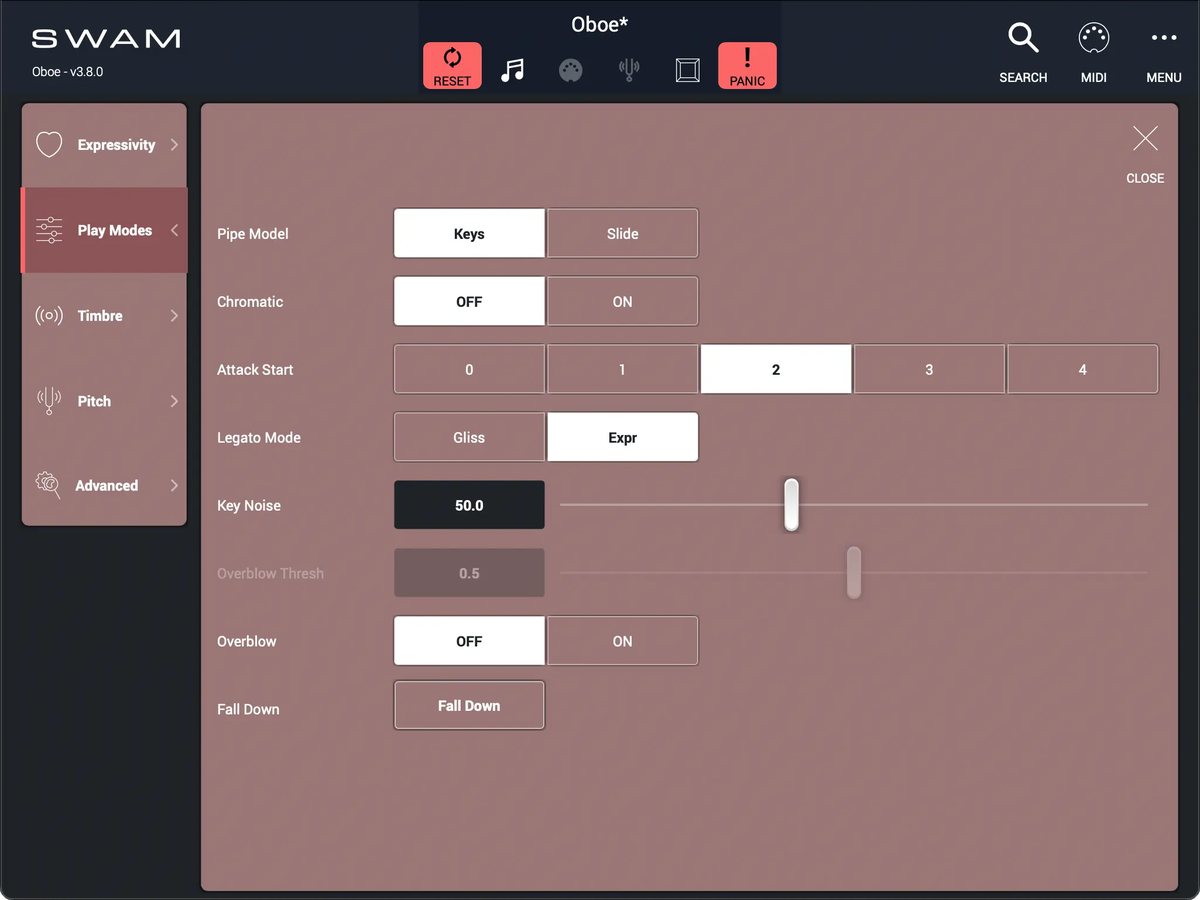
Master tuning, pitch-bend range and micro tuning sit alongside timbre and expressivity controls and FX. A slide-pipe model allows continuous bends up to plus or minus 12 semitones, which may suit uses such as maqam scales.
MIDI mapping and preset manager
MIDI Learn, curve remapping and controller presets are provided, with all assignments in one list. Presets can be saved, loaded and exported, which may help you tailor it to your controller.
Room feature
An acoustically modeled space is built in, with selectable room types and sizes. It may be a starting point when you want some air without adding an outside reverb.
Accessibility
It can be operated through the native accessibility frameworks on macOS, Windows and iOS. The Japanese distributor's page notes keyboard shortcuts and screen-reader descriptions were added in version 3.8.
Specifications
| Item | Details |
|---|---|
| Instruments | Oboe, English horn, bassoon, contrabassoon |
| Range (concert pitch) | Oboe Ab2-Gb5 / English horn D2-F5 / Bassoon A0-Gb4 / Contrabassoon A-1-G4 (middle C = C3; bassoons default one octave lower) |
| Formats (Mac) | Standalone, AU, VST, VST3, AAX (64-bit) |
| Formats (Windows) | Standalone, VST, VST3, AAX (64-bit) |
| NKS | VST3 only |
| OS | macOS 10.13-27 (Apple Silicon native), Windows 10/11 |
| Install size | Mac 52-180 MB, Windows 36-84 MB depending on formats |
| RAM | About 52 MB per instance |
| CPU | 1.6 GHz Core 2 Duo or better for one instance |
| Trial | 15 days |
What is included and system requirements
- Oboe
- English horn
- Bassoon
- Contrabassoon
- Formats: standalone, AU, VST, VST3, AAX (NKS in VST3)
- OS: macOS 10.13-27, Windows 10/11
How to use it
- Buy from the official site or the Japanese distributor and get the product from your account (Customer Portal).
- You can try the 15-day trial before buying.
- Run the installer and choose the plug-in formats your DAW uses (AU, VST3, AAX and so on).
- Create an instrument track in your DAW and load SWAM Double Reeds.
- Pick an instrument, such as the oboe, on screen.
- Move a knob or pedal on your MIDI controller and use MIDI Learn to assign it to key expression parameters.
- Choose the room type and size to set the sense of space.
- Save settings you like in the preset manager.
Who it may suit
- People who want to shape oboe or bassoon parts by hand
- People who want woodwinds with little storage and CPU load
- Players using a MIDI keyboard or breath controller
- People who want to try micro tuning
Good to know before you buy
- Its approach differs from sample libraries, and expressive control with a controller may take some getting used to.
- The listed price is an estimate; currency and taxes are set at checkout.
- The Japanese distributor lists different requirements (for example 245 MB), so check the official support page for current ones.
How it differs from similar products
We do not pick a winner; the official figures are placed side by side.
SWAM Flutes
Both are listed at 249 USD on the official pages. Double Reeds has four reed instruments, while Flutes has flute, alto flute, bass flute and piccolo. The choice comes down to reed or flute family.
Price
$249 (Audio Modeling official site, checked 2026-10-27). Prices can vary by region and promotion, so check the official page before buying.
See SWAM Double Reeds on the product page
More of the same kind
We have introduced 3 orchestral instruments. Here are some of the others.
We have introduced 12 other products from Audio Modeling.
- Audio Modeling SWAM Solo Trumpets
- Audio Modeling SWAM Solo Strings 3
- Audio Modeling SWAM Violin
- Audio Modeling SWAM Flutes
- Audio Modeling SWAM Double Bass v3
For a side-by-side comparison scored on the same criteria, see our comparison of orchestral instruments.
See the full list in Product database: Instruments.
Sources: audiomodeling.com minet.jp (checked 2026-10-27)









Comments