
Disclosure: This page may contain affiliate links. Prices were checked on the date shown and may change.
An introduction to Audio Modeling SWAM Violin, based on information from the maker and distributors: what it does, how to use it and who it may suit. It is not scored.
Each performance gesture—bow speed, pressure, and position—shapes the sound in real time.
— Audio Modeling official site
What is SWAM Violin?
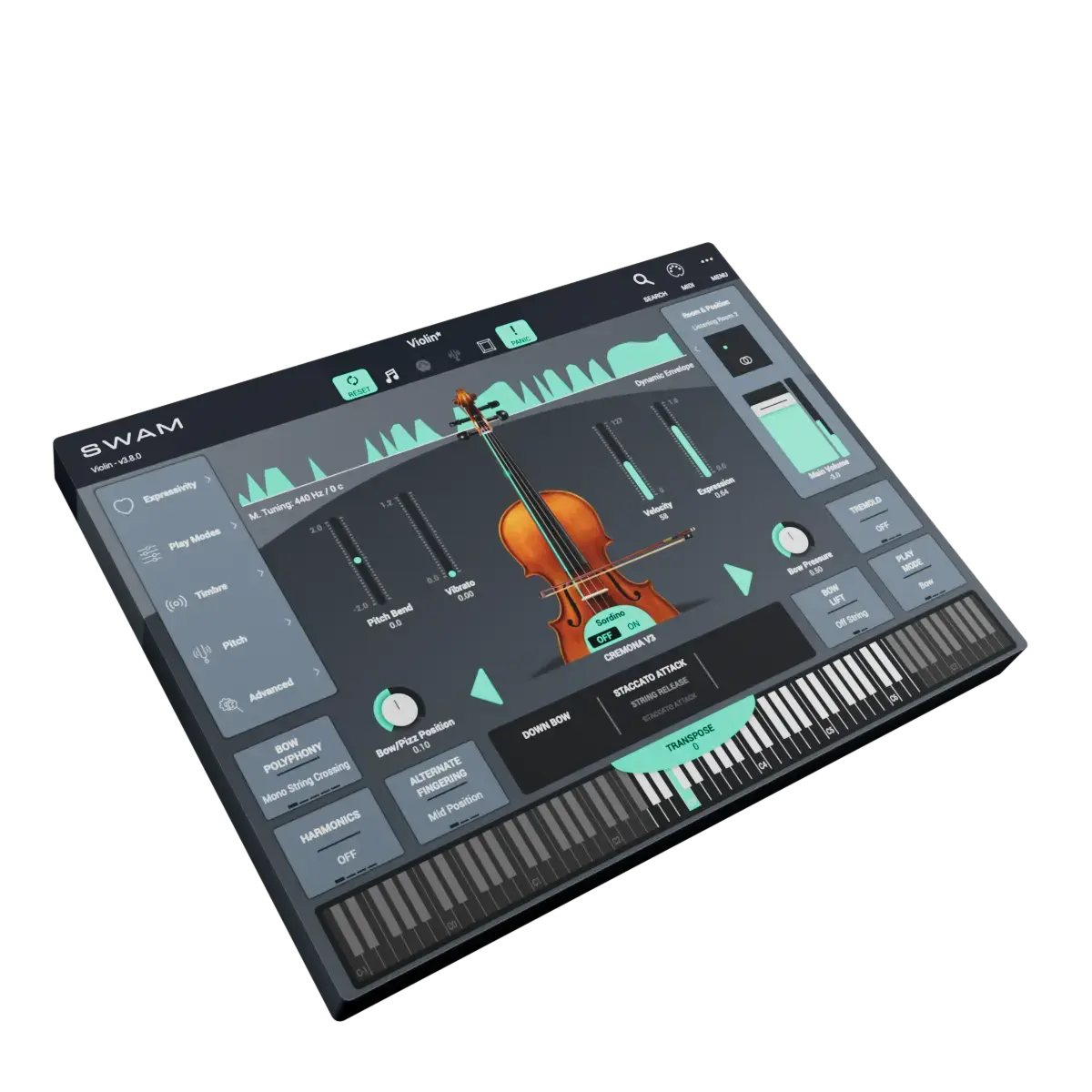
SWAM Violin (v3 on the official page) is a virtual instrument that recreates the bow-and-string interaction of a violin using physical modeling. It does not line up recorded samples.
The maker says each performance gesture, such as bow speed, pressure and position, shapes the sound in real time.
Legato, dynamics and vibrato are continuously controllable, with left hand, right hand and polyphony play modes.
The Japanese distributor says V3 adds stronger MIDI mapping, improved legato, a new pizzicato model and bow sensitivity control. Media Integration distributes it in Japan.
Key features
Continuous bow control
Bow speed, pressure and position are moved continuously, which may suit parts where you want to draw dynamic shifts by hand.
Play modes
Left hand, right hand and polyphony modes are available, switchable depending on whether the piece has double stops.
Rich expressive parameters
The distributor lists vibrato, portamento, growl, flutter tonguing, breath noise, dynamic pitch and more, with transitions needing no key switches.
Timbral collection
V3 adds a function to emphasize or reduce up to two harmonics, which may help tune tonal brightness.
Tuning and MIDI mapping
Master tuning, pitch-bend range and micro tuning come with MIDI Learn, curve remapping and controller presets.
Presets and room
A preset manager, a parameter search and a room with selectable materials and sizes are included.
Light design
It does not require gigabytes of storage and keeps CPU load down.
Specifications
| Item | Details |
|---|---|
| Range | G2-F6 (middle C = C3); extendable down to Ab1; higher via harmonics |
| Formats (Mac) | Standalone, AU, VST, VST3, AAX (64-bit) |
| Formats (Windows) | Standalone, VST, VST3, AAX (64-bit) |
| NKS | VST3 only |
| OS | macOS 10.13-27 (Apple Silicon native), Windows 10/11 |
| Install size | Mac 52-180 MB, Windows 36-84 MB |
| RAM | About 52 MB per instance |
| CPU | 1.6 GHz Core 2 Duo or better |
| Trial | 15 days |
What is included and system requirements
- SWAM Violin instrument
- Formats: standalone, AU, VST, VST3, AAX (NKS in VST3)
- OS: macOS 10.13-27, Windows 10/11
How to use it
- Buy from the official site or the Japanese distributor, or get the 15-day trial.
- Choose the formats your DAW uses and install.
- Create an instrument track and load SWAM Violin.
- Choose a play mode.
- Use MIDI Learn to assign an expression pedal or similar.
- Play notes and check legato and vibrato.
- Choose room material and size.
- Save settings as presets.
Who it may suit
- People who want to shape violin expression by hand
- People looking for a light string instrument
- Players using expression pedals or similar controllers
Good to know before you buy
- The listed price is an estimate; currency and taxes are set at checkout.
- It is also in the SWAM Solo Strings 3 bundle.
- The distributor's disk and RAM figures (15 MB) differ from the official ones.
How it differs from similar products
We do not pick a winner; the official figures are placed side by side.
SWAM Viola
Both are listed at 99 USD. The Japanese distributor gives the violin range as G2-F6 and the viola range as C2-C6.
Price
$99 (Audio Modeling official site, checked 2026-10-27). Prices can vary by region and promotion, so check the official page before buying.
See SWAM Violin on the product page
More of the same kind
Other introduction articles of the same kind.
- UVI Orbit
- Arturia Solina V
- Sonarworks SoundID VoiceAI Expansion PackC-Pop Voices
- IK Multimedia AmpliTube Orange
- MeldaProduction Rewind
- Pitch Innovations Groove Shaper
We have introduced 12 other products from Audio Modeling.
- Audio Modeling SWAM Solo Trumpets
- Audio Modeling SWAM Saxophones v3
- Audio Modeling SWAM Flutes
- Audio Modeling SWAM Viola
- Audio Modeling SWAM Cello v3
See the full list in Product database: Instruments.
Sources: audiomodeling.com minet.jp (checked 2026-10-27)









Comments