
Disclosure: This page may contain affiliate links. Prices were checked on the date shown and may change.
An introduction to Tracktion RetroMod 106, based on information from the maker and distributors: what it does, how to use it and who it may suit. It is not scored.
Simple and effective, the 3 classic Juno instruments have carved out a devoted following.
— Tracktion official site
What is RetroMod 106?
RetroMod 106 is a sample-based virtual instrument from Tracktion, built from sampled Roland Juno-60, Juno-106 and Alpha Juno 2 synthesizers.
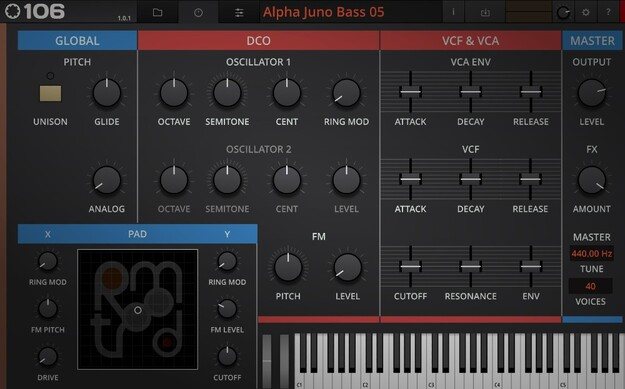
It is described as a multi-oscillator Juno that lets you layer tones, with stronger bass and chorused pads.
It contains 291 presets and about 15,000 samples in roughly 4.5 GB. It may be a candidate when you want to explore 1980s-style synth tones.
Formats are AU, AAX and VST on macOS and AAX and VST on Windows. The regular price is $49, and it is also part of the RetroMod Collection.
Key features
Three Juno models sampled
Sources are the Juno-60, Juno-106 and Alpha Juno 2, so one instrument covers several Juno flavours.
Layered oscillators
Multiple oscillators can be stacked to thicken a tone, which may help for leads and basses thicker than a single Juno.
Bass and pads
Stronger bass and chorused pads are the highlighted directions, which may be useful for low end and background chords.
291 presets
With 291 presets you can start by choosing a sound without tweaking many parameters.
About 15,000 samples
The library holds around 15,000 samples in about 4.5 GB, so check free disk space before installing.
Specifications
| Item | Details |
|---|---|
| Size | 4.5 GB |
| Presets | 291 |
| Samples | 15,000 |
| Source synths | Juno-60 / Juno-106 / Alpha Juno 2 |
| Formats | Mac: AU / AAX / VST, Windows: AAX / VST |
What is included and system requirements
- macOS 10.9 or later, Intel Core 2 Duo 2 GHz, 2 GB RAM (8 GB recommended)
- Windows 7, 8, 10, 11, Intel Core 2 Duo 2 GHz, 2 GB RAM (8 GB recommended)
- Formats: AU (Mac only) / AAX / VST
How to use it
- Buy from Plugin Boutique and get the license and installer.
- Install the roughly 4.5 GB library on a drive with free space.
- Rescan plug-ins in your DAW.
- Load RetroMod 106 on an instrument track.
- Choose a preset and play it on a keyboard.
- Adjust oscillator layering and effects to refine the sound.
Where it may come in handy
Synth-pop and 80s-style tracks
It may fit tracks where you want a Juno-type character.
Pads for width
Chorused pads could be used to build a track's background.
Bass lines
Layered oscillators may help build thicker bass sounds.
Who it may suit
- People who want Juno-style sounds in software
- People who prefer starting from presets
- People collecting the RetroMod series
Good to know before you buy
- It is a sample-based instrument of about 4.5 GB.
- It may also be included in the RetroMod Collection; check contents before buying.
Price
Please check the official page for the price.
See RetroMod 106 on the product page
More of the same kind
Other introduction articles of the same kind.
- Krotos Reformer Pro
- UJAM UJAM Usynth FLUID
- Krotos Weaponiser
- UJAM UJAM Usynth GLAM
- LANDR LANDR Composer
- Audio Modeling SWAM Cello v3
We have introduced 19 other products from Tracktion.
- Tracktion Outersect Modeler
- Tracktion RetroMod FAT
- Tracktion DAW Essentials Collection
- Tracktion Horizen
- Tracktion SpaceCraft
See the full list in Product database: Instruments.
Sources: pluginboutique.com (checked 2026-10-27)










Comments