
Disclosure: This page may contain affiliate links. Prices were checked on the date shown and may change.
An introduction to Tracktion SpaceCraft, based on information from the maker and distributors: what it does, how to use it and who it may suit. It is not scored.
The hugely popular iOS app by Delta-V Audio has come to the desktop!
— Tracktion official site
What is SpaceCraft?
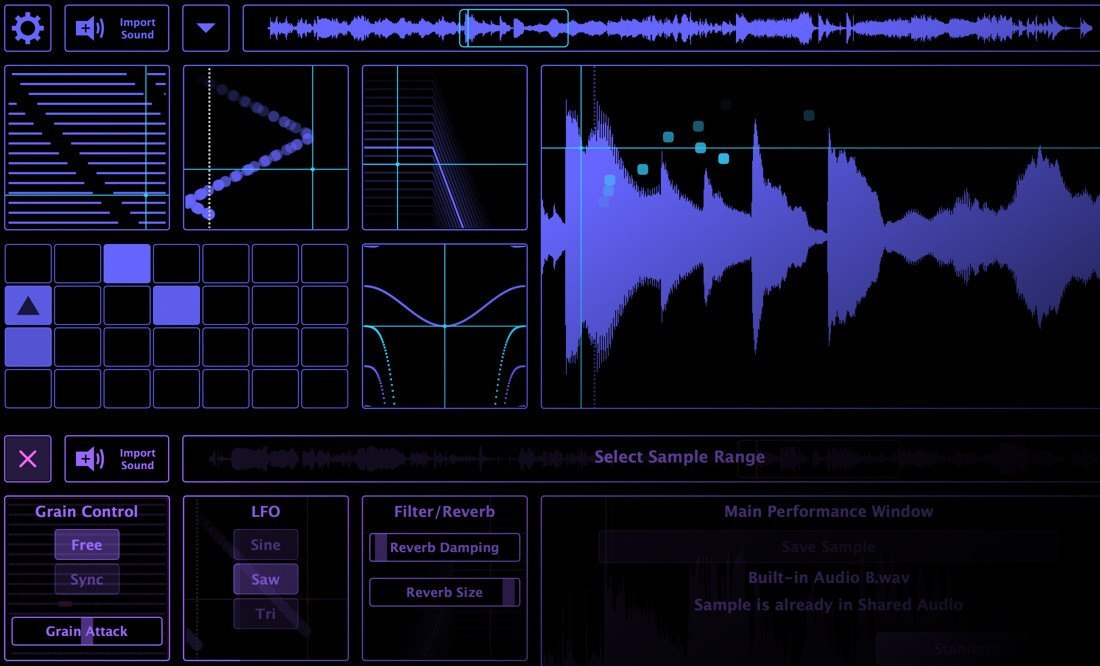
SpaceCraft is Tracktion's desktop version of a granular synth well known as an iOS app from Delta-V Audio. It splits a sample into small grains and plays them, and is described as giving instant gratification.
Two parallel granular engines provide grain frequency and length control, a sample-position LFO, stereo reverb and filter, and pitch and ring modulation.
A distinctive part is the arpeggiated note/grain sequencer grid that sets the grain pitch. Over 24 scales are offered, and the grain control XY pad lets you morph from granular chords and drones to rhythmic sequences.
Any sample you load or record becomes a playable MIDI or MPE instrument with no mapping needed. It has 16-note polyphony, and with MPE devices per-note pressure, pitch bend (Glide) and grain position (Slide) are available.
Key features
Two parallel granular engines
Two engines control grain frequency, length and sample position. They may help when layering samples into thick textures.
Grain pitch sequencer
An arpeggiated grid sets the grain pitch, with over 24 scales to choose from. It may help create melodic granular sounds.
Grain control XY pad
The XY pad morphs smoothly from chords and drones to rhythmic sequences. It may help when you want movement that follows a song's progression.
Live sampling
Samples can be loaded or recorded and become a playable instrument at once. It may suit voice or ambient-sound material.
MIDI and MPE
With an MPE device you get 16-note polyphony with per-note pressure, Glide and Slide. It may suit expressive pads and melodies.
Single-page interface
Controls sit on one page with fifteen color themes and reactive visuals. It may help you start sound design without time-consuming setup.
Specifications
| Item | Details |
|---|---|
| Polyphony | 16 notes |
| Scales | Over 24 |
| Color themes | 15 |
| Formats | AU / VST3 (Windows: VST3) |
| OS (maker) | macOS 10.11 or later (64-bit), Windows 8, 10, 11 (64-bit) |
What is included and system requirements
- SpaceCraft instrument
- Factory patches
- Formats: AU / VST3; macOS 10.11 or later, Windows 8, 10, 11
How to use it
- Create a Tracktion account and buy or start the free trial.
- Install SpaceCraft with the installer.
- Create an instrument track in your DAW and load SpaceCraft.
- Load or record a sample.
- Set the grain pitch using a scale and the sequencer grid.
- Move the XY pad to hear the grains change.
- Finish with the reverb and filter.
Where it may come in handy
Ambient drones
Splitting samples into grains may help create expanding drones and drifting textures.
Rhythmic granular patterns
The sequencer grid may help build rhythmic patterns.
Processing voice and field sounds
Recorded voice or ambient sound may become unusual textures.
Who it may suit
- People interested in granular synthesis
- People who want to turn samples into instruments quickly
- People who want expressive playing with MPE devices
Good to know before you buy
- The price is $99.
- A 30-day unlimited trial is offered.
- The iOS app version is from Delta-V Audio.
Price
$99 (Tracktion official site, checked 2026-10-27). Prices can vary by region and promotion, so check the official page before buying.
See SpaceCraft on the product page
More of the same kind
We have introduced 178 synthesizers. Here are some of the others.
- UVI Rumble
- Waves Element 2.0 Virtual Analog Synth
- KV331 Audio SynthMaster 3
- AIR Music Technology Hype
- Universal Audio Opal Morphing Synthesizer
- AIR Music Technology Hybrid 3
We have introduced 19 other products from Tracktion.
- Tracktion Waverazor
- Tracktion F.'em
- Tracktion RetroMod LoFreq Modern
- Tracktion Atmosia
- Tracktion Outersect Modeler
For a side-by-side comparison scored on the same criteria, see our comparison of synthesizers.
See the full list in Product database: Instruments.
Sources: tracktion.com (checked 2026-10-27)









Comments