
Disclosure: This page may contain affiliate links. Prices were checked on the date shown and may change.
An introduction to LANDR LANDR Composer, based on information from the maker and distributors: what it does, how to use it and who it may suit. It is not scored.
Break through creative barriers and speed up your workflow with a powerful AI chord progression generator for creating melodies, basslines, and arpeggios.
— LANDR official site
What is LANDR Composer?
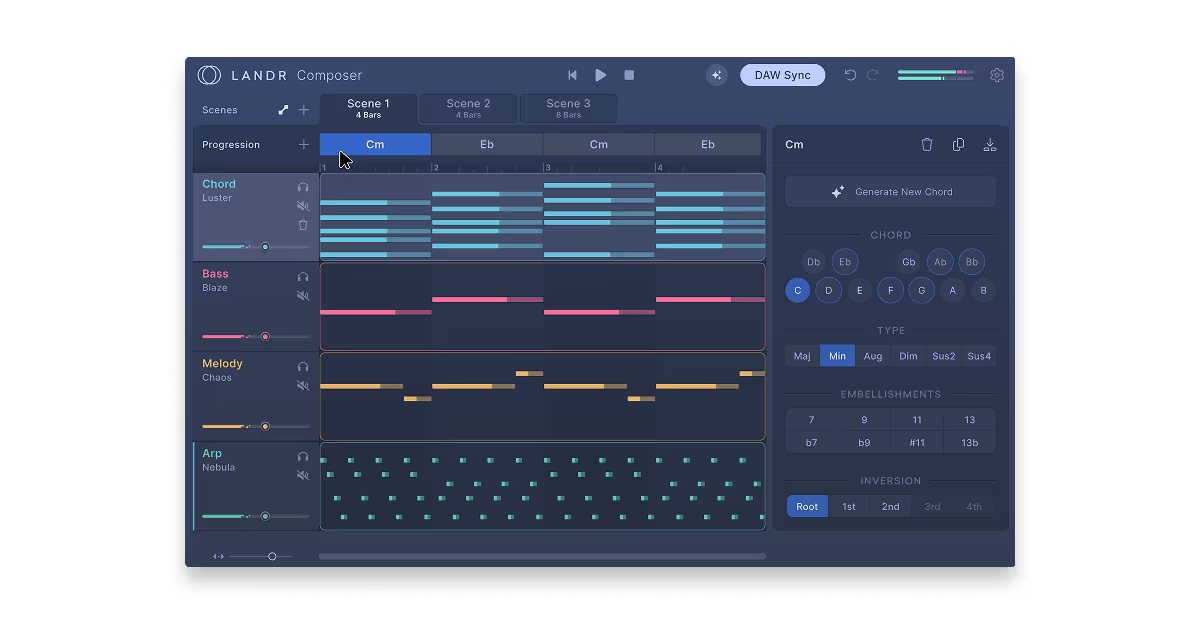
LANDR Composer is a plug-in from LANDR that generates MIDI for chord progressions, melodies, basslines and arpeggios. The maker describes it as AI-assisted composition that lets you create chords without music theory knowledge.
Chords include major, minor, augmented, diminished and suspended, with typical extensions and inversions available. All standard Western keys and modes can be selected.
Basslines, melodies and arpeggios are generated to follow the chord progression, with modifiers such as polyphony and humanization. The generated MIDI can be dragged and dropped onto a MIDI track in your DAW.
It also has its own sounds, with over a hundred presets in categories such as Bass, Keys, Lead and Pad. It is also described as included in LANDR Studio, a subscription.
Key features
Chord progression generation
It generates complex chord progressions and individual chords and lets you edit them afterward. The Chord Progression Guide lets you move and refine chords to shape the harmonic flow.
MIDI generation
It generates chord, bass, melody and arpeggio performances as MIDI. Modifiers such as polyphony and humanization let you adjust what comes out.
Piano roll editing
The built-in piano roll lets you fix generated MIDI note by note. You may use the output as a starting point and finish it by hand.
Scenes and Song Mode
Several musical ideas can be organized as scenes and arranged into a full composition. It may help when you want to turn short ideas into a song structure.
DAW sync and drag-and-drop
It syncs with your DAW, and generated MIDI patterns can be dragged straight into your project.
Built-in preset sounds
Over a hundred presets let Composer play sound on its own so you can audition ideas. They are divided into categories such as Bass, Keys, Lead and Pad.
Specifications
| Item | Details |
|---|---|
| Maker | LANDR |
| Type | AI chord progression / MIDI generator |
| Formats (Mac) | VST3, AU, AAX |
| Formats (Windows) | VST3, AAX |
| OS (Mac) | macOS 10.14 or later (Apple Silicon native / Intel) |
| OS (Windows) | Windows 10 (64-bit) or later |
| Presets | 100+ |
What is included and system requirements
- The LANDR Composer plug-in
- Over 100 preset sounds
- Also included in LANDR Studio (subscription)
How to use it
- Download the plug-in with your LANDR account and install it.
- Load Composer in your DAW.
- Choose a key and mode.
- Generate a chord progression and refine it with the Chord Progression Guide.
- Generate MIDI for chords, bass, melody and arpeggios.
- Fine-tune notes in the piano roll.
- Drag and drop the finished patterns onto a MIDI track in the DAW.
Where it may come in handy
Getting song ideas
It may be tried to build a rough draft when you cannot think of a chord progression.
Building your own chord packs
The maker mentions saving generated chords as a library of MIDI ideas.
Drafting basslines and arpeggios
It may suggest bass and arpeggio ideas that fit the chords, as a base to rewrite by hand.
Who it may suit
- People unsure about music theory who struggle with chord progressions
- Producers who want to try song ideas quickly
- DAW users who compose with MIDI
Good to know before you buy
- It is also described as included in LANDR Studio, a subscription.
- It generates MIDI and preset sounds; the final result depends on your editing.
- There is no AU format for Windows.
Price
Please check the official page for the price.
See LANDR Composer on the product page
More of the same kind
Other introduction articles of the same kind.
- Audio Modeling SWAM Double Bass v3
- Krotos Reformer Pro
- Sonarworks SoundID VoiceAI Expansion PackC-Pop Voices
- Impact Soundworks Shreddage 3 Stratus Free
- Samplemodeling Brass Bundle v3
- UJAM UJAM Usynth WEBCORE
We have introduced 10 other products from LANDR.
- LANDR LANDR Strata
- LANDR LANDR VoxChain / VoxTune / VoxVerb / VoxDeEss
- LANDR LANDR Ultimate Bundle
- LANDR Horizon
- LANDR LANDR FX Bass
See the full list in Product database: Instruments.
Sources: landr.com pluginboutique.com (checked 2026-10-27)










Comments