
Disclosure: This page may contain affiliate links. Prices were checked on the date shown and may change.
An introduction to AudioThing Things – Voice, based on information from the maker and distributors: what it does, how to use it and who it may suit. It is not scored.
Things – Voice is a simple one-knob “throw it on and it sounds good” compressor for voice-over and vocals.
— AudioThing official site
What is Things – Voice?
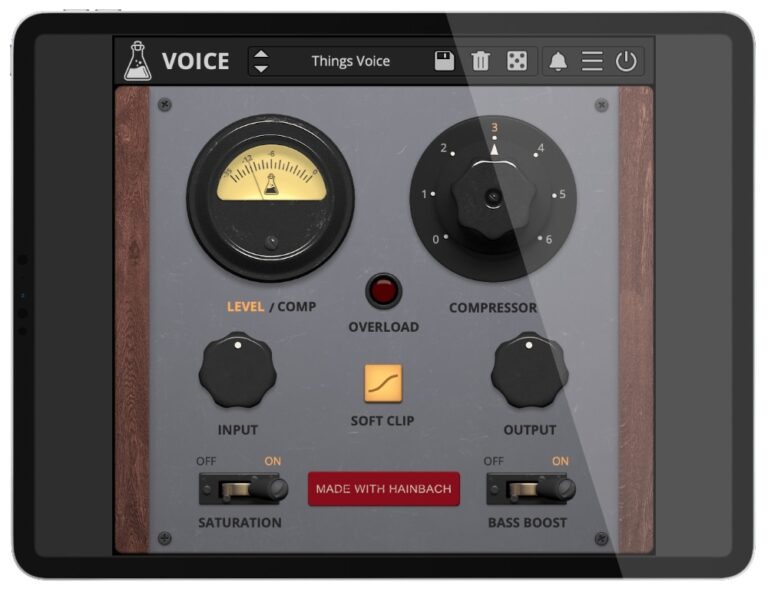
Things – Voice is a voice-oriented compressor from AudioThing. It is a simple, knob-driven plug-in intended for voice-over and vocals. It is the seventh plug-in in AudioThing's collaboration series with Berlin musician and video creator Hainbach.
Its basis is a German broadcast measurement instrument from the 1950s and 60s, originally used to send a fixed level and frequency to a radio transmitter. AudioThing says Rogalow Audio's Wojcek Czern in Poland found that it could be adapted into a high-quality mic preamp.
The unit's large steel-tubed amplifier compresses the signal as a side effect. AudioThing analyzed this behavior and made it adjustable, so the overtone-rich gain of the preamp and the compressor can be set separately.
Added features include a saturation button for tube gain and an EQ that boosts the low end. It has a preset system with a randomizer and a resizable window, runs on Windows, Mac and Linux, and is also available for iOS and iPadOS.
Key features
Compressor based on broadcast gear
It is based on the behavior of a German broadcast instrument from around the 1950s. With few controls, it may suit quickly processing a voice.
Preamp and compressor set separately
The gain character of the tube amplifier and the compression, which are tied together in the original, can be adjusted independently. This helps when you want to set thickness and amount of compression separately.
Tube saturation
A saturation button adds modified tube gain. AudioThing positions it for those who want to get closer to the original unit's vintage tone.
Bass boost
A built-in EQ boosts selected frequencies and is intended to add weight to the low end of a voice. It can be left alone when not needed.
Presets and randomizer
Presets are included, and a randomizer changes settings at random. This may help when looking for a starting point.
Wide platform support
Windows supports VST2 / VST3 / AAX / CLAP and Mac supports VST2 / VST3 / AU / AAX / CLAP. The official site also lists a Linux version, and the window is resizable.
Specifications
| Item | Details |
|---|---|
| Maker | AudioThing |
| Type | Voice compressor |
| Formats (Windows) | VST2, VST3, AAX, CLAP (64-bit) |
| Formats (Mac) | VST2, VST3, AU, AAX, CLAP (64-bit, Universal 2) |
| Formats (Linux) | VST2, VST3, CLAP (64-bit) |
| OS | Windows 7 or later / macOS 10.13 or later / Ubuntu 20.04 or later |
| System (per Plugin Boutique) | 2 GHz CPU, 4 GB RAM |
| License | One license for up to three computers |
| Demo | Silence for 3 seconds every 45 seconds, saving disabled |
What is included and system requirements
- Things – Voice plug-in
- Presets with a randomizer
- Installers for Windows, Mac and Linux
- Online or offline authorization
- Brightness and contrast controls for the interface
How to use it
- Create an AudioThing account.
- If you bought from Plugin Boutique, enter the redeem code on the redeem page.
- Download the installer for your OS and the offline activation license.
- Run the installer and choose the formats to install.
- Open Things – Voice in your DAW and activate online or offline.
- Insert it on a vocal or narration track and adjust the compressor control.
- Add saturation and bass boost as needed.
- Start from a preset and fine-tune to taste.
Where it may come in handy
Narration and voice-over
With few controls, it may suit situations where you want to even out a recorded voice quickly. Since it is based on broadcast gear, AudioThing positions it for spoken voice.
Vocal recording tracks
You could use it on vocals to even out level while adding tube-gain character. The amount of saturation can be adjusted to taste.
Video and streaming voice
It may help add low-end weight to narration for videos or a streaming voice. The bass boost EQ is another way to add body.
Processing synths and mono sources
AudioThing says the original unit is used by Hainbach to process synths. You might try it on a synth to add thickness.
Who it may suit
- Narrators and streamers who want to shape a voice quickly
- People looking for a simple, one-knob style compressor
- People interested in tone based on broadcast equipment
- People who want to use one plug-in on Windows, Mac or Linux
Good to know before you buy
- An AudioThing account is required (online authorization or an offline license file).
- One license can be used on up to three computers.
- The demo on AudioThing's site inserts 3 seconds of silence every 45 seconds and cannot save.
- The iOS / iPadOS version is sold separately on the App Store (AUv3 and standalone).
Price
$19 (Plugin Boutique, checked 2026-10-27). Prices can vary by region and promotion, so check the official page before buying.
See Things – Voice on the product page
More of the same kind
We have introduced 85 compressors. Here are some of the others.
- W. A. Production Vocal Compressor
- Baby Audio IHNY-2
- Waves PuigChild Compressor
- Apogee Mod FX Bundle
- Waves CLA-3A Compressor / Limiter
- FabFilter FabFilter Pro-MB
We have introduced 34 other products from AudioThing.
- AudioThing Lines
- AudioThing Mantis
- AudioThing Space Strip
- AudioThing Materia
- AudioThing Things – Bubbles
For a side-by-side comparison scored on the same criteria, see our comparison of compressors.
See the full list in Product database: Effects.
Sources: audiothing.net pluginboutique.com (checked 2026-10-27)










Comments