
Disclosure: This page may contain affiliate links. Prices were checked on the date shown and may change.
An introduction to AudioThing Materia, based on information from the maker and distributors: what it does, how to use it and who it may suit. It is not scored.
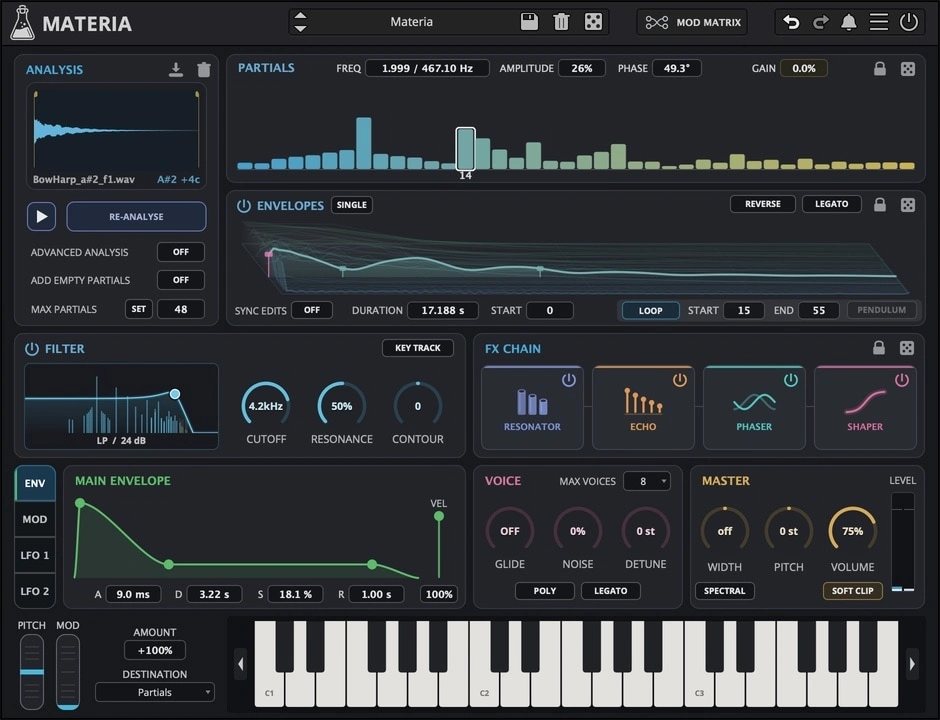
Materia is an additive re-synthesizer that transforms any sample into a playable instrument. Load a sound and Materia analyses it into harmonic partials, each with its own frequency, amplitude, phase, and complex envelope.
— AudioThing official site
What is Materia?
Materia, from Italian developer AudioThing, is an additive re-synthesizer. You load a sample and it analyses the sound into a set of harmonic partials, then lets you play the result as an instrument. Rather than simply replaying a recording, it rebuilds the sound from its components.
Each partial can be adjusted individually in frequency ratio, amplitude and phase. Every partial also has its own 128-point envelope, so you can redraw when each harmonic appears, sustains and fades. You can keep the feel of the source sample or push it toward something quite different.
After the partials there is a filter with low-pass, high-pass, band-pass, notch and formant modes, plus four effects. The centrepiece is an algorithmic resonator that models materials such as pipes, plates, glass, wood, stone, gongs, membranes and springs, alongside a tap echo, a multi-stage phaser and a waveshaper.
The analysed model is stored with the plug-in state, so a project or preset can be reopened without the original sample file. It runs on Windows, macOS and Linux, and a separate iPad app exists. A limited demo is offered on the official site so you can try it before buying.
Key features
Sample-to-partials analysis
Loading a sample triggers an analysis that shows it as up to 96 partials. Because the sound is treated as a combination of harmonics instead of a waveform, you can lift or remove individual harmonics.
128-point envelope per partial
Each partial has its own envelope with editable duration and sustain-loop points. You can give different harmonics different attacks and decays, for example a fast onset with a long, drifting tail.
Advanced Analysis and empty partials
Advanced Analysis gives partials independent envelopes and sustain loops. Add Empty Partials makes silent partials available so you can draw in new colours by hand.
Material-model resonator
A built-in resonator models materials like pipes, plates, glass, wood, stone, gongs, membranes and springs, letting you add struck-metal or resonant-body textures without a separate effect.
Filter and four effects
The filter offers 10 types including low-pass, high-pass, band-pass, notch and formant. The four effects are the resonator, tap echo, phaser and waveshaper.
Modulation and presets
There are two envelopes and two LFOs with fully drawable waves. The preset browser includes a randomizer, so you can explore chance variations instead of building from scratch.
Analysis stored in plug-in state
The analysed model is saved with the plug-in state, so projects and presets reopen even if the original sample has moved or been deleted, which can simplify moving sessions between machines.
Specifications
| Item | Details |
|---|---|
| Type | Additive re-synthesizer (instrument) |
| Partials | 96 |
| Envelopes | 2, plus a 128-point envelope per partial |
| LFOs | 2 (fully drawable waves) |
| Filter | 10 types |
| Effects | 4 (resonator, echo, phaser, waveshaper) |
| Formats | VST2 / VST3 / AU / AAX / CLAP (64-bit; no AU on Windows; Linux has VST2/VST3/CLAP) |
| OS | Windows 7-11, macOS 10.13-26, Ubuntu 20.04 LTS or newer |
| Requirements | 2GHz CPU, 4 GB RAM |
| Other | Resizable window, preset browser with randomizer, demo available |
What is included and system requirements
- Plug-in for Windows, macOS and Linux (VST2, VST3, AU, AAX, CLAP; formats vary by OS)
- Presets, with a preset browser and randomizer
- PDF manual (downloadable from the official site)
- A demo with limits (3 seconds of silence every 45 seconds, saving disabled); after purchase the license authorizes the demo to run as the full version
How to use it
- Download the demo or full version and load it as a plug-in in your DAW.
- Load the sound you want to use into the sample panel, such as a single note, a voice or an ambient recording.
- Materia analyses the sound into harmonic partials. When it finishes, play the keyboard to hear the result.
- Select a partial and adjust its frequency ratio, amplitude and phase to shape the spectrum.
- Edit the envelopes to redraw how each harmonic starts, sustains and fades. Turn on Sync Partial Edits to apply the same timing to every partial.
- Add character with the filter and effects such as the resonator.
- Save the result as a preset; it can be reopened without the original sample.
- If you are unsure where to go, use the randomizer to create variations and keep the ones you like.
Where it may come in handy
Turning a sample into a new instrument
Loading a voice, an ambient recording or a short instrument note and removing or emphasising harmonics might transform it into a keyboard-playable instrument or pad that differs greatly from the source.
Sound design and effects
The resonator's material models may add metal- or wood-like resonance, which could suit background music or sound effects for video and streams.
Ambient and experimental music
Drawing different envelopes for different partials might create slowly evolving tones for ambient or experimental pieces.
Building your own sounds
If bundled sound libraries are not enough, starting from your own recordings might give you timbres of your own.
Who it may suit
- People who want to turn their own recordings or favourite samples into playable sounds
- People who like editing sound at the level of individual harmonics
- Those interested in sound design or ambient material
- Anyone who wants to try a demo before deciding to buy
Good to know before you buy
- The demo adds 3 seconds of silence every 45 seconds and cannot save; authorizing a purchased license removes the limits.
- The Windows version has no AU format; formats differ by OS.
- When bought through Plugin Boutique, you redeem a code in your AudioThing account to get the installer and license.
- The iOS/iPadOS app is a separate product.
How it differs from similar products
We do not pick a winner; the official figures are placed side by side.
Dawesome Abyss II
Materia is an additive design with 96 partials, regularly priced at $69. Abyss II arranges sound on a colour gradient and ships with 400+ presets, regularly $149 at Plugin Boutique. Both can build tones from samples.
Price
$69 (AudioThing official site, checked 2026-10-27). Prices can vary by region and promotion, so check the official page before buying.
See Materia on the product page
More of the same kind
We have introduced 178 synthesizers. Here are some of the others.
- GForce Software impOSCar3
- D16 Group Phoscyon 2
- Future Audio Workshop SubLab XL
- Cherry Audio P-10 Synthesizer
- Cherry Audio Eight Voice
- Cherry Audio Dreamsynth
We have introduced 34 other products from AudioThing.
For a side-by-side comparison scored on the same criteria, see our comparison of synthesizers.
See the full list in Product database: Instruments.
Sources: audiothing.net pluginboutique.com (checked 2026-10-27)










Comments