
Disclosure: This page may contain affiliate links. Prices were checked on the date shown and may change.
An introduction to Harrison Consoles MPC Compressor, based on information from the maker and distributors: what it does, how to use it and who it may suit. It is not scored.
The MPC Console Compressor is the most advanced compressor developed by Harrison, with a full suite of professional-level features from their digital consoles.
— Harrison Consoles official site
What is MPC Compressor?
MPC Compressor is a plug-in from Harrison, the Nashville console maker. It is a compressor based on features from the company's digital consoles, and is described as the most advanced compressor Harrison has developed.
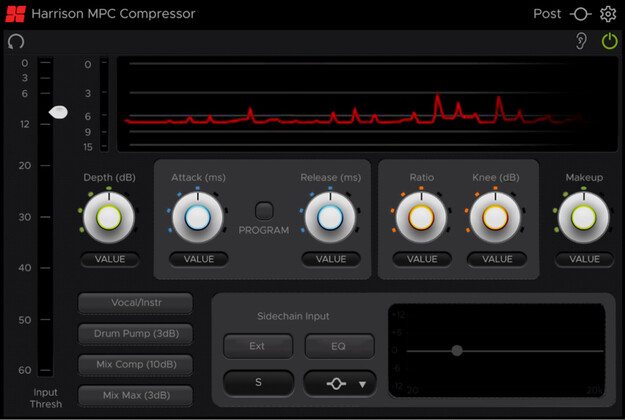
Its signature element is a scrolling history display that shows what the compressor is doing over time. It also has a Program (Pgm) button that controls dynamics while keeping punch, and a Depth control that limits the maximum gain reduction.
The sidechain has an EQ with 7 shapes to focus where the compressor reacts, and an external sidechain input lets you use another track as the key. It is intended for both music and post-production sessions.
Besides the basic threshold, ratio, attack, release and makeup gain, there is also a Knee control. Eight presets are provided as starting points for common compression tasks.
Key features
Scrolling gain-reduction history
A red meter shows the current gain reduction while the graph to the right shows its history, letting you see exactly what the compressor is doing.
Depth control
This sets the maximum gain reduction. It lets you use a lower threshold and higher ratio while avoiding over-compression when the signal momentarily gets very loud.
Program (Pgm) button
It engages three parallel detectors tuned to different speeds, helping the compressor behave more consistently on material with a wide dynamic range. The name comes from broadcast radio, where speech and music alternate.
Knee
A larger knee applies the ratio progressively as the input gets louder. Harrison says this can give a softer effect comparable to vintage opto-coupled compressors.
Sidechain EQ and external key
The sidechain EQ is a single band with shapes including high/low-pass, bell and high/low shelf. With an external key selected, the threshold and meter refer to the key signal, and a Key Listen button lets you audition it.
Eight presets
Eight presets are included as starting points for common compression tasks.
Specifications
| Item | Details |
|---|---|
| Maker | Harrison Consoles |
| Type | Console-style compressor |
| Threshold range | -60 dB to 0 dB |
| Plug-in formats (macOS) | AU / VST2 / VST3 / AAX Native |
| Plug-in formats (Windows) | VST2 / VST3 / AAX Native |
| Supported OS (per Plugin Boutique) | macOS 11 Big Sur – 13 Ventura (M1 supported), Windows 10-11 (64-bit) |
| Memory | 4 GB or more (8 GB recommended) |
| Required | Free iLok account |
| Presets | 8 |
What is included and system requirements
- The MPC Compressor plug-in
- Eight presets
- macOS: AU, VST2, VST3, AAX Native
- Windows: VST2, VST3, AAX Native
- Authorization with a free iLok account
How to use it
- Create a free iLok account and add the license after purchase.
- Insert MPC Compressor on the track or bus you want to compress.
- Audition the eight presets and pick one close to your task.
- Lower the threshold slider on the left and check how the compression engages.
- Set the character with ratio, attack and release.
- If compression gets too deep on loud passages, set a limit with Depth.
- Try the Pgm button on highly dynamic material.
- To trigger from another track, enable External Key.
Where it may come in handy
Vocal sidechain tuning
The documentation explains that boosting highs in the sidechain EQ makes the compressor more sensitive to harsh or sibilant vocals. You could try this when handling vocals.
Mix bus
Using the sidechain high-pass to avoid compressing kick and bass so the mix stays fuller is described.
Post-production and radio-style material
The Pgm button is based on the idea of broadcast signals that alternate between voice and music. It may be worth trying on material that mixes narration and music.
Who it may suit
- People who want to see what the compressor is doing
- People who want to limit maximum gain reduction
- People who want detailed sidechain control
- People who need a compressor for both music and post-production
Good to know before you buy
- A free iLok account is required.
- The supported OS list is from Plugin Boutique (up to macOS 13), so check Harrison's current information.
- Harrison's own site lists a compressor with the same description as “XT Console Compressor” in the XT Plug-in Suite. Note the different name.
How it differs from similar products
We do not pick a winner; the official figures are placed side by side.
SSL Native Bus Compressor 2
MPC Compressor features a scrolling history display, Depth, Pgm and an external sidechain. SSL Native Bus Compressor 2 is based on the G Series bus compressor and has a MIX knob and 2x and 4x oversampling.
Price
$149 (Plugin Boutique, checked 2026-10-27). Prices can vary by region and promotion, so check the official page before buying.
See MPC Compressor on the product page
More of the same kind
We have introduced 85 compressors. Here are some of the others.
- Slate Digital Virtual Buss Compressors
- McDSP SPC2000
- Minimal Audio Fuse Compressor
- Waves Waves H-Comp Hybrid Compressor
- Waves OneKnob Pressure
- McDSP SPC2000 Serial/Parallel Compressor Native v7
We have introduced 6 other products from Harrison Consoles.
- Harrison Consoles Lookahead Compressor
- Harrison Consoles 32Classic Channel Strip
- Harrison Consoles MPC Channel Strip
- Harrison Consoles Drum Flow
- Harrison Consoles Harrison Consoles Stunning Phaser
For a side-by-side comparison scored on the same criteria, see our comparison of compressors.
See the full list in Product database: Effects.
Sources: pluginboutique.com harrisonaudio.com (checked 2026-10-27)










Comments