
Disclosure: This page may contain affiliate links. Prices were checked on the date shown and may change.
An introduction to Harrison Consoles Drum Flow, based on information from the maker and distributors: what it does, how to use it and who it may suit. It is not scored.
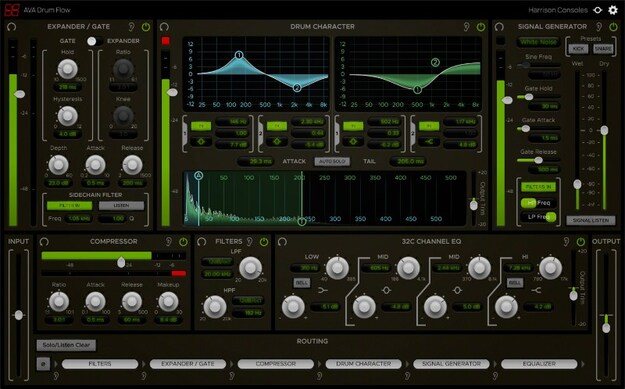
Drum Flow is an all-in-one processing suite designed specifically to improve your drum tones. It contains 6 routable processing elements and a master section with input, output, and routing controls.
— Harrison Consoles official site
What is Drum Flow?
Drum Flow is an all-in-one processing plugin for drum tones from Harrison Consoles. It combines six processing elements (a drum-hit-aware EQ, an expander/gate, a signal generator, a compressor, a 32C channel EQ and filters) with a master section for input, output and routing.
The product description says the drum sound is the foundation of a song and that each drum, drummer and room needs a different approach. It argues for extracting punch while keeping nuance, rather than replacing everything with samples.
The 'Drum Character' element detects the transient of each drum hit and lets you EQ the attack and tail ranges separately. When the input exceeds the threshold, a trigger indicator lights, and a waveform display is used to set the boundary between the two ranges.
A flow of gating bleed on snare or toms, adding sound with the signal generator, and finishing with the compressor and 32C EQ can be built in one window. The order of the elements can be changed with the routing section.
Key features
Drum Character EQ
An EQ that detects each hit and equalizes attack and tail separately. Each range has two bands whose shape can be low shelf, high shelf, bell or notch. It may help when you want to treat the moment of impact and the decay separately.
Expander/Gate
A dynamics processor usable as either an expander or a gate. The page mentions tightening drum sounds and reducing bleed from nearby drum mics.
Signal Generator
A gated signal is blended in parallel. Sine wave, white noise, internal input or external input can be chosen, and the page describes adding noise to a snare or a low sine wave to a kick.
Compressor
Harrison's console compressor with ratio, attack, release and makeup controls. It can be used to adjust the cohesion and energy of drums.
32C Channel EQ
An emulation of Harrison's 32C channel strip EQ is included. It may be used together with Drum Character to shape overall tone.
Filters and routing
High- and low-pass filters with selectable shapes are included. The master routing lets you rearrange the processing order, for example before or after the gate.
Specifications
| Item | Details |
|---|---|
| Type | All-in-one drum processing plugin |
| Elements | Drum Character / Expander-Gate / Signal Generator / Compressor / 32C Channel EQ / Filters (six elements) |
| Mac | macOS 10.9 or newer |
| Windows | Windows 7 or newer |
| DAW support | Pro Tools 10.3.5+ (Windows) / 11+ (Mac), Logic (AU), Cubase (VST/VST3) and others; enable the needed format during installation |
| Linux | The page advises trying the demo |
What is included and system requirements
- The plugin
- Six processing elements (Drum Character, Expander/Gate, Signal Generator, Compressor, 32C Channel EQ, Filters)
- A master section for input, output and routing
- Formats: AAX, AU, VST, VST3 (selected during installation)
How to use it
- After purchase, register the license and install the plugin, enabling the formats you will use.
- Insert Drum Flow on a drum track.
- Set the Drum Character threshold so it responds only to the hits you want.
- Set Attack Width and Tail Width on the waveform display.
- Adjust the attack-range EQ and the tail-range EQ separately.
- If needed, use the gate to reduce bleed and the signal generator to add sound.
- Finish with the compressor and the 32C EQ.
- Rearrange the processing order with the routing and compare the results.
Where it may come in handy
Shaping home-recorded drums
It may be a candidate when you want to adjust attack and decay of recorded drums separately.
Reinforcing e-drums or samples
The signal generator could add a low sine wave or noise to adjust body.
Cleaning up bleed
The gate could reduce other drums' sound entering the snare or tom mics.
Who it may suit
- People who want to shape drum tones in one plugin
- People adjusting the texture of live drums or drum samples
- People who want to EQ attack and tail separately
Good to know before you buy
- The Plugin Boutique page notes that registration steps differ depending on the license format.
- You need to enable the format your DAW uses during installation.
- Please check the store page.
Price
Please check the official page for the price.
See Drum Flow on the product page
More of the same kind
Other introduction articles of the same kind.
- Sonnox Oxford Inflator
- FLUX:: Ircam Trax
- United Plugins FireCobra
- Klevgrand Brusfri
- Waves Cobalt Saphira
- ADPTR AUDIO Metric AB
We have introduced 6 other products from Harrison Consoles.
- Harrison Consoles Harrison Consoles Stunning Phaser
- Harrison Consoles Vocal Flow
- Harrison Consoles MPC Channel Strip
- Harrison Consoles MPC Compressor
- Harrison Consoles Lookahead Compressor
See the full list in Product database: Effects.
Sources: pluginboutique.com solidstatelogic.com (checked 2026-10-27)










Comments