
Disclosure: This page may contain affiliate links. Prices were checked on the date shown and may change.
An introduction to McDSP Channel G HD v7, based on information from the maker and distributors: what it does, how to use it and who it may suit. It is not scored.
Channel G delivers the big board sound with unprecedented flexibility and seamless integration with Avid control surfaces including S6, S3, D-Control, D-Command, and VENUE Live sound systems including S3L and S6L.
— McDSP official site
What is Channel G HD v7?
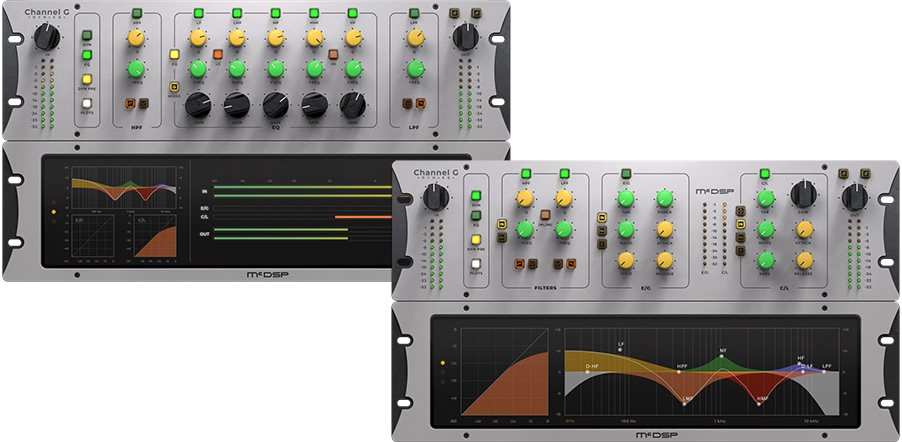
Channel G HD v7 is a console-style channel strip from McDSP. It combines dynamics (expander/gate and compressor/limiter) and EQ in a single plug-in, so you can shape a sound in the same flow as a large mixing console.
It is made up of three plug-ins: G Dynamics, which covers the gate and compressor; G Equalizer, a five-band EQ; and G Console, which combines the two. You can pick whichever fits the job.
According to the maker, it has calibration modes for music and post production, plus modes modeled on well-known analog mixing desks. The official site describes switching between six large-format consoles.
The HD version is aimed at users of Pro Tools' dedicated DSP (AAX DSP). It also supports AAX Native, AU and VST3, so it can be used in ordinary DAWs. A Native version is sold separately.
Key features
Three configurations
G Dynamics, G Equalizer and G Console are included. You can use dynamics only, EQ only, or both in one instance, so you can match the setup to each track.
Five-band EQ
A five-band EQ with shelving and parametric sections, plus high-pass, low-pass and notch filters (slopes of 6 to 24 dB/oct). It may help with clearing low end and adjusting bands.
Gate and compressor
It has an expander/gate and a compressor/limiter, and the compressor can run before or after the EQ. It may be used to reduce low-level noise or even out levels.
Console switching
The official site says you can switch among models of six large-format consoles with a button. It may be handy when you want to try different character on the same settings.
Analog saturation modeling
It includes the analog saturation modeling McDSP is known for, with double-precision processing and zero-latency algorithms.
Real-time analyzer
A real-time analyzer (RTA) shows how the spectrum changes. The official site says it is available in the AAX Native, AU and VST3 formats.
Side chain
Side-chain input is supported, so dynamics can be triggered by another track's signal.
Specifications
| Item | Details |
|---|---|
| Configurations | G Dynamics / G Equalizer / G Console |
| EQ | 5 bands (shelving + parametric) |
| Filters | High-pass, low-pass, notch (6-24 dB/oct) |
| Dynamics | Expander/gate, compressor/limiter |
| Processing | Double precision, zero latency |
| Formats (HD v7) | AAX DSP, AAX Native, AU, VST3 |
| Authorization | iLok (USB key or cloud) |
What is included and system requirements
- Channel G (G Dynamics, G Equalizer, G Console) HD version
- OS: macOS 10.13 or later (64-bit, Apple Silicon supported) / Windows 7, 8, 10 (64-bit)
- Formats (v7 Native): AAX Native, AU, VST3 (VST support ended with v7)
- Authorization: iLok2/iLok3 USB key, or an iLok License Manager account with iLok Cloud
- Two activations per license
How to use it
- Create an iLok account and install the iLok License Manager.
- Enter the 30-digit activation code from your Plugin Boutique account in 'Redeem Activation Code' in the License Manager.
- Open an iLok Cloud session, or move the license to your USB key.
- Download the installer from your account and run it following the on-screen steps.
- Launch your DAW and load the plug-in as an insert on a track.
- Pick a preset first, then adjust the bands and controls little by little.
Where it may come in handy
Tidying vocals and instruments
Handling EQ and compression in one plug-in may cut down on stacking separate plug-ins on every track.
Post production and narration
The post-production calibration mode and gate-based reduction of low-level noise may be useful.
Working in Pro Tools
As an HD version supporting AAX DSP, it may suit people who want to run it on Pro Tools' dedicated DSP.
Who it may suit
- People who want to shape sound in a large-console workflow
- Pro Tools users working with AAX DSP
- People who want EQ and dynamics in one plug-in
Good to know before you buy
- The Native version is sold separately; its price needs separate confirmation.
- An iLok2/iLok3 USB key, or an iLok account with iLok Cloud, is required.
- VST (legacy) support ended with v7; only VST3 is supported.
- Band counts differ between this HD version (5 bands) and the Compact version (4 bands).
How it differs from similar products
We do not pick a winner; the official figures are placed side by side.
McDSP Channel G Compact Native v7
Channel G HD has a five-band EQ and an expander/gate. Channel G Compact uses a four-band EQ and a compressor/limiter, with a smaller DSP footprint.
Price
$179 (Plugin Boutique, checked 2026-10-27). Prices can vary by region and promotion, so check the official page before buying.
See Channel G HD v7 on the product page
More of the same kind
We have introduced 51 channel strips. Here are some of the others.
- Solid State Logic SSL 4K E
- Waves Abbey Road REDD Consoles
- Waves Magma Tube Channel Strip
- Solid State Logic SSL Guitarstrip
- Solid State Logic SSL Native Drumstrip
- Waves Renaissance Channel
We have introduced 53 other products from McDSP.
- McDSP Channel G Compact
- McDSP 6050 Ultimate Channel Strip Native v7
- McDSP 6050 Ultimate Channel Strip
- McDSP Channel G
- McDSP Channel G Compact Native v7
See the full list in Product database: Effects.
Sources: pluginboutique.com mcdsp.com (checked 2026-10-27)










Comments