
Disclosure: This page may contain affiliate links. Prices were checked on the date shown and may change.
An introduction to McDSP Channel G Native v7, based on information from the maker and distributors: what it does, how to use it and who it may suit. It is not scored.
Channel G delivers the big board sound with unprecedented flexibility and seamless integration with Avid control surfaces
— McDSP official site
What is Channel G Native v7?
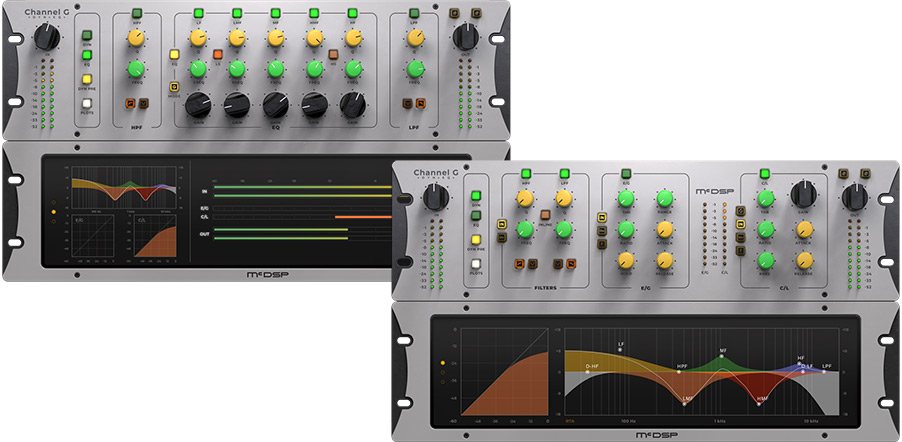
Channel G is a channel-strip plugin from McDSP, described as delivering the sound of a large-format console. The Native v7 edition supports AAX Native, AU and VST3, while a separate HD edition exists for AAX DSP users.
It consists of three plugins: G Dynamics with a console-style dynamics section, G Equalizer with a five-band EQ, and G Console, which combines both.
Every configuration has calibration modes for music and post production and models of popular analog mixing desks.
The listing says it integrates with Avid control surfaces such as S6, S3, D-Control and D-Command, as well as VENUE live systems.
Key features
Three plugins in one
G Dynamics, G Equalizer and G Console are included, so you can pick dynamics only, EQ only, or both together.
Console-style dynamics
Expander/gate, compressor/limiter and a filter section are provided, which may suit tasks from noise control to level shaping in one plugin.
Five-band EQ
A five-band EQ with shelving and parametric sections plus filters. The compressor/limiter can run before or after the EQ.
Filter slopes
Multi-mode filters (high-pass, low-pass, notch) with selectable slopes from 6 to 24 dB/oct.
Analog saturation modeling
Analog-style saturation modeling is included.
Zero latency, double precision
Zero-latency algorithms and double-precision processing are listed, along with real-time analyzers.
Specifications
| Item | Details |
|---|---|
| Type | Channel strip (dynamics + EQ) |
| Formats | AAX Native, AU, VST3 |
| OS | macOS 10.13 or later / Windows 7, 8, 10 |
| Channels | Mono and stereo |
| Authorization | iLok (USB key or iLok Cloud), two activations per license |
| EQ | 5 bands |
| Filters | 6 to 24 dB/oct slopes |
What is included and system requirements
- G Dynamics
- G Equalizer
- G Console
- New presets
- Apple Silicon support
How to use it
- Create an iLok account and install iLok License Manager.
- Enter the 30-digit code from your Plugin Boutique account in iLok License Manager.
- Open an iLok Cloud session and move the license to it.
- Run the installer.
- Insert G Console or another configuration in your DAW.
- Set the gate and compressor thresholds.
- Adjust each EQ band.
- Try switching the compressor before or after the EQ.
Where it may come in handy
Mixing channel strips
It may help when you want dynamics and EQ for each track in one plugin.
Post production
With calibration modes for post production, it may be worth considering for dialogue or narration.
Avid-based workflows
It may suit people who want to control it from supported Avid control surfaces.
Who it may suit
- People who want console-style mixing
- Those who want dynamics and EQ in one plugin
- Users working in Pro Tools or other Avid environments
Good to know before you buy
- An iLok2/3 USB key, or a free iLok account with iLok Cloud, is required.
- This is the Native edition; an HD edition for AAX DSP is sold separately.
- From v7, VST is no longer supported; VST3 is used instead.
How it differs from similar products
We do not pick a winner; the official figures are placed side by side.
McDSP FilterBank HD v7
Channel G is a channel strip with dynamics and a five-band EQ, while FilterBank focuses on EQ and filters with E6060, F202 and P606.
Price
$149 (Plugin Boutique, checked 2026-10-27). Prices can vary by region and promotion, so check the official page before buying.
See Channel G Native v7 on the product page
More of the same kind
We have introduced 51 channel strips. Here are some of the others.
- Softube Summit Audio Grand Channel
- Harrison FasTrack
- United Plugins UniChannel
- Waves Renaissance Channel
- Waves SSL E-Channel
- Waves Waves Eddie Kramer Drum Channel
We have introduced 53 other products from McDSP.
- McDSP Channel G Compact
- McDSP 6050 Ultimate Channel Strip
- McDSP Channel G
- McDSP 6050 Ultimate Channel Strip Native v7
- McDSP Channel G Compact Native v7
See the full list in Product database: Effects.
Sources: pluginboutique.com mcdsp.com (checked 2026-10-27)










Comments