
Disclosure: This page may contain affiliate links. Prices were checked on the date shown and may change.
An introduction to Waves Curves Resolve, based on information from the maker and distributors: what it does, how to use it and who it may suit. It is not scored.
It processes one track by listening to another, carving space only when and where there’s a clash.
— Waves official site
What is Curves Resolve?
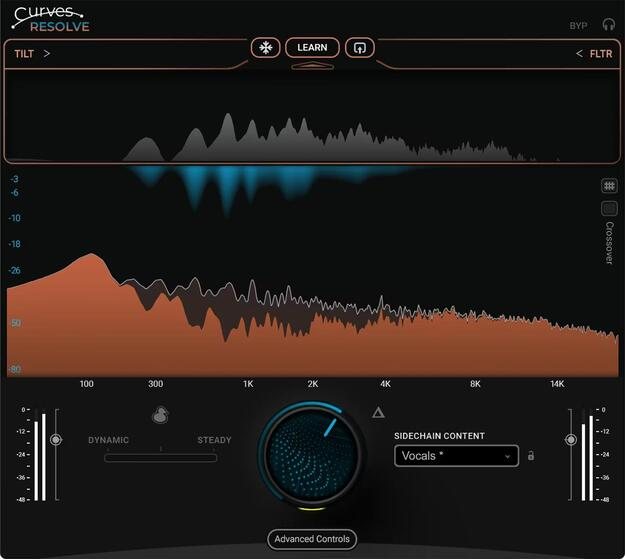
Curves Resolve is a plug-in for resolving clashes between multiple tracks. It processes one track while listening to another, carving out space only when and where a clash happens.
According to the maker, it aims to reduce masking and muddiness and give the mix room to breathe. It is designed to solve conflicts with one knob and is described as hard to overprocess.
Carving can be dynamic (real-time) or steady (learned), and ducking can be wide (classic) or frequency-specific (smart).
A zero-latency Curves Resolve Live version is included. This summary covers only what the maker's description states.
Key features
Listens to another track
The processed track reacts to another track's signal, pairing two clashing sounds.
Intelligent carving
Dynamic (real-time) and steady (learned) modes.
Intelligent ducking
Choose wide (classic) or frequency-specific (smart) ducking.
Snapshots
Carving modes optimized for specific instruments.
Side-chain controls
Controls for adjusting the side-chain input.
Live version
Includes the zero-latency Curves Resolve Live.
One-knob control
Described as solving conflicts with a single knob.
Specifications
| Item | Details |
|---|---|
| OS (Mac) | macOS 13 Ventura to 26 Tahoe, Intel or Apple Silicon |
| OS (Windows) | Windows 10/11 (64-bit) |
| RAM | 16 GB |
| Disk space | 30 GB free on system drive |
| Display | Recommended 1920×1080 |
What is included and system requirements
- Curves Resolve
- Curves Resolve Live (zero-latency version)
How to use it
- Get the installer and license from your Plugin Boutique account.
- Run the installer.
- Insert the plug-in on the track to process (for example, bass).
- Set the clashing partner track (for example, kick) as the side-chain input.
- Choose a snapshot that fits the instrument.
- Move the knob to find where the clash reduces.
Where it may come in handy
Bass and kick
It may help with two sounds that tend to clash in the low end.
Vocals and backing
It may be used to open space in the backing for the vocal.
Home-recording mixdowns
It may be worth trying when many tracks make the mix muddy.
Who it may suit
- People who want to sort out clashes between tracks quickly
- People who find detailed EQ work tedious
- People who want to try side-chain-based processing
Good to know before you buy
- System requirements are fairly large: 16 GB RAM and 30 GB free space.
- USB displays are not supported as the primary display.
Price
$79 (Plugin Boutique, checked 2026-10-27). Prices can vary by region and promotion, so check the official page before buying.
See Curves Resolve on the product page
More of the same kind
Other introduction articles of the same kind.
- MeldaProduction MMatcher
- Leapwing Audio RootOne
- Sugar Bytes Transfigure
- Sonarworks Apollo Monitor Correction Add-on
- Blue Cat Audio Blue Cat's Connector
- AudioThing Megaphone
We have introduced 215 other products from Waves.
- Waves Waves CLA Nx
- Waves Sub Align
- Waves Clarity Vx DeReverb Pro
- Waves X-Click
- Waves Greg Wells PianoCentric
See the full list in Product database: Effects.
Sources: pluginboutique.com (checked 2026-10-27)










Comments