
Disclosure: This page may contain affiliate links. Prices were checked on the date shown and may change.
An introduction to Sonarworks Apollo Monitor Correction Add-on, based on information from the maker and distributors: what it does, how to use it and who it may suit. It is not scored.
Speaker and headphone calibration running directly on Apollo X hardware.
— Sonarworks official site
What is Apollo Monitor Correction Add-on?
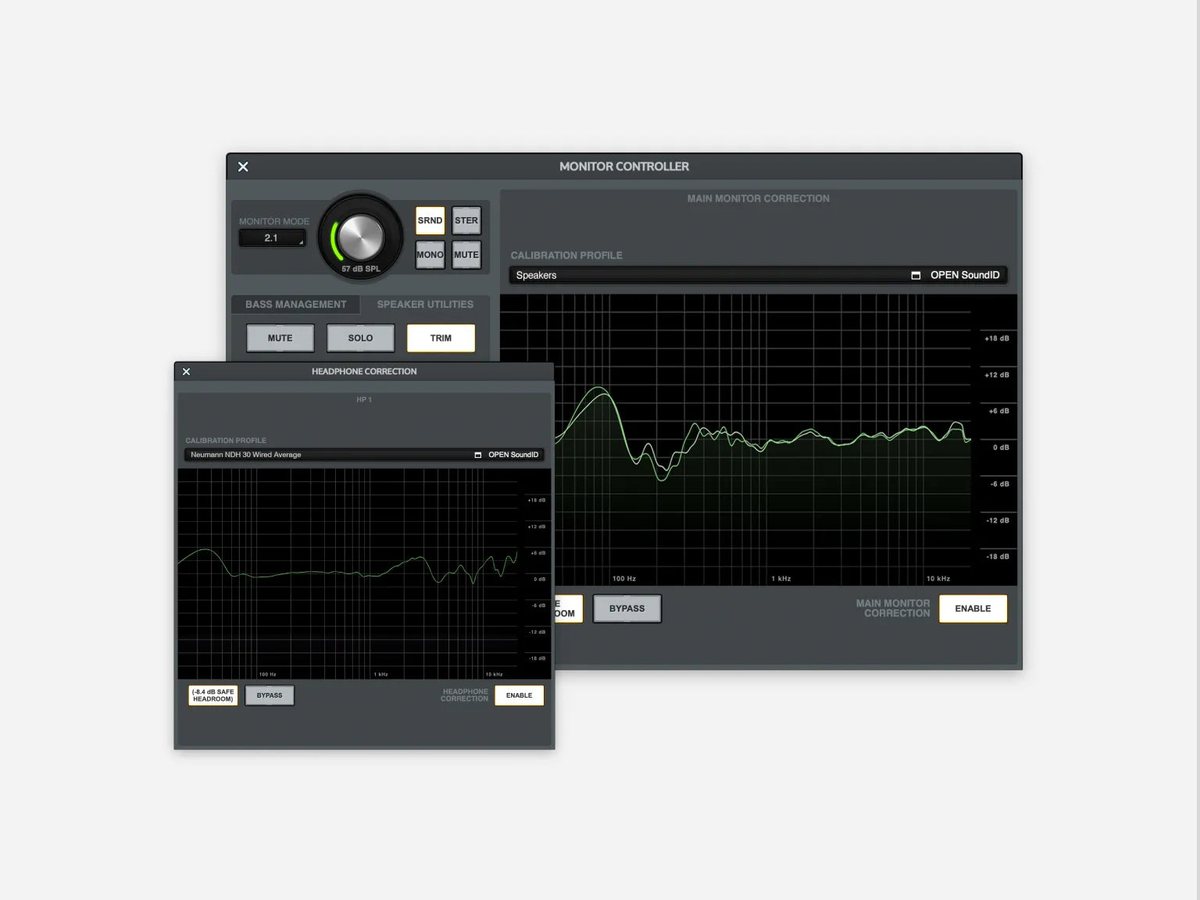
The Apollo Monitor Correction Add-on is an additional license that runs Sonarworks SoundID Reference speaker and headphone calibration on Universal Audio Apollo X hardware. The correction is processed inside the interface.
Instead of inserting a plugin in the DAW, the correction runs on the Apollo's DSP, so monitoring can be corrected with very low latency. It may suit people who want to hear a corrected monitor while recording.
It covers speaker layouts from stereo up to multichannel (9.1.6) and more than 500 headphone models. Depending on the model, one speaker profile and up to two headphone profiles can be calibrated at the same time.
It does not work on its own and requires a permanent SoundID Reference license. It supports Apollo X Gen 1 and Gen 2, and the activation key can be used on up to three devices.
Key features
Runs on the Apollo X
Correction is processed inside the Apollo hardware, independent of the DAW. It offers low-latency monitor correction and fits tracking sessions.
Stereo to 9.1.6
Speaker layouts range from stereo to immersive 9.1.6. It is relevant to stereo producers and those planning to expand to multichannel.
500+ headphone models
Headphone calibration supports over 500 models. It could help home-studio users who work on headphones and want to reduce tonal bias.
Multiple outputs at once
One speaker profile and up to two headphone profiles can be calibrated simultaneously, depending on the model. This suits workflows that switch between speakers and headphones.
Bass management
Bass management is provided for stereo speakers with a subwoofer, helping to organize how low frequencies are handled in the room.
Multiple targets
Target modes include Flat, a Dolby Atmos Music curve, a custom target, and device emulation via Translation Check.
Specifications
| Item | Details |
|---|---|
| Gen 1 interfaces | Apollo Twin X Duo/Quad, Twin X USB, x4, x6, x8, x8p, x16 |
| Gen 2 interfaces | Apollo Twin X Duo/Quad, x4, x6, x8, x8p, x16, x16D |
| OS | macOS 11 Big Sur or later, Windows 10/11 |
| Required software | UAD Console v1.2.1+, UAD-2 Software v11.5.1+ |
| Required license | Permanent SoundID Reference license |
| Activation | Up to 3 devices |
What is included and system requirements
- Activation key (usable on up to 3 devices)
- Not included: a permanent SoundID Reference license (Headphones, Speakers & Headphones, or Multichannel)
- Not included: a supported Apollo X interface
- An internet connection is required (offline use is not supported)
How to use it
- Prepare a permanent SoundID Reference license.
- Update UAD Console and UAD-2 Software to the required versions or later.
- Purchase the add-on and receive the activation key.
- Measure your speakers with SoundID Reference and create a profile.
- If using headphones, select the model and create a profile.
- Load the profiles in UAD Console.
- Choose a target mode such as Flat.
- Confirm that no correction plugin is also active in the DAW to avoid double processing, then start working.
Where it may come in handy
Low-latency tracking
When recording vocals or instruments while monitoring through correction, the low-latency processing may help.
Switching speakers and headphones
In a home studio that uses headphones at night and speakers by day, you may be able to prepare corrections for both.
Checking for Atmos
Since a Dolby Atmos Music target is available, it may be an option when setting up an immersive workflow.
Who it may suit
- Apollo X owners who want to add monitor correction
- People who already own SoundID Reference
- Those who want corrected monitoring while recording
Good to know before you buy
- It cannot be used alone; a permanent SoundID Reference license is required.
- Older SoundID Reference generations (3 and 4) are noted as not supported.
- It cannot be used with interfaces other than Apollo X.
- Take care not to run correction on the Apollo and a correction plugin in the DAW at the same time.
Price
about $89 (converted from €79.00) (Sonarworks official site, checked 2026-10-27). Prices can vary by region and promotion, so check the official page before buying.
See Apollo Monitor Correction Add-on on the product page
More of the same kind
Other introduction articles of the same kind.
- Waves eMo Generator
- Blue Cat Audio AcouFiend
- Sound Particles AudioMatrix
- W. A. Production Noizzer
- Waves Waves Maserati B72
- Waves Waves CLA Nx
We have introduced 6 other products from Sonarworks.
- Sonarworks SoundID VoiceAI ROCK Voice pack
- Sonarworks SoundID VoiceAI K-pop voices
- Sonarworks SoundID VoiceAI
- Sonarworks SoundID VoiceAI Expansion PackC-Pop Voices
- Sonarworks SoundID Reference for Multichannel
See the full list in Product database: Effects.
Sources: store.sonarworks.com pluginboutique.com (checked 2026-10-27)










Comments