
Disclosure: This page may contain affiliate links. Prices were checked on the date shown and may change.
An introduction to Waves Abbey Road King's Microphones, based on information from the maker and distributors: what it does, how to use it and who it may suit. It is not scored.
Modeled in close collaboration with Abbey Road Studios
— Waves official site
What is Abbey Road King's Microphones?
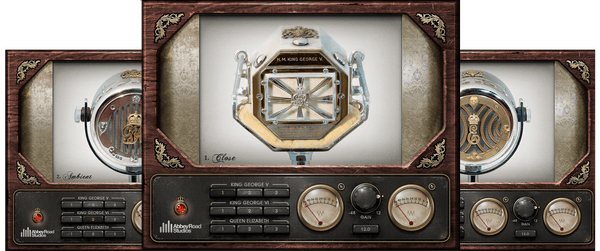
Abbey Road King's Microphones is a plug-in from Waves, created in collaboration with Abbey Road Studios. It models microphones that EMI built for British royalty in the 1920s and 30s.
The original mics sat in the EMI Archive Trust for decades before being restored for the film "The King's Speech", where they recorded orchestral parts and re-amped dialogue. Abbey Road engineers then experimented with re-amping guitars and synths through them for unique, filter-like qualities.
In the plug-in, each microphone has three range positions: close, natural and ambient. The description says the characteristics of 1920s and 30s microphones yield "lost" timbres suited to sound design and music production.
Following the plug-in with reverb is suggested for novel room and ambience effects.
Key features
Abbey Road collaboration
It is described as modeled in collaboration with Abbey Road Studios, reproducing the characteristics of historical microphones.
1920s and 30s microphones
The models are microphones built for British royalty, which may offer characteristics different from modern mics.
Includes a carbon mic
The King George V mic is presented as a carbon microphone model, which may give a texture unlike modern mics.
Three range positions
Each mic has close, natural and ambient positions, useful for changing distance and ambience.
For sound design
Using it on guitars and synths to add filter-like qualities is suggested.
Pairing with reverb
Placing reverb after it is suggested for new room and ambience effects.
Specifications
| Item | Details |
|---|---|
| Type | Historical microphone emulation |
| Microphones | EMI King's microphones (including a carbon mic) |
| Range positions | close / natural / ambient |
| Plug-in formats | Mac: VST / AU / AAX; Windows: VST / AAX |
| OS | macOS Monterey 12 to Sequoia 15; Windows 10 or newer |
What is included and system requirements
- Mac: VST / AU / AAX (macOS 12 to 15)
- Windows: VST / AAX (Windows 10 or newer)
How to use it
- Activate the license with your Waves account and install.
- Rescan plug-ins in your DAW.
- Insert King's Microphones on the track you want to process.
- Choose the microphone.
- Select close, natural or ambient.
- Compare the processed sound with the original.
- Add a reverb after it if desired.
Where it may come in handy
Texture for guitars and synths
Running sources through it like a re-amp may add a filter-like quality.
Special vocal effects
It could be used to give the impression of an old microphone.
Narration and post-production
It may suit projects that call for the feel of an old recording.
Sound design
Combined with reverb it may create unusual spaces.
Who it may suit
- People who want to try old-microphone character as a plug-in
- People seeking distinctive sounds for sound design
- People interested in Abbey Road related products
Good to know before you buy
- Plugin Boutique's description notes that the original mics were never designed for this kind of use.
Price
$99 (Plugin Boutique, checked 2026-10-27). Prices can vary by region and promotion, so check the official page before buying.
See Abbey Road King's Microphones on the product page
More of the same kind
Other introduction articles of the same kind.
- Lese Fletcher
- Softube Fix Phaser
- W. A. Production Zqueezer
- Klevgrand Klevgrand Gaffel
- LANDR LANDR FX Acoustic
- IK Multimedia AmpliTube SVX 2
We have introduced 215 other products from Waves.
- Waves TRACT System Calibration
- Waves Waves CLA Nx
- Waves C4 Multiband Compressor
- Waves MultiMod Rack
- Waves InPhase LT
See the full list in Product database: Effects.
Sources: pluginboutique.com (checked 2026-10-27)










Comments