
Disclosure: This page may contain affiliate links. Prices were checked on the date shown and may change.
An introduction to Waves C4 Multiband Compressor, based on information from the maker and distributors: what it does, how to use it and who it may suit. It is not scored.
Unlike multiband dynamics processors with rigidly defined capabilities, the C4 is a sonic chameleon that adapts its processing and functionality to your needs, and your tracks.
— Waves official site
What is C4 Multiband Compressor?
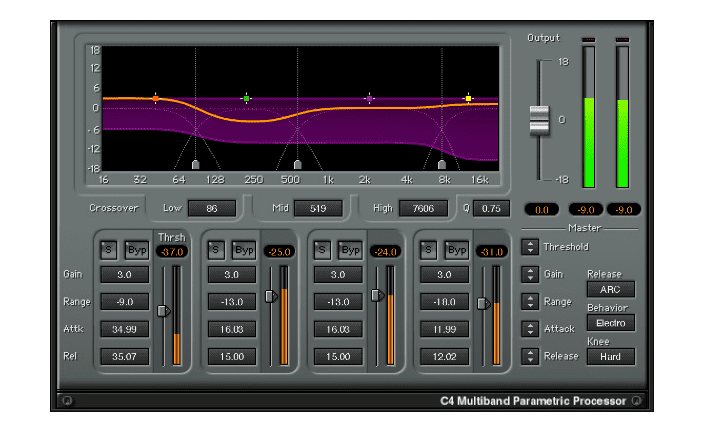
The C4 Multiband Compressor is a four-band multiband dynamics processor from Waves. Multiband means the sound is split into frequency ranges and each range gets its own processing. Besides compression, it combines an expander, a limiter, a dynamic EQ and a standard EQ in a single plugin.
The Japanese distributor page says the design combines technology from the Renaissance Comp and the C1. Plugin Boutique describes it as adapting its processing to the user's tracks, in contrast to multiband processors whose functions are rigidly defined.
Any of the four bands can be given compression, expansion, limiting or EQ. The distributor gives the example of compressing the lows, expanding the low-mids, equalizing the high-mids and limiting the highs, all at once. With dynamics bypassed, it works as a four-band focusing equalizer.
Formats are VST, AU and AAX on Mac and VST and AAX on Windows. Plugin Boutique lists macOS Monterey 12 to Sequoia 15 and Windows 10 or later; the Japanese distributor lists macOS up to Tahoe 26 for the current Waves version. The Japanese distributor page lists both a perpetual license and a subscription option.
Key features
Four freely assignable bands
Each of the four bands can run compression, expansion, limiting or EQ. When you want a different treatment per frequency range, this may save you from loading several separate plugins.
Auto Release Control (ARC)
Waves' ARC technology provides an automatic release mode. With material where the right release time is hard to judge, you can start with the automatic setting and adjust from there.
Independent per-band control
The distributor page lists threshold, range, gain, attack, release and band width as controllable per band. Master controls that move all bands together are also provided.
Range control
A Range control limits how far the gain action can move. It can be used to cap the amount of processing on a band where you do not want heavy treatment.
DynamicLine display
The DynamicLine display shows the actual gain change as a moving EQ-style curve, so you can see how much each band is working while you adjust.
Phase-corrected crossovers
The distributor page explains that the crossovers are phase-corrected so as to avoid artifacts and pitch-shift effects between bands, which matters when you want multiband processing to stay clean.
Use as a four-band EQ
Bypass the dynamics and it acts as a four-band focusing equalizer, so the plugin stays useful even where no compression is needed.
Specifications
| Item | Details |
|---|---|
| Maker | Waves |
| Type | Multiband dynamics (compressor / expander / limiter / dynamic EQ / EQ) |
| Bands | 4 |
| Formats (Mac) | VST / AU / AAX |
| Formats (Windows) | VST / AAX |
| OS (per Plugin Boutique) | macOS Monterey 12 to Sequoia 15, Windows 10 or later |
| Processing | 32-bit floating point with dithered output |
| Components | Mono / Stereo |
What is included and system requirements
- C4 Multiband Compressor (Mono and Stereo components)
- Formats: Mac = VST / AU / AAX, Windows = VST / AAX
- A Waves account and the Waves Central app are used for installation and activation (the serial from Plugin Boutique is registered there)
How to use it
- Create a Waves account and register the purchased serial with Register New Products.
- Download and launch the Waves Central app and log in.
- On the Install Products tab, tick C4 and press Install & Activate.
- Open your DAW and insert C4 on a track or bus.
- Set the crossover points of the bands to suit the material.
- Choose per band whether to apply compression, expansion, limiting or EQ, and set the thresholds.
- If the release is hard to judge, try ARC, and use Range to cap the amount of processing.
- Watch the DynamicLine display for each band's movement and compare with bypass.
Where it may come in handy
Per-band vocal shaping
It may be used to even out boominess in the low end or harshness in the highs of a vocal by splitting bands and applying compression or expansion. It might suit shaping that does not need the precision of a de-esser.
Drum and bus finishing
On a drum bus you might compress the lows firmly while touching the highs lightly. It may help when you want to even out the weight of the kick in a home setup.
Mix bus balance
It could be used to gently restrain low or high frequencies across the whole mix, band by band. It can also be used like a dynamic EQ instead of a static one.
Voice-over and streaming audio
It might reduce uneven low frequencies in a voice, or use expansion on one band to make air-conditioning noise less noticeable.
Who it may suit
- People who want to control dynamics separately per frequency range
- Users who prefer compression and EQ in a single plugin
- Those new to multiband processing who want to see the action on screen
- Anyone adding band-by-band adjustment to mixing or mastering
Good to know before you buy
- Plugin Boutique sometimes shows limited-time sale prices, so check the current price before buying.
- Licenses are managed through the Waves account; installation and activation use Waves Central.
- Supported OS versions and DAWs are updated with each Waves release, so check the latest compatibility list before installing.
Price
Please check the official page for the price.
See C4 Multiband Compressor on the product page
More of the same kind
Other introduction articles of the same kind.
- MeldaProduction MVintageRotary
- Antares Mic Mod
- Native Instruments Tape Wobble
- Almudio 3D Panner
- IK Multimedia ReSing MAX
- AudioThing Vinyl Strip
We have introduced 215 other products from Waves.
See the full list in Product database: Effects.
Sources: minet.jp pluginboutique.com (checked 2026-10-27)










Comments