
Disclosure: This page may contain affiliate links. Prices were checked on the date shown and may change.
An introduction to Waves TRACT System Calibration, based on information from the maker and distributors: what it does, how to use it and who it may suit. It is not scored.
TRACT System Calibration is now a complete system-tuning toolkit, with three plugins working together to help you measure, calibrate and monitor your PA.
— Waves official site
What is TRACT System Calibration?
TRACT System Calibration from Waves is a package for measuring, correcting and monitoring the sound pressure of a PA (a venue sound system). It is aimed at live sound and runs inside Waves live hosts.
The package now contains three plugins: TRACT Measure for measurement, TRACT System Calibration for building the correction from the measurement, and SPL Meter for watching sound pressure during a show.
With TRACT Measure you can measure a PA directly inside eMotion LV1, SuperRack Performer or SuperRack SoundGrid, without external measurement software or a second computer.
It also still accepts measurement data from Smaart®. If you want to keep using Smaart® features such as its spectrograph or phase alignment analysis, that combination is available too.
Key features
TRACT Measure
Connect a measurement microphone and capture frequency response and delay from pink noise. It has Auto and Manual modes, and measurements from several microphone positions can be merged into one correction curve.
Automatic correction EQ
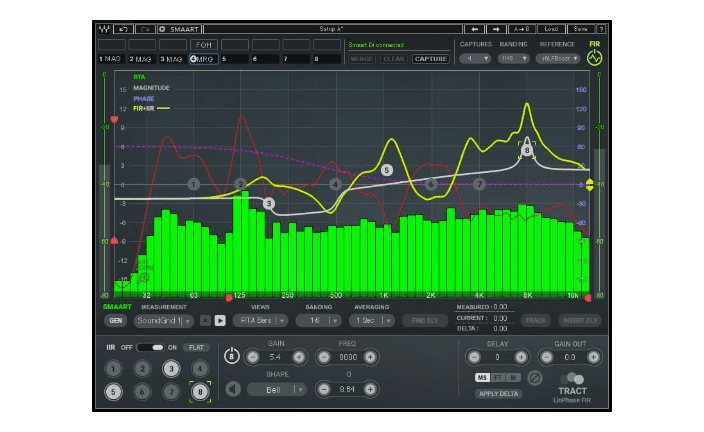
A correction FIR EQ curve is generated from the measurement. You can choose minimum phase, which stresses low latency, or linear phase, which stresses phase response.
Sweet area approach
Rather than creating a single sweet spot, up to eight response snapshots are combined into one correction curve to cover as wide an area as possible. It suits adjustments with the whole audience area in mind.
Time alignment and 8-band IIR EQ
Mains, fills and delay towers can be time-aligned. On top of the FIR curve, up to eight IIR EQ bands allow finishing adjustments.
Sub Zoom
A function for adjusting low-frequency behaviour, intended for tidying up muddiness or cancellation around subwoofers.
SPL Meter
It monitors sound pressure level with A- and C-weighting, lets you set thresholds and maximum-level warnings, and exports the measurement log to CSV.
Specifications
| Item | Details |
|---|---|
| Maker | Waves |
| Type | PA measurement, system calibration and SPL monitoring suite (3 plugins) |
| Contents | TRACT Measure, TRACT System Calibration, SPL Meter |
| Host | eMotion LV1, SuperRack Performer, SuperRack SoundGrid |
| External software | Smaart® |
| Correction curve | FIR (minimum or linear phase) plus up to 8 IIR EQ bands |
| Snapshots | Up to 8 |
| Supported OS | Mac: macOS 13 Ventura, 14 Sonoma, 15 Sequoia, 26 Tahoe; Windows 10 and 11 (64-bit) |
What is included and system requirements
- TRACT Measure
- TRACT System Calibration
- SPL Meter
- System requirements: Mac with Intel or Apple silicon, 16 GB RAM or more, 30 GB free space or more (common to Waves V17 products)
How to use it
- Create a Waves account and register the purchased product.
- Install and activate the plugins with Waves Central.
- Insert TRACT Measure on a mono channel in eMotion LV1 or SuperRack.
- Connect a measurement microphone and load its calibration file.
- Measure with pink noise to obtain frequency response and delay.
- Send the data to TRACT System Calibration to generate correction EQ and time alignment.
- Adjust the correction curve with the IIR EQ if needed.
- During the show, check sound pressure and the log with SPL Meter.
Where it may come in handy
Tuning the PA of a small venue
It may be useful when you want to go from measurement to correction inside the live host, without external measurement software or a second computer.
Aligning mains and fills
In venues that combine several speaker groups, it could be used to adjust time alignment of each part while checking the numbers.
Level management during a show
At venues or events with volume limits, the threshold warnings and log could be used to record sound pressure.
Who it may suit
- PA engineers who tune systems in Waves live hosts
- Users who want to apply Smaart® measurements to correction
- Those who want to log sound pressure during a show
- It may not suit those who want studio monitor correction for home recording, because it is a live sound product
Good to know before you buy
- This product is used in Waves live hosts such as eMotion LV1, SuperRack Performer and SuperRack SoundGrid.
- Measurement requires a measurement microphone and its calibration file.
- The suite consists of three plugins, including TRACT Measure.
Price
Please check the official page for the price.
See TRACT System Calibration on the product page
More of the same kind
Other introduction articles of the same kind.
- W. A. Production ChopBeast 2
- IK Multimedia AmpliTube Metal
- W. A. Production Detroubler
- Baby Audio Smooth Operator Pro
- Klevgrand DAW Cassette
- BLEASS BLEASS Spectral Resonator
We have introduced 215 other products from Waves.
- Waves OneKnob Louder
- Waves Greg Wells MixCentric
- Waves Waves Maserati B72
- Waves Curves Resolve
- Waves StudioRack
See the full list in Product database: Effects.
Sources: minet.jp pluginboutique.com (checked 2026-10-27)










Comments